Best AI tools to turn flat lay and ghost mannequin photos into on-model images (2026)
If you sell clothing and already have flat lays, ghost-mannequin shots or supplier packshots, six tools will put those garments on a model: Botika, Claid, FASHN, Photoroom, Uwear and WearView. They all do the basic job. They differ on what happens around it: which photos they accept, whether the back is shot or guessed, who checks the print, whether the same model returns on the next SKU, what a photo costs, and whether a whole range runs at once. This page compares them on those six points, from each vendor’s own pages and prices read on October 7, 2026, and groups them by the job each fits best rather than ranking them.
Disclosure. Uwear makes one of the tools compared here. We compared the others on their published capabilities, documentation and pricing as of October 7, 2026; we did not test them hands-on.
The short answer
- People who fix the misses: Botika, with retouch rounds included, if one-by-one flat-lay uploads are fine.
- The lowest published price per image: Claid, FASHN through its API, or Photoroom, none of which names its image model. You check the results yourself.
- A contract that pays only for passing images: Photoroom Enterprise.
- A whole range on one model, every photo checked against its product photo: Uwear. Runs of up to 10,000 items, a self-serve AI reviewer, $0.50 a photo at 2K on Gemini 2.1 (Nano Banana 2.1), the default, or $0.20 on GPT Image 2 (low), the budget option.
- A small catalog shot on hangers or mannequins: WearView or FASHN, which both name hanger photos as inputs.
Three seller photos, one saved model: what Uwear returned
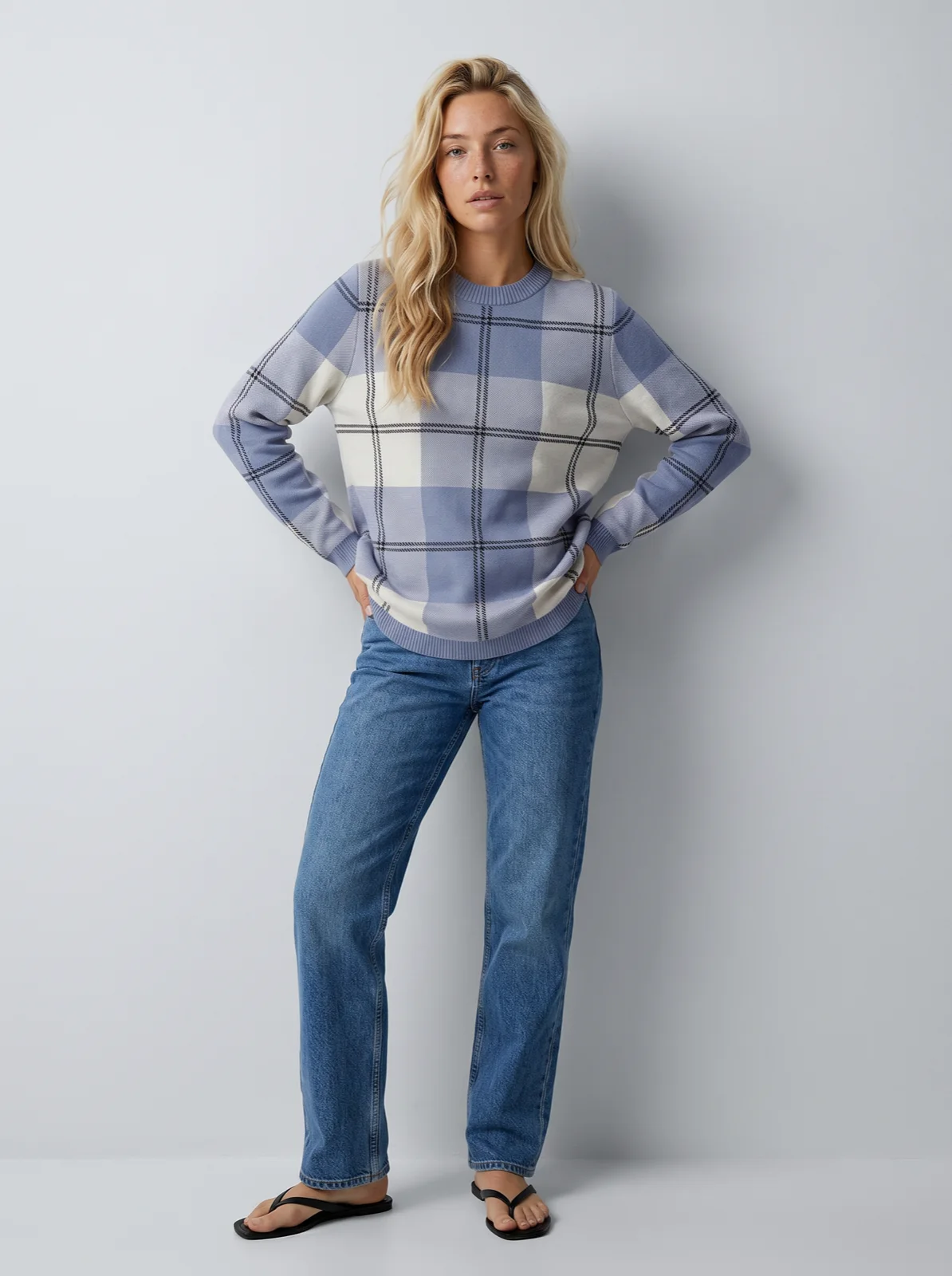
Each pair is a phone photo in and an on-model photo out: jeans on a concrete floor, a sweater on a carpet, a top on a hanger. Uwear takes photos like these as they arrive, with no clean-up pass required. All three went to the same saved model and the same studio art direction, which is what keeps the person, light and framing identical from one SKU to the next. We show Uwear only, because we did not test the other five tools hands-on.
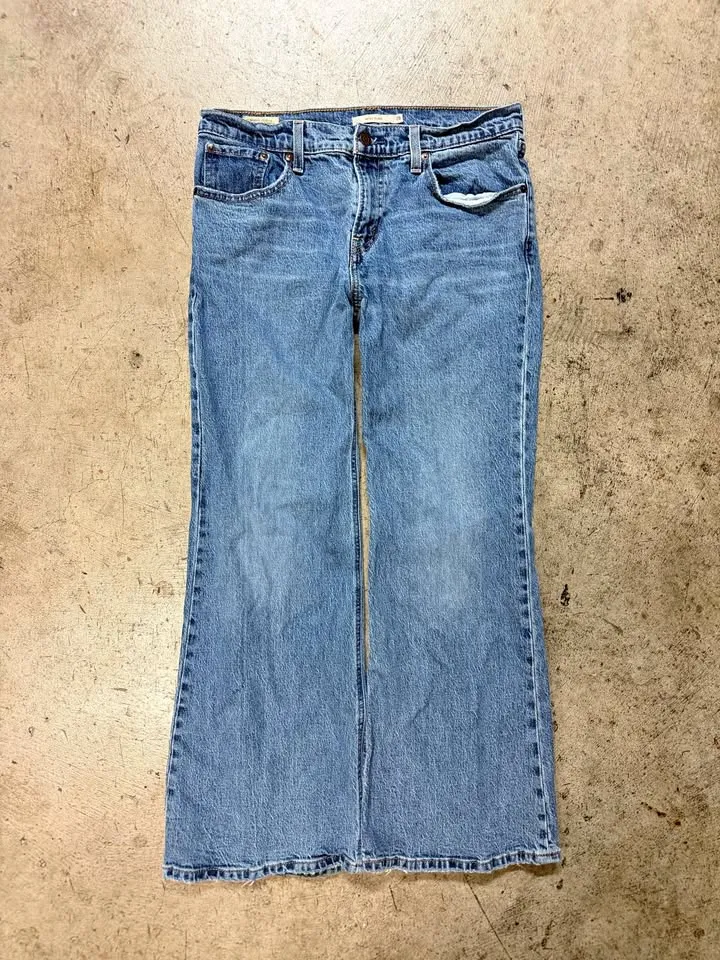 Flat lay on a concrete floor
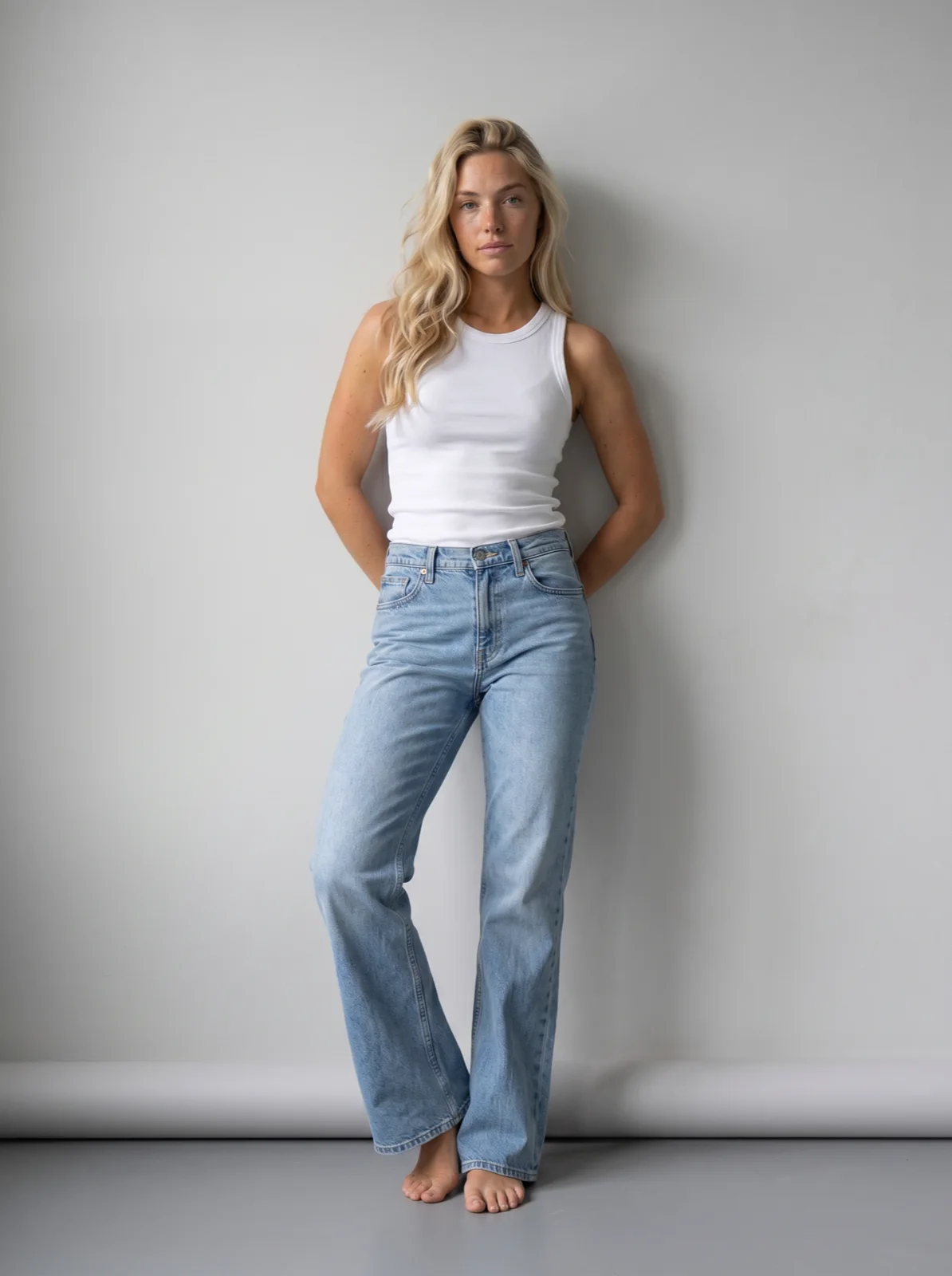 Uwear
Uwear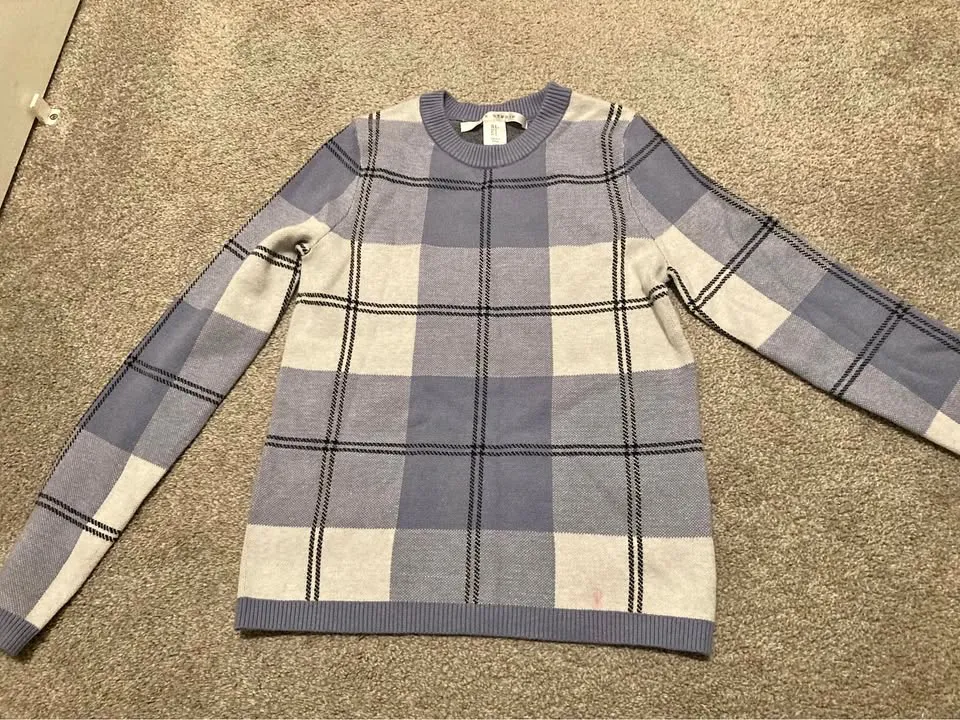 Flat lay on a carpetUwear
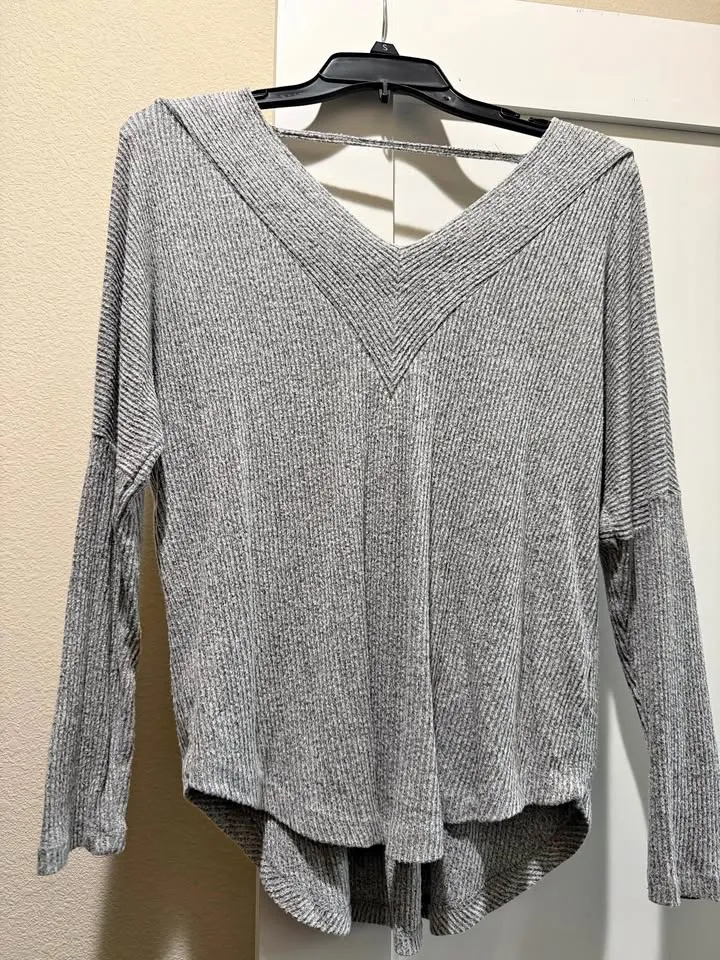 On a hanger
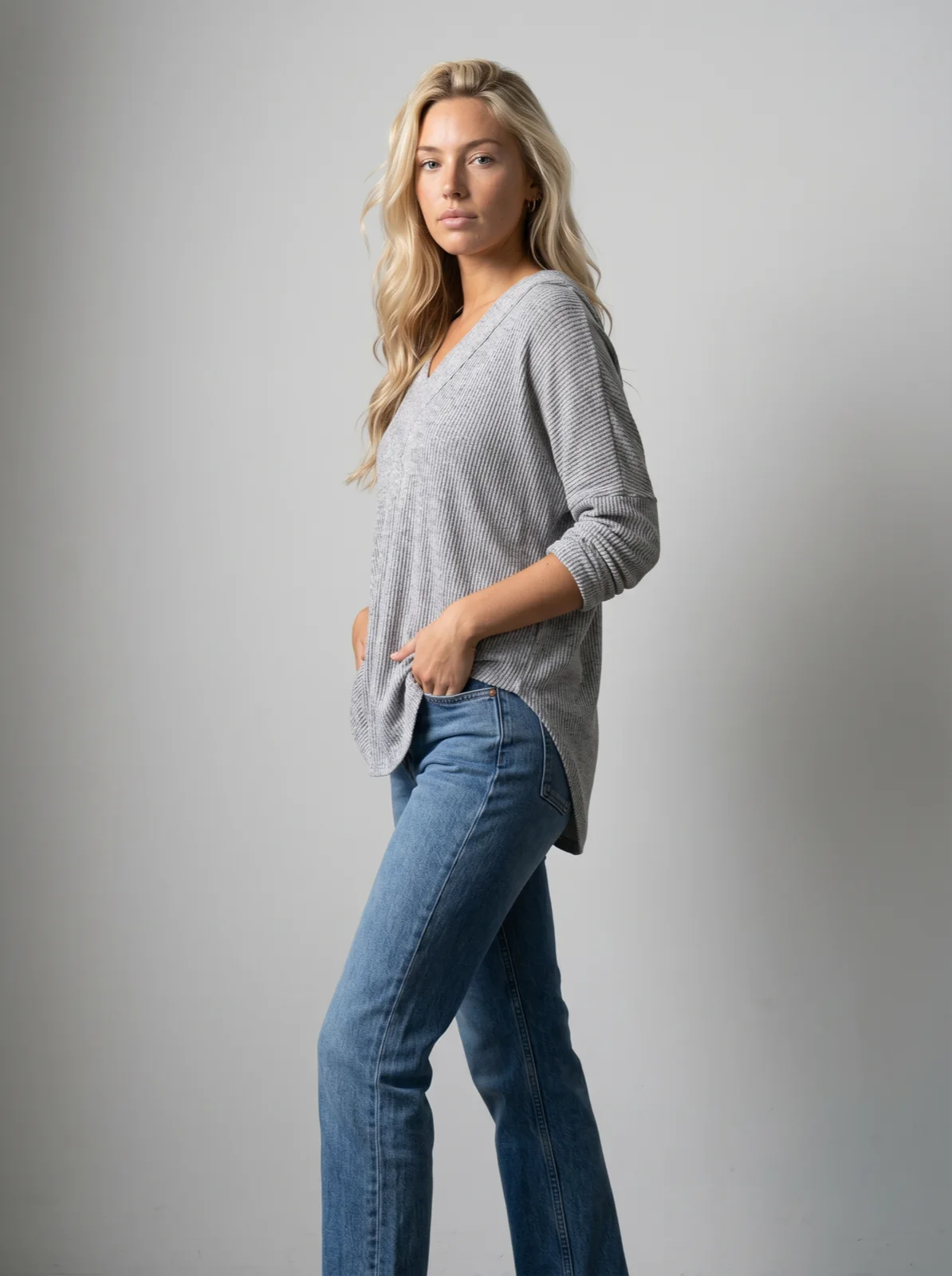 Uwear
Uwear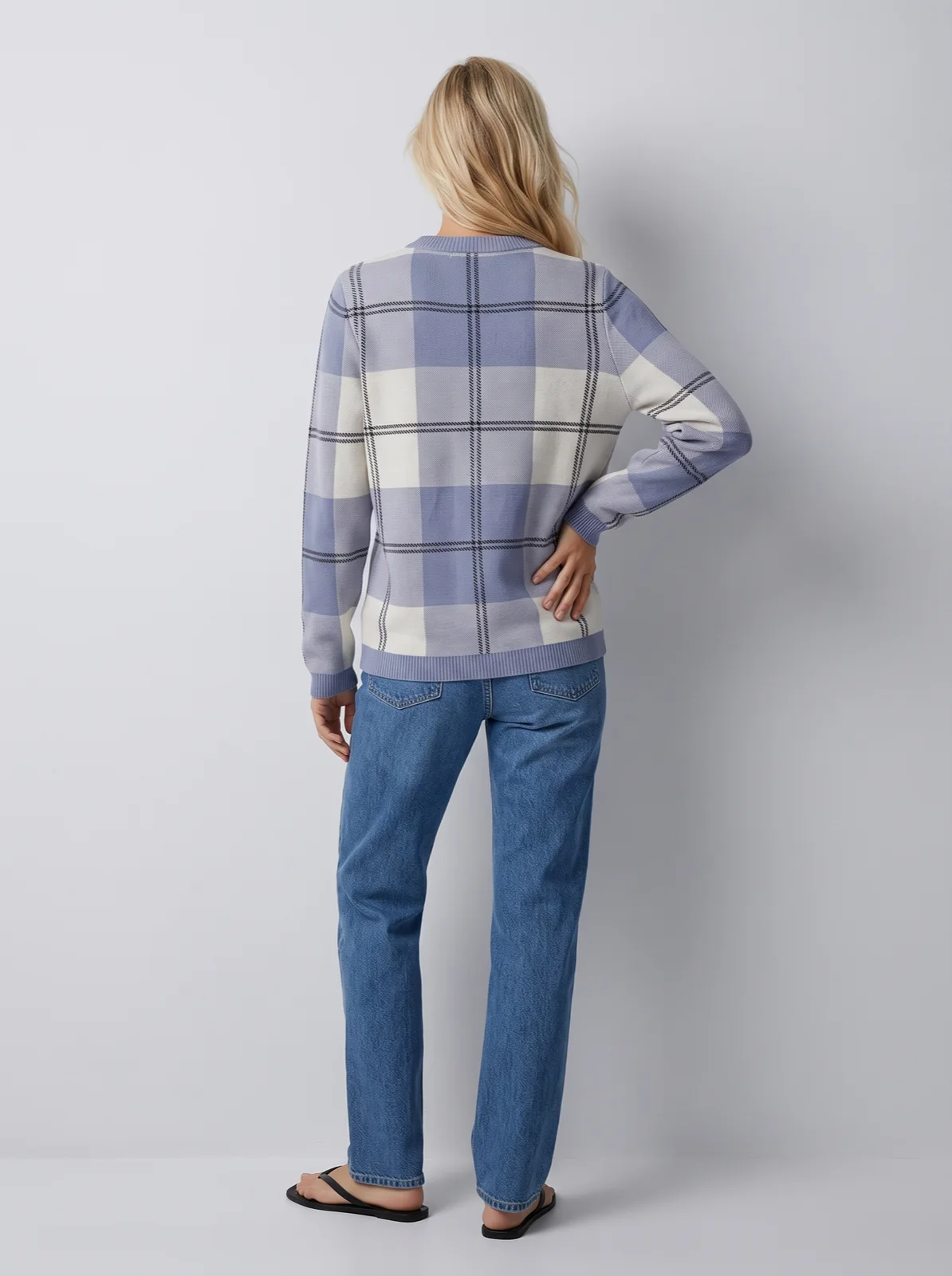
The six tools side by side
Listed alphabetically; the order is not a ranking. Prices are per generated image at 2K where the vendor publishes a 2K rate, with the image model named where the vendor names it, worked out from the published plan price and the images it covers. They are not prices per accepted image: a retry costs again everywhere except where noted. Numbers in brackets are the sources at the end of the page.
| Tool | Photos it names as input | Back of the garment | Who checks the garment | Same model across SKUs | Price per image: resolution and image model | A whole range at once |
|---|---|---|---|---|---|---|
| Botika | Flat lay, mannequin, on-model [1] | Upload front, back or side mannequin views [1] | Two to three human retouch rounds per photo [2] | Limited library on Pro, all models on Advanced [2] | About $0.92 at 2K on Pro, billed yearly, retouch included; image model not named [2] | Flat lay and mannequin one by one [3] |
| Claid | Flat lay, ghost mannequin; clean background best [7] | Not described [7] | Not for see-through fabrics; complex prints may fail [7] | 100+ AI models, or upload your own [7] | About $0.07 to $0.12 (4 credits), 2K on every paid plan; image model not named; monthly plans [8][9] | API for “thousands of model images” [7] |
| FASHN | Flat lay, ghost mannequin, on-hanger, product-only [10] | Not described; “explore new views” in Edit [13] | Failed API predictions not charged [12] | Face reference, +3 credits [10][11] | $0.15 to $0.30 at 2K via API (2 to 4 credits by mode; 1K from $0.075); image model not named [11][12] | API; up to four variations at once in the app [10] |
| Photoroom | Flat lay, ghost mannequin [4] | Front, three-quarter, full body named [4] | Visual QA and a pay-for-passing guarantee, Enterprise only [4][6] | 12+ preset models; custom models in Brand Kit [4][5] | About $0.11 at 2K on Max; under 1 cent at 1K; image model not named [6] | Batch tool; Enterprise API [5][6] |
| Uwear | Flat lay, ghost mannequin, hanger, packshot, seller phone photo | Back flat lay accepted; back and side as camera edits of the front | Optional AI reviewer on every photo, opt-in retries of a mismatch (self-serve) | Saved model, the same person on every SKU | $0.50 at 2K on Gemini 2.1 (Nano Banana 2.1), the default and recommended model; $0.60 on GPT Image 2.5 (High); $0.20 at 1K or 2K on GPT Image 2 (low), the budget option; AI check free. Pay as you go, credits never expire [18] | CSV up to 10,000 items; API and MCP |
| WearView | Flat lay, hanger, mannequin, dress form, on a person [14][15] | Not described | States prints, textures and logos preserved [15] | 100+ models; “same models and style every time” [14][15] | $0.49 to $1.44 at 2K (3 credits), billed yearly; HD from $0.33; image model not named; credits reset monthly except on Advanced [17] | “1,000+ images per day” [16] |
Why per-image prices mislead
A headline price is usually the vendor’s cheapest setting, the lowest resolution and the fastest model, and most of these tools do not say which image model they run, so two prices in the same column can buy very different images. None includes retakes, or your team’s time re-describing the model, fixing drift and checking prints, which is what tooling saves: on Uwear, a saved model and art direction, batch runs of up to 10,000 items, automations and the optional AI reviewer. The number that matters is the cost per approved photo plus the hours to get there, so test the same garments at the same resolution.
Which tool fits which job
Each tool sits under the job it fits best, in alphabetical order. None is ranked above another.
Best if you want people to fix the misses: Botika
Botika turns flat lays and mannequin photos into model photos and says plainly that you can upload front, back or side mannequin views and get each one on a model [1]. Its difference is human: Pro includes two retouch rounds per photo with two-day delivery, Advanced three with one-day delivery, and Enterprise white-glove quality control [2]. That is reflected in the price: Pro is $46 a month billed yearly for 600 credits a year, one credit a photo [2], so about $0.92 a photo at 2K (4K starts on Advanced). Bulk upload covers the on-model workflow; flat-lay and mannequin uploads are one by one, per a help article last updated in October 2025, and the retouch service is capped at 100 photos a day per user [3].
Strengths
- Human retouch rounds included in every plan
- Back and side mannequin views accepted as inputs
- Video from the same photos on every plan
Watch out for
- Among the highest prices per photo on entry plans, retouching included
- Flat-lay and mannequin workflows have no bulk upload yet
- The full model library starts on Advanced
Best for clean flat lays and ghost mannequins at low cost: Claid
Claid turns flat lays and ghost-mannequin shots into model photos and is candid about the input: a clean, simple background, the product fully visible, minimal wrinkles and shadows [7]. It names its limits too: see-through fabrics and underwear may not work, and a complex print or a poor source photo can break fidelity [7]. You pick from 100+ AI models or upload your own [7]. An AI Fashion generation is 4 credits; Pro’s 2,000 credits cover 500 of them [8], at $49 a month or $39 billed yearly [9], so about $0.08 to $0.10 an image at 2K, which every paid plan includes [8]. Claid does not name the image model. The API is positioned for “thousands of model images” [7], and the wider toolbox (background removal, upscaling, video) sits on the same credits.
Strengths
- Low price per image on self-serve plans
- Honest published input guidance and limits
- Broad editing toolbox on one credit balance
Watch out for
- Its flat-lay page names flat lays and ghost mannequins only
- Not for see-through fabrics or underwear, by its own FAQ
- Back views not described on the flat-lay page
Best for developers who want a low, clearly published API price: FASHN
FASHN’s Product to Model names one of the widest input lists here: flat lay, ghost mannequin, on-hanger and product-only shots, plus shoes, bags, hats and jewelry, with up to three items combined into one outfit [10]. It says it keeps “prints, logos, textures, colors” [10]. Through the API a credit is $0.075 on demand ($7.50 minimum), top-up credits fall to $0.0488 on the largest commitment tier, and failed predictions cost nothing [12]. An image is 1 to 5 credits depending on speed mode and resolution, so a 2K image is 2 to 4 credits ($0.15 to $0.30 on demand) on a model FASHN does not name, and a face reference to keep the same person adds 3 credits [11]. The app runs up to four variations at once [10]; a catalog run is code you write against the API.
Strengths
- Low, clearly published API price per image, and failed API calls are free
- Hanger and product-only shots named as inputs
- Clear credit table by mode and resolution
Watch out for
- Same-person consistency costs 3 extra credits an image
- No automatic review step on the pages we read; you check by eye
- Back views are not described for Product to Model
Best if you already run Photoroom, or need a contract on fidelity: Photoroom
Photoroom’s Virtual Model takes a flat lay or ghost-mannequin image and returns front-facing, three-quarter and full-body shots, with 12+ preset models and your own brand models saved for reuse [4][5]. At Enterprise level, Visual QA “scores every output for fidelity”, and the Enterprise Guarantee says you “pay only for the outputs that pass” [4]. Self-serve, AI Fashion Models at 1K are on every plan: Pro is $7.50 a month billed yearly for up to 1,600 generations, and 2K starts on Max, $20.99 for up to 185 [6]. Visual QA is not on the self-serve plans [6]. Prices are as shown to us and vary by country.
Strengths
- Lowest entry price at 1K, inside a broad seller toolbox
- Contractual fidelity guarantee for enterprise buyers
- Saved brand models for consistency
Watch out for
- Visual QA and the guarantee are Enterprise only
- 2K and 4K cost far more credits than 1K
- Hanger and supplier photos not named as inputs
Best for a whole range on one saved model, checked automatically: Uwear
Uwear is built around the run, not the single image. You save a model and an art direction once, then send the range: flat lays, ghost-mannequin shots, hanger photos or supplier packshots, as the three photos above show. The optional AI reviewer compares each result with its product photo (garment details, colour, length, fit, and whether it is the same person) and, with retries on, retries what it rejects. A batch run takes a CSV of up to 10,000 items, and the same pipeline runs from the REST API or an AI assistant through the MCP server. You pick the image model per run, and the price follows it. The default and recommended model is Gemini 2.1 (Nano Banana 2.1), the most recent and best-performing model Uwear offers, at 5 credits ($0.50) at 2K; GPT Image 2.5 (High) is 6 credits ($0.60). The budget option is GPT Image 2 (low) at 2 credits ($0.20) a photo at 1K or 2K. We recommend paying more for the recent models: they tend to hold garment detail, prints and logos better and need fewer retakes, so the cost per approved photo can end up close. Test both on your own garments. The check is free; credits are $0.10 with no subscription and never expire [18].
The workflows have their own pages: flat lay to on-model and ghost mannequin to model, where a hollow-man shot of shorts becomes a front, side and back set.
Strengths
- The AI check runs on self-serve credits, not only on an enterprise contract
- One saved model and one art direction across up to 10,000 items
- Packshot, detail and back view come from the same run as the model photo
- Choose the image model per run, for example GPT Image 2.5 when a small label must read
Watch out for
- Not the cheapest per 2K image: Claid, Photoroom Max and FASHN publish lower prices, though none names its image model
- No human retouching included, and no pass-rate guarantee
- A back view from a front-only photo is the model’s inference
Best for small sellers with hanger and mannequin photos: WearView
WearView accepts “flat-lay, hanger, or on a person” photos [14], plus mannequin, dress-form and invisible-mannequin shots [15], and offers 100+ models with “same models and style every time” [14][15]. It states prints, textures and logos are preserved [15] and a capacity of “1,000+ images per day” [16]. An HD image is 2 credits, 2K 3, 4K 5 [17]; plans run from $24 a month billed yearly for 50 credits to $82 for 500, so an HD image is about $0.33 to $0.96 and a 2K image about $0.49 to $1.44 [17]. Unused credits do not roll over except on Advanced [17].
Strengths
- Broad input list, including hanger and dress-form shots
- Large preset model library
- Separate ghost-mannequin removal tool if you need that image too
Watch out for
- No API or batch documentation on the pages we read
- Credits expire monthly on the lower plans
- No published review step beyond the fidelity claim
Source-cited head-to-heads with Uwear are on Uwear vs Botika, Uwear vs Photoroom, Uwear vs Claid and Uwear vs FASHN.
What to send, whichever tool you pick
- The whole garment in frame: hem, shoulders and sleeves not cropped. Claid asks for the product fully visible, with minimal wrinkles and no heavy shadows [7]. Uwear takes creased photos on a busy floor as they are, as above; if you also want a clean flat lay or packshot, Uwear’s AI Edits can clean up the photo as an optional step, and either version works as the input.
- A back photo when the back matters: rear pockets, a yoke, a back print. Without one, every tool guesses.
- A close-up of any small text or logo. Small lettering is where image models drift; in our Gemini 2.1 (Nano Banana 2.1) vs GPT Image 2.5 test, GPT Image 2.5 wrote a small garment label clearly where Gemini 2.1 did not.
New to the terms? The glossary covers flat-lay photography, ghost-mannequin photography and ghost mannequin vs on-model.
How we compared
We compared the six on published capabilities, documentation and pricing as of October 7, 2026, one page per claim, listed below. We did not test the other tools hands-on, so this page makes no claim about their output quality; the photos above are Uwear’s. The tools are grouped by the job they fit, not ranked. Where a vendor page does not mention something, the table says “not described” rather than “no”. Prices per image divide the plan price by the images it covers, at 2K where published, before tax and before retries. For the wider market, including video and API, see the best AI fashion generators roundup.
Questions about flat lay and ghost mannequin to model AI
Can AI turn a flat lay into a photo of a model wearing it?
Yes. All six tools on this page accept a flat lay and return the garment on a model: Botika, Claid, FASHN, Photoroom, Uwear and WearView. They differ on the photos they name as inputs, how they handle the back, who checks the result and what a photo costs. A clean, uncropped flat lay on a plain background gives every tool its best chance.
Can AI turn ghost mannequin photos into model photos?
Yes. Botika, Claid, FASHN, Photoroom and WearView all name ghost-mannequin or mannequin shots as an input, and on Uwear a ghost-mannequin shot is a product photo like any other: a hollow-man photo of shorts became a front, side and back set on a model. Botika says you can upload front, back or side mannequin views; Uwear takes extra views alongside the front.
What happens to the back of the garment?
If you only supply the front, every tool has to infer the back. Botika lets you upload front, back or side mannequin views. On Uwear you can add a back flat lay when rear pockets or graphics matter, and back or side views are camera edits of the approved front photo, priced as a photo. Photoroom names front, three-quarter and full-body shots; the other pages we read do not describe back views.
Which tool is cheapest per image?
It depends on the resolution and the image model, so compare at the same resolution. At 2K, on published prices: Claid about $0.07 to $0.12 (4 credits), Photoroom about $0.11 on its Max plan, FASHN $0.15 to $0.30 through its API, Uwear $0.50 on Gemini 2.1 (Nano Banana 2.1), its default and recommended model, or $0.20 on GPT Image 2 (low), the budget option, Botika about $0.92 with retouch rounds included, and WearView about $0.49 to $1.44. Photoroom at 1K is under 1 cent. Only Uwear names the image model behind each price. These are prices per generation: none includes retakes or the time your team spends checking, so compare cost per approved image on your own garments.
Will the print and the logo stay the same?
Every vendor says so, and every one has limits. Claid notes it might not work when the source photo is poor or the print too complex, and not with see-through fabrics. Small lettering is where image models drift most. The fix is a check against the product photo: Botika has people retouch, Photoroom Enterprise scores fidelity with Visual QA, and Uwear has an optional AI reviewer that compares each photo with the product photo and can retry a mismatch.
Can I convert a whole catalog of flat lays at once?
Yes, with different limits. Claid and FASHN offer APIs you can script against, Photoroom has a Batch tool and an Enterprise API, WearView states 1,000+ images a day, and Uwear runs a CSV of up to 10,000 items on one saved model and one saved art direction, through Studio, the REST API or the MCP server. Botika’s bulk upload covers its on-model workflow; flat-lay and mannequin uploads are one by one for now.
Sources
Claims and prices are as published by each source on the access date. Uwear rates are on the models page; Uwear workflow claims come from its own product pages.
- [1] Botika: Products (flat lay, mannequin and on-model workflows). Accessed October 7, 2026.
- [2] Botika: Pricing (plans, credits a year, retouch rounds). Accessed October 7, 2026.
- [3] Botika Help: How many images can I generate every day? (bulk upload by workflow). Accessed October 7, 2026.
- [4] Photoroom: Virtual Model API (inputs, preset and custom models, Visual QA). Accessed October 7, 2026.
- [5] Photoroom: Virtual Model tool (Brand Kit models, Batch). Accessed October 7, 2026.
- [6] Photoroom: Pricing (plans, AI Fashion Models generations per plan). Accessed October 7, 2026.
- [7] Claid: Flatlay to model (inputs, limits, models, API). Accessed October 7, 2026.
- [8] Claid: Pricing (credits per AI Fashion generation, credits per plan). Accessed October 7, 2026.
- [9] Claid blog: Flatlay-to-model AI tools (Claid plan prices, monthly and yearly). Accessed October 7, 2026.
- [10] FASHN: Product to Model (inputs, detail, face reference). Accessed October 7, 2026.
- [11] FASHN API docs: Product to Model (credits per output by mode and resolution). Accessed October 7, 2026.
- [12] FASHN Help: API on-demand and commitment tiers. Accessed October 7, 2026.
- [13] FASHN: Homepage (consistent models, new views). Accessed October 7, 2026.
- [14] WearView: Homepage (inputs, model library). Accessed October 7, 2026.
- [15] WearView: Mannequin to Model. Accessed October 7, 2026.
- [16] WearView: Product to Model (inputs, daily volume). Accessed October 7, 2026.
- [17] WearView: Pricing (plans, credits per image). Accessed October 7, 2026.
- [18] Uwear models page: per-model credit rates. Accessed October 7, 2026.