Skip to content

Photoroom alternative for fashion brands

Compare Photoroom and Uwear for fashion production.

Photoroom gives sellers a fast, capable image toolbox. Uwear gives fashion brands an art-directed production line for catalog images and on-model video.

What Photoroom does well

Start from the job you actually have.

Choose Photoroom

Photoroom is excellent at fast, listing-ready visuals for sellers, small brands, and enterprise teams. More than 1M businesses use its tools.[1][2]

Choose Uwear

Use Uwear when the job is the whole range: one saved model and one saved look, every photo checked against its product photo, the clip made from the photo you approved, and the results delivered to the store, all priced before the run starts.

Five differences

Where the two tools part ways.

Not a feature checklist. Each row follows the work through both tools, and every Photoroom claim cites a page read on the access date.

Production axisUwearPhotoroom
Art-directed productionSaves the model, set, light, framing and the reviewer’s rules as one art direction, reused by every run.Publishes Virtual Model controls for preset or custom models, poses, settings, and still-image outputs.[5][6]
Full-catalog volumeCoordinates catalog work as one run with direction, status, QA, retries, approvals, and delivery attached.Runs app batches up to 250 images, advertises Enterprise batch jobs across thousands, and now documents continuous Fashion Models API production across catalog SKUs.[3][7][12]
On-model fashion videoGenerates moving on-model fashion clips from approved catalog stills for product pages and campaigns.Publishes a template-first video generator with more than 300 ecommerce templates alongside its still-image AI Fashion Model workflow.[5][7]
In-loop automatic QAAn optional AI reviewer, 1 credit per photo, compares each result with the product photo and the saved model, records the reason for a rejection, and retries it.Sets contractual fidelity criteria upfront through the Enterprise Guarantee, and ships Visual QA that rates outputs and can retry failures before delivery; API-side Fix is in beta.[8][10]
Transparent, scalable pricingPublishes a $0.10 credit price and model rate table for self-serve planning. Enterprise terms are quoted separately for volume, invoicing, shared workspaces and implementation.Lists Enterprise as custom pricing on negotiated annual commitments and volume tiers; API Enterprise adds an annual commitment and a 200K-image minimum.[3][4]

01

Save the look once, reuse it on every run.

On Uwear the art direction, meaning the model, the set, the light, the framing and the rules the reviewer checks, is saved once. The next run, the next drop and the API all reuse it without anyone choosing it again.

Photoroom publishes strong still-image controls for model choice, pose, setting, and custom model references. Choose Uwear when the requirement is one shared direction that governs the whole production run, not a collection of output settings.[5][6]
02

Run the whole range as one job.

A run on Uwear takes the product photos in, applies the saved look, checks and retries each photo, queues the approvals and delivers, up to 10,000 images, priced before it starts.

Photoroom publishes three volume surfaces: AI Tools in Batch runs up to 250 images at once, Enterprise batch editing covers thousands in a single job, and its Fashion Models API now documents continuous production across catalog SKUs without a manual trigger per batch. The useful comparison is coordinated production scope, meaning what travels with the job, not a claim that Photoroom stops at 250 images.[3][7][12]

03

Make the clip from the photo you approved.

The 5-second clip starts from an approved on-model photo, so it shows the same person and the same garment as the listing next to it, 23 credits with Kling 3 Pro.

Photoroom publishes a template-first video generator that can sit beside its AI Fashion Model image workflow. Choose Uwear when the required output is moving on-model fashion video from a still your team already approved.[5][7]

04

Check every photo inside the run.

The AI reviewer compares each result with the product photo and the saved model, records a pass or fail with the reason, and retries what fails, 1 credit per photo and optional. Failed takes never reach the delivery folder. It is a check and a retry, not a fidelity guarantee.

Photoroom now publishes pre-delivery checking on two levels: the Enterprise Guarantee agrees product-fidelity criteria upfront and credits or regenerates misses, and Visual QA rates outputs and can retry failures before they reach a catalog, with API-side Fix in beta. Compare the scope of the checks, where they run, and who controls them: the Uwear reviewer is self-serve, optional, and attached to every job across Studio, API and MCP.[8][10][11]

05

Know the price before the run, from the app or from an assistant.

A credit is $0.10, the rate per photo and per clip is published per image model, and the estimate for a run is shown before you approve it. Enterprise terms are quoted separately because volume, invoicing and shared workspaces go beyond credits.

Photoroom publishes custom Enterprise pricing negotiated on annual commitments and volume tiers, and annual API Enterprise terms with a 200K-image minimum. The contrast is how much of the cost can be computed before a sales process, not which company is cheaper.[3][4]

Decision guide

Choose the workflow that matches your team.

Choose Photoroom for seller velocity.

  • Fast listing-focused editing across a broad ecommerce toolset.
  • Preset or custom virtual models for still-image outputs.
  • Template-first sales videos and self-serve AI-tools batches.
  • Contractual product-fidelity remedies for qualifying Enterprise work.

Choose Uwear for the whole range.

  • One saved model and one saved look across the whole run.
  • A 5-second clip made from the photo you approved.
  • A reviewer that checks every photo against its product photo, with the reason on each rejection.
  • Public self-serve prices before an enterprise rollout quoted by sales.

One direction, four garments

This is what reusable art direction produces.

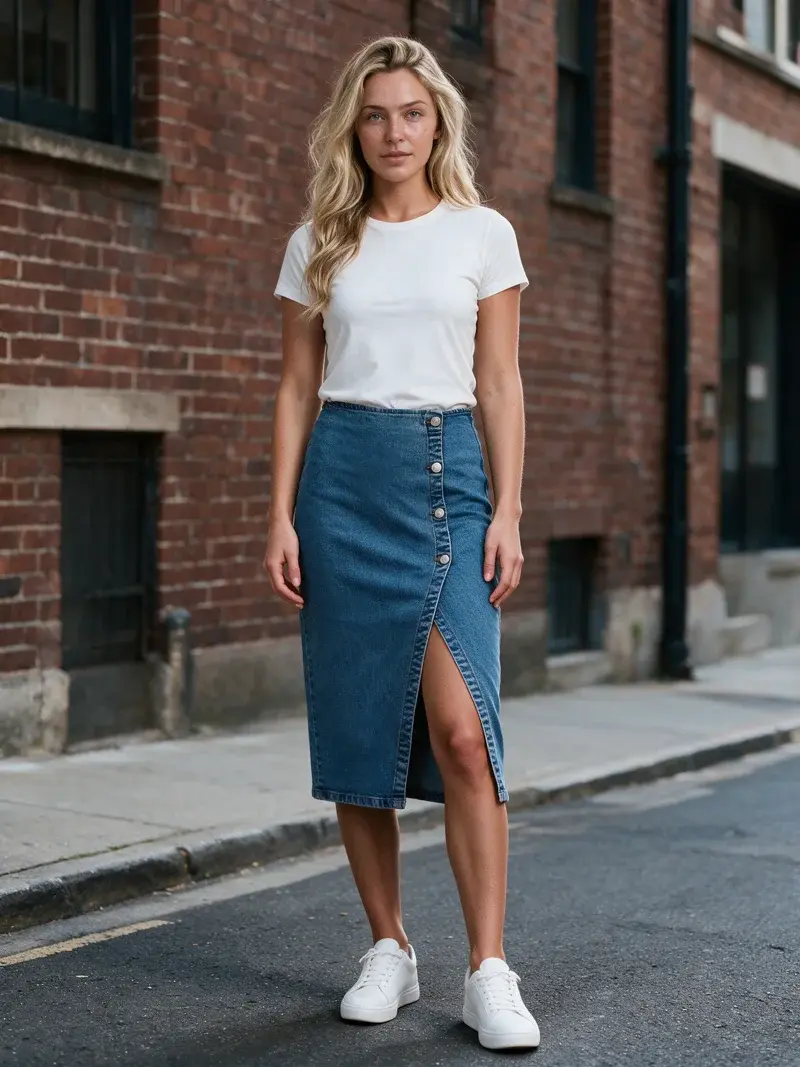
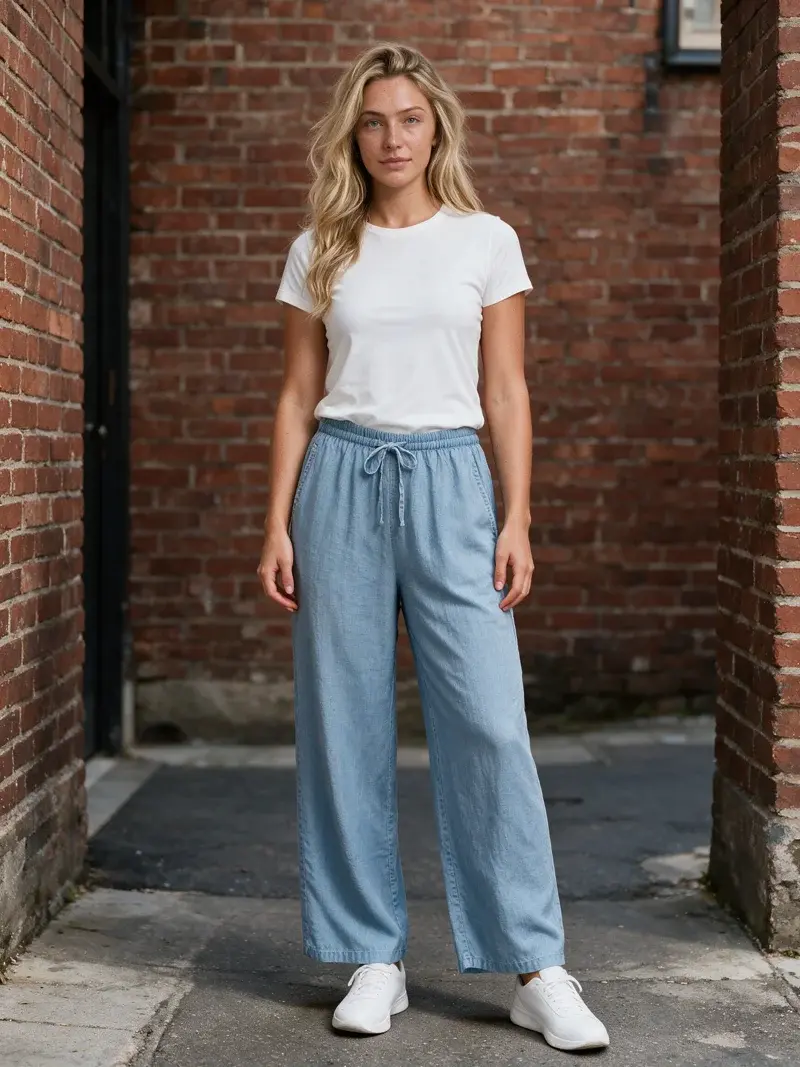
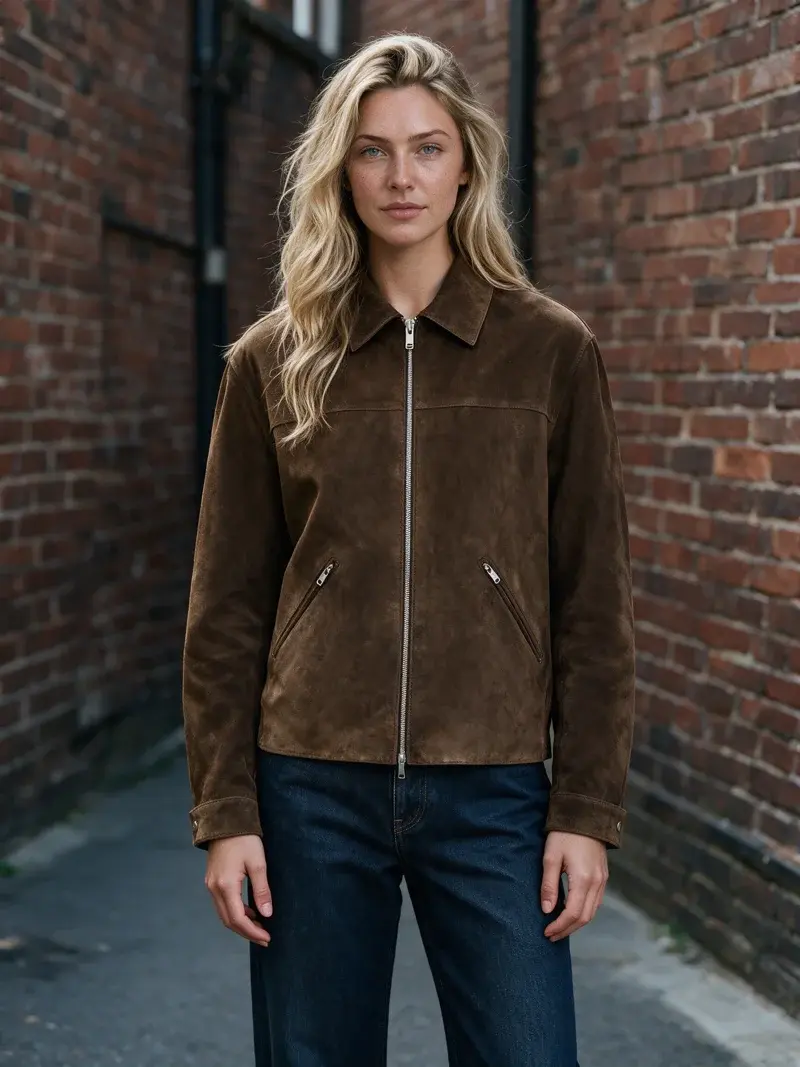
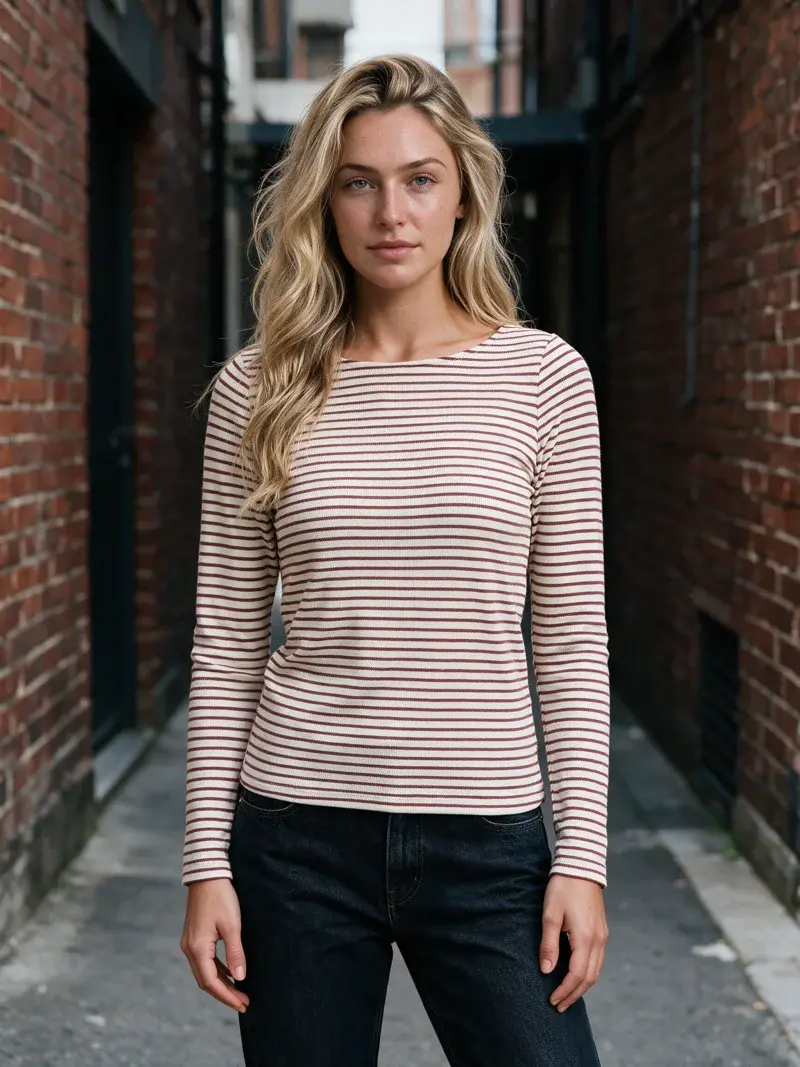
Four different garments, one saved art direction, the same model and camera. Uwear generated all four; nothing else changed between shots. That consistency, held across a full catalog, is the production difference these pages compare.

  • AI-generated on-model photo of a suede zip jacket, Urban Brick Editorial art direction, generated with Seedream 5.0 Pro on Uwear

    Suede jacket

  • AI-generated on-model photo of a red striped knit top, Urban Brick Editorial art direction, generated with Seedream 5.0 Pro on Uwear

    Striped knit top

  • AI-generated on-model photo of a denim midi skirt, Urban Brick Editorial art direction, generated with Seedream 5.0 Pro on Uwear

    Denim midi skirt

  • AI-generated on-model photo of light wide-leg pants, Urban Brick Editorial art direction, generated with Seedream 5.0 Pro on Uwear

    Wide-leg pants

Ask the practical questions.

The answers come from both tools’ published pages, read on the access date.

Yes, when the job is art-directed fashion production rather than fast seller-focused editing. Photoroom serves more than 1M businesses and is excellent at listing-ready visual tools. Uwear is designed for fashion teams that need reusable direction, coordinated catalog runs, automatic QA, and on-model fashion video. See sources 1, 5, and 7.

Photoroom brings a broad toolbox for creating and editing ecommerce visuals. Uwear operates as a production line for fashion brands: art direction, catalog jobs, automatic QA, retries, approvals, on-model video, and delivery stay connected.

Photoroom says AI Tools in Batch handles up to 250 images at once, its Enterprise offer advertises thousands of images in one job, and its Fashion Models API now documents continuous catalog production. Uwear focuses the comparison on a coordinated catalog run with direction, QA, retries, approvals, and delivery attached. See sources 3, 7, and 12.

Photoroom publishes a template-first video generator with more than 300 ecommerce templates and connects it to the same session as AI Fashion Model images. Uwear focuses on moving on-model fashion clips generated from approved catalog stills. See sources 5 and 7.

The Uwear reviewer is automatic and optional inside each job, and holds failed work for retry or review. Photoroom layers two mechanisms: the Enterprise Guarantee agrees fidelity criteria upfront and credits or regenerates misses, and Visual QA rates outputs and can retry failures before delivery, with API-side Fix in beta. See sources 8 and 10.

Uwear publishes a $0.10 self-serve credit price and model rate table so teams can estimate a run before buying credits. Enterprise work is quoted by sales for volume and implementation. Photoroom lists custom Enterprise pricing negotiated on annual commitments and volume tiers, while API Enterprise lists an annual commitment and a 200K-image minimum. See sources 3 and 4.

Source notes

Review the published source material.

  1. [1]
    Photoroom homepage

    Accessed July 17, 2026

    Photoroom says more than 1M businesses use its seller-focused visual tools.

  2. [2]
    Photoroom pricing

    Accessed August 25, 2026

    Pro is positioned for resellers and solopreneurs, Max for small brands, and Enterprise uses custom pricing; Photoroom notes that prices and credits vary by country or region.

  3. [3]
    Photoroom Enterprise

    Accessed August 25, 2026

    Enterprise advertises batch editing for thousands of images in one job and annual pricing with volume tiers negotiated at contracting; the page publishes no numeric image minimum.

  4. [4]
    Photoroom API pricing

    Accessed August 25, 2026

    API Enterprise terms list an annual commitment, a 200K-image minimum, and volume-based discounts.

  5. [5]
    Photoroom Virtual Model tool

    Accessed July 17, 2026

    The tool publishes controls for model type, pose, background, image dimensions, and still-image downloads.

  6. [6]
    Photoroom Virtual Model API

    Accessed August 25, 2026

    The API turns flat lay or ghost mannequin inputs into on-model photography with preset or custom models, poses, settings, and image quality checks.

  7. [7]
    Photoroom H1 2026 product recap

    Published July 1, 2026

    AI Tools in Batch processes up to 250 images at once; the video offer is described as template-first with more than 300 ecommerce templates.

  8. [8]
    Photoroom Enterprise Guarantee

    Accessed August 25, 2026

    Fidelity criteria are agreed upfront, every output is checked, misses are credited or regenerated, and aesthetic choices are outside the guarantee.

  9. [9]
    Photoroom Enterprise Guarantee launch

    Published June 19, 2026

    The launch announcement scopes the initial guarantee to food and fashion enterprise customers operating at mid-volume scale.

  10. [10]
    Photoroom Visual QA

    Accessed August 25, 2026

    Visual QA analyzes inputs, rates generated outputs, and can retry failed results before they reach a catalog; API-side Fix is described as beta.

  11. [11]
    Photoroom Visual Agents

    Published August 14, 2026

    Describes a production loop with pass thresholds, automatic retry, and isolation of failures for manual review, plus motion generated from an approved still.

  12. [12]
    Photoroom Fashion Models API guide

    Published August 13, 2026

    Documents continuous API production for fashion SKUs with preset or custom models, scenes, poses, and enterprise resolutions.

Bring one real range

Price your first run with us.

Bring the product photos you have, the look you want and where the results need to go. We price the first run together and show you the rejected takes as well as the approved ones.