Best AI Fashion Video Generators for Ecommerce (2026)
Compared October 7, 2026 on published capabilities, docs and pricing; updated October 8 with prices by video model and the editing step.
The best AI fashion video generator for ecommerce takes a photo you already approved and ends with a video you can publish. A clothing brand's clip has to show the same garment as the listing photo next to it, so every useful tool animates a still (image-to-video). The differences are in the rest of the path: which video model does the animating, whether you can choose it, how many products you can run at once, and whether the clips become one finished video or a folder of loose files.
Disclosure. Uwear makes one of the tools compared here. We compared the others on their published capabilities, documentation and pricing as of October 7, 2026; we did not test them hands-on.
Short answer. Each tool fits a different job. For a documented video API with batch, at 720p: Claid. For a developer adding clips to their own product: FASHN's API, still marked Experimental. For social clips from ready-made templates: Photoroom. For the whole path in one place: Uwear. You start from the approved photo, make clips on the video model you pick (MiniMax H3, Seedance 2.5, Gemini Omni Flash, Wan 3.0 or Kling 3 Pro), cut them together in Montage and export the finished video, with a clip per product in a batch run. The sections below say where each is stronger.
Why per-clip prices mislead
- Vendors quote their cheapest setting. A headline price is usually the shortest clip, at the lowest resolution, on the least expensive model. The same tool can cost several times more at the length and resolution you actually publish.
- The model underneath decides most of it. Video models differ widely in how the body moves and how well the garment holds its print, drape and fit through a turn. A cheap clip that warps the check on a sweater is not a saving.
- Some vendors don't say which model they run. Of the eight tools here, only Uwear and Claid name theirs. Without the name you cannot tell whether a price change is a model change.
- Retakes are not in the price. Every quote is per generation, and not every generation is usable.
- What counts is the publishable clip and the time to a finished video. That includes the photo it starts from, the retakes, and the editing that turns clips into the video that goes live.
The fair test: put the same approved photo through each tool you are considering, at the length and resolution you will publish, and count what it took to get a clip you would ship.
How the eight tools work
Listed alphabetically here and in the price table; the order is not a ranking.
| Tool | Starts from | Aspect ratios | Batch and API | Editing and templates |
|---|---|---|---|---|
| Botika [4] | Any photo: on a model, flat or on a mannequin | Not published | No video batch or API published | Movement presets: zoom in, casual, runway walk |
| Claid [10][11][12] | An on-model photo; make it first if you only have the garment | Input in any ratio; output ratios not listed | Image-to-video API with batch generation | Not published |
| FASHN [17][18] | Your on-model or product photo, optional end image | 9:16 recommended in the app; the API does not specify | API endpoint marked Experimental; 3 to 11 simultaneous generations in the app | Not published |
| Kive [24] | A start frame or a text prompt, with a saved character | 21:9 to 9:16 | No public REST API for generation; MCP endpoint | Not published |
| Modelia [25] | A fashion image as the starting frame, plus a motion prompt | Not published on the product page | API lists video, price on request | Not published |
| Photoroom [6][7][8] | 1 to 4 images of the garment, accessory or model, plus a template or prompt | 9:16, 1:1, 16:9 | Batch for images; video API not published | 300+ e-commerce video templates |
| Uwear [1][3][32][33] | An approved on-model photo from the same run, or any image in your library; Seedance 2.5 also from a prompt | 9:16 to 16:9 by model; Kling 3 Pro follows the photo’s ratio; Montage exports in the ratio you set | A clip per garment in a batch run; REST API and MCP | Montage: trim, order, speed and mute up to 10 clips and export one MP4, included at no extra cost |
| WearView [21][22] | Product, model, flat-lay or ghost-mannequin shots | Not published | API on Enterprise only | Templates: catwalk, 360° spin, side reveal |
What a 5-second clip costs, and on which model
Each price applies to the model and setting in its row, without the photo the clip starts from and without retakes. Credit-to-dollar math is ours, on the vendor's published plan. Uwear is shown by model because you pick the model per clip.
| Tool | Video model | Length and resolution | 5-second clip | Caps and commitments |
|---|---|---|---|---|
| Botika [5] | Not disclosed | Length and resolution not published | 5 credits: about $4.17 to $6.00 depending on plan | Subscription; credits roll over while it is active |
| Claid [10][13][14][15][16] | Grok Imagine (xAI) | 5 s at 720p | 60 web credits, about $1.10 to $1.90 on Essentials or Pro; 35 API credits | 8 clips a month on Essentials, 33 on Pro; web and API credits are separate |
| FASHN [19][20] | Not disclosed | 5 s at 480p, 720p or 1080p | 6 credits at 1080p: $0.45 on the API, $0.60 on app top-ups; 3 credits at 720p | API credits from a $7.50 minimum; app plans $19 to $199 a month |
| Kive [23][24] | Not named; models are interchangeable | 4 to 15 s; default length not stated | About $0.38 to $0.50 for a default-length video (our estimate) | Basic $40 a month for 2,000 credits |
| Modelia [26][27] | Not disclosed | 5 or 10 s; resolution not published | 25 to 40 credits: $5 to $8 at the Creator rate | Creator $30 a month for 150 credits |
| Photoroom [9] | Not disclosed | Length not published; 4K on Ultra | About $0.70 a generation on Max monthly, $0.42 billed yearly | Video only on Max (up to 50 video generations a month) and Ultra (up to 150) |
| Uwear [1][2] | MiniMax H3 Max | 5 to 15 s; 768p, or 1080p | 16 credits ($1.60) at 768p; 32 ($3.20) at 1080p | $0.10 a credit, no subscription, credits never expire |
| Uwear [1][2] | Seedance 2.5 | 4 to 30 s; 480p or 720p | 45 credits ($4.50) at 480p; 95 ($9.50) at 720p | $0.10 a credit, no subscription, credits never expire |
| Uwear [1][2] | Gemini Omni Flash 1.1 | 3 to 10 s; 720p, 1080p or 4K | 20 credits ($2.00) at 720p; 30 ($3.00) at 1080p; 60 ($6.00) in 4K | $0.10 a credit, no subscription, credits never expire |
| Uwear [1][2] | Wan 3.0 | 2 to 30 s; 720p or 1080p | 20 credits ($2.00) at 720p; 40 ($4.00) at 1080p | $0.10 a credit, no subscription, credits never expire |
| Uwear [1][2] | Kling 3 Pro | 3 to 15 s; resolution not listed in the catalog | 23 credits ($2.30); 34 with sound | $0.10 a credit, no subscription, credits never expire |
| WearView [22] | Not disclosed | Length not published; 1080p or 4K | 20 credits at 1080p: $4.90 on Pro monthly, $3.28 on Advanced yearly; 4K is 40 | Video from the Pro plan ($49 a month, 200 credits) |
One approved photo, two Kling models
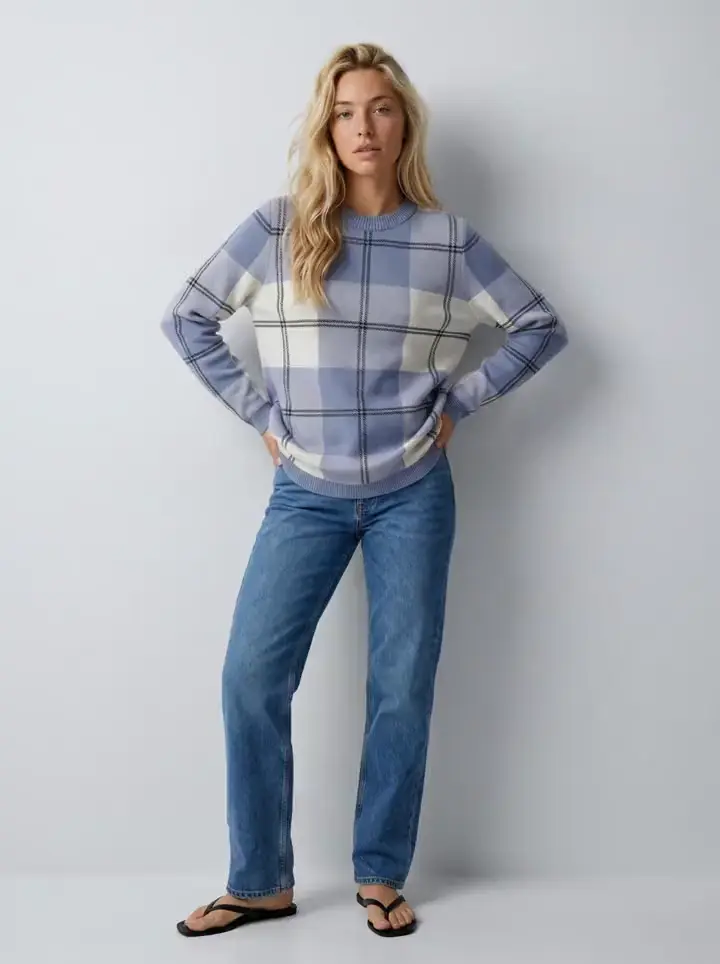
Both clips were generated in Uwear from the same approved photo of the same saved model. Each starts on that photo as its first frame, so the sweater's check, the jeans and the set are the ones that were signed off. The back of the sweater is the part the photo never showed: watch it as she turns. This is the test to run on every tool you consider.
From clips to a finished video
A product-page loop is one clip. A campaign video, a launch reel or a TikTok for a drop is several clips cut together, and that step usually means exporting everything to a separate video editor.
Uwear's Montage editor does it in the same workspace as the photos and the clips [3][32][33]. You add up to 10 clips to a timeline, either generated there from an image or taken from your files. Per clip you set the in and out points, split it, change its speed and mute it, and you drag clips into order, with undo. Then you choose the aspect ratio and resolution, up to 2160p, and whether each clip fills the frame (cover) or keeps its full composition with padding (contain), and Montage exports one MP4. The Uwear assistant can also propose a montage from your existing videos and images. Montage is included at no extra cost: you pay for the clips at their video model's rate, not for cutting them together.
What it is not: a full video editor. It joins clips with straight cuts and keeps each clip's own sound; there are no transitions, titles or music track. The comparison with other tools is about where the edit starts. Photoroom's 300+ templates, WearView's catwalk, 360° spin and side-reveal templates and Botika's movement presets shape a clip from your images; Montage assembles clips you shot and chose yourself. None of the other seven publishes a timeline for stitching your own generated clips.
What we compared, and why
- Garment fidelity in motion. A turn or a walk shows parts of the garment the photo did not. Tools that take extra reference images, such as a back view, have something to copy instead of something to invent.
- Approved photo or from scratch. Image-to-video from a photo someone already checked against the product keeps the clip consistent with the listing. A clip made from a prompt or straight from a flat lay has to be checked from zero.
- The video model, and whether you choose it. It sets the motion, the fidelity and most of the price.
- Length and resolution. A product-page loop needs a few seconds; social clips can run longer. Several tools do not publish clip length at all.
- Batch. A drop of 40 products needs 40 clips. Running them one request at a time is a job; running them as one batch is a setting.
- Aspect ratios for the product page and for social. The gallery wants the listing photo's portrait frame; TikTok and Reels want 9:16.
- The finished video. Whether clips can be assembled into the video that goes live without leaving the tool.
We did not test the other tools hands-on. Competitor facts are what each vendor publishes, read on October 7, 2026, and gaps are marked as not published rather than guessed. Tools are grouped by the job they fit, not ranked.
Which tool fits which job
Each tool sits under the job it fits best, in alphabetical order. None is ranked above another.
Best for a few clips from photos already in Botika: Botika
Botika animates any photo, on a model, flat or on a mannequin, with presets such as zoom in, casual and runway walk [4]. Each video is 5 credits, and credits roll over while the subscription runs [5]. Clip length, resolution, ratios, the video model, batch and an API for video are not published. Who it suits: a merchant who already uses Botika for photos and wants a few clips.
Best for a documented video API with batch: Claid
Claid turns on-model photos into 5- or 10-second clips at 720p, with sound generated alongside; its image-to-video page names xAI's Grok Imagine as the model. If you only have the garment shot, it tells you to create the model photo first, at extra cost [10][11][15]. Its Image-to-Video API supports batch generation [12]. A 5-second clip is 60 web credits or 35 API credits, from separate pools [13][14]; Claid's own table gives Essentials 8 clips a month and Pro 33, and a third-party guide lists those plans at $9 to $15 and $39 to $49 [16]. The animation page promises clothing "100% true to the original shot" and also suggests another take when needed. Who it suits: a team that wants video through an API with batch, and can live with 720p.
Best for developers adding clips to their own product: FASHN
FASHN animates your on-model or product photo, with an optional end image, at 5 or 10 seconds and 480p, 720p or 1080p [17][18]. A 5-second 1080p clip is 6 credits, $0.45 at the $0.075 API rate, and failed predictions are not charged [19][20]. The app says it keeps the colour, print and fit of the original, and recommends 9:16 for Reels and TikTok. The trade-offs: the API documentation labels the endpoint Experimental, the video model is not named, and there is no video batch beyond 3 to 11 simultaneous generations in the app. Who it suits: a developer adding clips to a product of their own.
Best for campaign and mood clips with a saved character: Kive
Kive generates video from a start frame or a prompt, 4 to 15 seconds, from 21:9 to 9:16, and a saved character keeps the same person in the still and the clip [24]. Its pricing page, which describes itself as agent guidance rather than a quote, puts 1,000 credits at about 40 default-length videos, with the default length not stated [23]. There is no public REST API for generation, only an MCP endpoint. Who it suits: campaign and mood clips more than catalog runs.
Best for brands already on Modelia for photos: Modelia
Modelia animates a fashion image you upload as the starting frame, with a motion prompt, at 5 or 10 seconds [25]. Its own blog puts a video at 25 to 40 credits [27], against the Creator plan's $30 for 150 credits [26]. Resolution and ratios are not published, the free Starter plan is watermarked, and the API lists video with the price on request. Who it suits: a brand already on Modelia for photos.
Best for social clips from templates: Photoroom
Photoroom's Video Generator turns 1 to 4 images of the garment, accessory or model into a clip, from more than 300 e-commerce templates or a prompt, in 9:16, 1:1 or 16:9 [6][7][8]. It is on the Max plan ($34.99 a month, up to 50 video generations) and Ultra (up to 150, with 4K) [9]. Clip length, the video model and a video API are not published, and Visual QA is an Enterprise image feature, not a video check. Who it suits: a brand making a steady stream of social clips that wants templates more than a catalog run.
Best for the whole path from approved photo to finished video: Uwear
The path runs in four steps in one workspace. The on-model photo is generated on your saved model in your saved art direction and, when the automatic reviewer is on, checked against the product photo. The clip starts from the approved photo, on the video model you choose for that clip. Montage cuts the clips into one video. The export is the finished file [1][3][32].
Nine video models are in the catalog. The four we reach for first are MiniMax H3, Seedance 2.5, Gemini Omni Flash and Wan 3.0; Kling 3 Pro is there too, and it is the model in the clips above and in two ready-made templates: "Product page set" adds a 5-second 360-degree turn to every garment, and "Instagram drop" a 5-second clip at 4:5 from the hero photo. Runs go through batch generation, the API or an assistant through MCP, and any frame of a clip can be saved back as a photo. Credits are $0.10 each with no subscription; the price table above lists each model [1][2].
Where others are stronger. Photoroom has far more ready-made templates for social clips, and WearView has fashion-specific ones. FASHN prices its clips simply, by length and resolution, behind an API. Claid generates sound with every clip. The automatic reviewer checks photos, not clips: clips go through the same review states as photos (approve, flag, retry), and there is no automatic check on video. Montage cuts and exports but adds no transitions, titles or music.
Uwear's facts come from our own model catalog, templates and product code.
Best for small brands that want stills and video templates in one plan: WearView
WearView accepts product shots, model shots, flat lays and ghost-mannequin shots, with catwalk, 360° spin and side-reveal templates for TikTok and Reels [21]. Video starts on the Pro plan: 20 credits at 1080p and 40 in 4K [22]. Clip length, aspect ratios and the video model are not published, and the API is on Enterprise only. Who it suits: a small brand that wants stills, ghost mannequin and video in one plan.
The video models behind the tools
Fashion tools run general video models underneath. These are the models brands hear about, and which of them Uwear runs inside its workflow. Called directly, any of them animates a photo you supply; the on-model photo, the check against the product, the run across a drop and the edit stay with you. OpenAI shut the Sora 2 API down on September 24, 2026 [31].
| Model | Maker | What it does | Inside Uwear |
|---|---|---|---|
| MiniMax H3 [1] | MiniMax | Keyframe video with native audio, up to 15 seconds | Yes: MiniMax H3 Max |
| Seedance [1] | ByteDance | Video from a start frame, references or a prompt; 2.5 runs up to 30 seconds | Yes: Seedance 2.5 and Seedance 1.5 Pro |
| Gemini Omni Flash 1.1 [1] | Video from first and last frames or image and video references, up to 4K | Yes | |
| Wan 3.0 [1] | Alibaba | Video from a start frame or several references, up to 30 seconds | Yes: Wan 3.0 and Wan 3.0 Prime |
| Kling 3.0 [1][28] | Kuaishou | Image-to-video from a start frame, with an optional end frame; a native 4K model since April 2026 | Yes: Kling 3 Pro and Kling 2.5 Turbo Pro |
| PixVerse v6 [1] | PixVerse | Image-to-video from 360p to 1080p, 5 to 15 seconds | Yes |
| Veo 3.1 [29] | 4, 6 or 8 seconds with sound, 16:9 or 9:16, from a start image, a last frame or up to three reference images | No | |
| Runway Gen-4.5 and Aleph 2.0 [30] | Runway | Video generation and video editing in the Runway app and API | No |
Which one for which job
- A looping clip in every product gallery: Uwear's Product page set (a 360-degree turn per garment in a batch run), or FASHN's API if you build the loop into your own product.
- A launch or campaign video cut from several clips: Uwear, shot on the model you choose and assembled in Montage; add titles and music in a video editor if you need them.
- TikTok and Reels clips from templates: Photoroom or WearView; for clips matched to an Instagram carousel, Uwear's Instagram drop or the fashion ad creative set.
- Clips through an API, in batch: Uwear (REST and MCP) or Claid.
Questions brands ask about AI fashion video
What is the best AI fashion video generator for ecommerce?
The best one depends on what you need at the end. For a documented video API with batch, at 720p: Claid. For a developer adding clips to their own product: FASHN’s API. For social clips from ready-made templates: Photoroom. For a finished video made from your own approved photos, on a video model you choose, in one place: Uwear, which runs the photo, the clips and the Montage edit in the same workspace. Uwear publishes this comparison and did not test the other tools hands-on, so run the same approved photo through each before you decide.
Can I turn a product photo into a model video?
Yes, in two steps that some tools hide: the product photo becomes an on-model photo, and that photo is animated. Botika, WearView and Photoroom accept a flat lay or packshot and do both. Claid tells you to create the model photo first and charges for it separately. Uwear makes the on-model photo in the same run (from 3 credits) and the clip starts from it.
How much does an AI fashion video cost per clip?
It depends mostly on the video model, the length and the resolution, so compare like with like. On Uwear, at $0.10 a credit, a 5-second clip is $1.60 on MiniMax H3 Max at 768p, $2.00 on Wan 3.0 or Gemini Omni Flash at 720p, $2.30 on Kling 3 Pro and $9.50 on Seedance 2.5 at 720p. FASHN quotes $0.45 at 1080p on its API and Photoroom about $0.42 to $0.70 a generation on Max, without naming the model. What you pay for in the end is a clip you can publish, retakes included.
Can I edit several AI clips into one finished video?
In Uwear, yes: Montage puts up to 10 clips on a timeline, where you trim, reorder, split, change speed and mute each one, then exports one MP4 in the aspect ratio and resolution you set, at no extra cost beyond the clips. Photoroom and WearView build a clip from a template instead. Montage has no transitions or music track; for those, finish in a video editor.
Which aspect ratio should a product-page clip use, and which for TikTok?
On a product page the clip sits in the gallery next to the photos, so it should match their portrait frame. TikTok and Reels play vertical 9:16. In Uwear, Kling 3 Pro takes the ratio from the photo, and a Montage export takes the ratio you set, with a crop or a padded fit. Photoroom offers 9:16, 1:1 and 16:9.
Does the garment stay accurate in motion?
Starting from an approved photo anchors the first frame, which is why every tool here works image-to-video. What the photo cannot carry is the back of the garment: a turn shows it, and the model has to invent it unless you give it a back view. In Uwear, Kling 3 Pro takes up to three reference images; Photoroom takes up to four images. No tool here publishes a measured fidelity rate for video, so review every clip before it ships.
Sources
Read on October 7, 2026. Claid's plan prices render only in a browser, so its dollar prices come from a named third-party guide. Botika's prices are the ones its pricing page loads. Uwear's current rates are on the models page.
- [1] Uwear models page: video models, durations and credit rates. Accessed October 7, 2026.
- [2] Uwear pricing: $0.10 per credit, no subscription. Accessed October 7, 2026.
- [3] Uwear fashion video use case: clips from approved stills, review states, batch, Montage editor. Accessed October 7, 2026.
- [4] Botika AI fashion video generator: any photo in, movement presets. Accessed October 7, 2026.
- [5] Botika pricing: each video costs 5 credits; plan prices as loaded by the page. Accessed October 7, 2026.
- [6] Photoroom Video Generator: 1 to 4 product images, 300+ e-commerce templates. Accessed October 7, 2026.
- [7] Photoroom fashion video templates: garment, accessory or model images. Accessed October 7, 2026.
- [8] Photoroom help: create a video from a photo (16:9, 9:16, 1:1). Accessed October 7, 2026.
- [9] Photoroom pricing: Video Generator on Max (up to 50 generations) and Ultra (up to 150). Accessed October 7, 2026.
- [10] Claid AI fashion video: 720p, 60 credits for five seconds, create the model photo first. Accessed October 7, 2026.
- [11] Claid fashion animation API: 5- or 10-second videos. Accessed October 7, 2026.
- [12] Claid Image-to-Video API: batch animation generation. Accessed October 7, 2026.
- [13] Claid pricing: AI Video generations per plan (60 credits for 5s). Accessed October 7, 2026.
- [14] Claid API pricing: AI video 35 credits per 5s, 70 per 10s. Accessed October 7, 2026.
- [15] Claid image to video, powered by Grok Imagine. Accessed October 7, 2026.
- [16] WizCommerce, Claid AI pricing guide (third party, updated September 30, 2026). Accessed October 7, 2026.
- [17] FASHN AI fashion video generator. Accessed October 7, 2026.
- [18] FASHN API reference: image-to-video (Experimental). Accessed October 7, 2026.
- [19] FASHN app pricing: video credits by length and resolution. Accessed October 7, 2026.
- [20] FASHN API pricing: $0.075 per credit on demand. Accessed October 7, 2026.
- [21] WearView AI video generator: product, model, flat-lay and ghost mannequin input. Accessed October 7, 2026.
- [22] WearView pricing: 1080p 20 credits, 4K 40 credits per video. Accessed October 7, 2026.
- [23] Kive pricing (published as agent guidance). Accessed October 7, 2026.
- [24] Kive vs Higgsfield (Kive blog): start frame, 4 to 15 seconds, 21:9 to 9:16. Accessed October 7, 2026.
- [25] Modelia AI video generator: a fashion image as the starting frame. Accessed October 7, 2026.
- [26] Modelia pricing. Accessed October 7, 2026.
- [27] Modelia blog: 25 to 40 credits per video. Accessed October 7, 2026.
- [28] Kling AI blog: native 4K video model. Accessed October 7, 2026.
- [29] Gemini API docs: Veo 3.1 durations, resolutions, aspect ratios, reference images. Accessed October 7, 2026.
- [30] Runway pricing page: the Gen-4.5 and Aleph 2.0 models. Accessed October 7, 2026.
- [31] OpenAI API docs: video generation (Sora 2 shut down September 24, 2026). Accessed October 7, 2026.
- [32] Uwear changelog, April 2026: the Montage video editor (timeline, reorder, split, speed, mute, export settings). Accessed October 7, 2026.
- [33] Uwear changelog, May 2026: Montage proposals and cover or contain export. Accessed October 7, 2026.