Free AI fashion model tools: how to try AI photos on your own clothes (2026)
Updated November 16, 2026. Free offers change often: check each vendor’s page before you sign up.
How can I try AI model photos on my own clothes for free?
Yes, you can see your own clothing on an AI model for free before you pay. There are four kinds of free option: free credits on signup where you upload your own product photo (FASHN, Photta, The New Black), free plans and trials with limits that differ by tool, such as a watermark, no commercial rights or a public gallery (Modelia, Flair, Botika, Photoroom), a free preview made on your own products (Uwear shoots three products from your store), and open-source try-on demos (IDM-VTON on Hugging Face). The table below gives what is free in each, the limits, and the price after the free part. [5][12][22][15][18][10][26][1][34]
Disclosure. We make Uwear. We have not tested the other tools hands-on; their facts come from their own pages, linked below and read on November 16, 2026.
What kinds of free AI fashion model option are there?
- Free credits on signup. A one-time balance, usually with no card, that you spend on your own product photos. FASHN gives 10 credits, Photta 20 (four 2K photos) and The New Black an unpublished number. [5][12][22]
- A free plan or a free trial. A plan that stays free with a small allowance, or a short trial. The limits differ by tool, such as a watermark, no commercial rights or a public gallery: Modelia, Flair, Botika and Photoroom. [15][18][10][26]
- A free preview on your own products. The vendor shoots a few of your products for you. Uwear shoots three products from your store and emails the photos and two short videos within 24 hours. [1]
- Open-source try-on demos. A public model you run in the browser on shared GPUs. IDM-VTON puts your garment on a photo of a person, under a non-commercial license. [34][35]
Which free AI fashion model tools let you use your own product photos?
Nine free options, read on their own pages on November 16, 2026. “Not published” means we found nothing on the vendor’s pricing page, help center, FAQ or terms. Prices are as each vendor showed them; Photta and Photoroom showed Canadian dollars.
| Tool | Kind of free option | What is free | Limits on the free part | Your own product photo? | After the free part |
|---|---|---|---|---|---|
| Uwear (we make it)[1][2][3] | Free preview, shot for you | One AI photoshoot per store: three products from your store, five on-model photos of each, a mixed look and two short videos, by email within 24 hours | One preview per store. Uwear picks the three products. A work email at the store’s domain. A person at Uwear checks the plan before the shoot. No account or card | Yes, from your store: it uses the product photos already on your public store. You do not upload or choose them | $0.10 a credit. A photo is 3 credits ($0.30) on Gemini 2.1, the default image model, at 1K. Other image models start at 2 credits ($0.20). Minimum purchase: 70 credits ($7). |
| FASHN[5][6][7][8][9] | Signup credits (app) | 10 credits, no card. A Fast image is 1 credit at 1K, 2K or 4K, so up to 10 images | Expiry, resolution, watermark and commercial use of the free credits: not published. No free API credits | Yes: flat lay, ghost mannequin, on-hanger or product-only photos (Product to Model), or try-on on a person photo | App Basic US$19 a month, or US$16 billed yearly, for 200 credits, up to 4K. API credits from US$7.50 for 100, valid 12 months |
| Botika[10][11] | Free trial | Pricing page: 300 credits for 7 days, “about 10 Standard photos” (30 credits each, 2K). Its FAQ still describes 20 credits for business trials or 8 for other signups | Ends after 7 days or when the credits run out; downloads after that need a plan. The FAQ says the restricted trial is watermarked at lower quality. Card rule for the 300-credit trial: not published. Its FAQ permits commercial use of generated photos, with no separate trial exclusion stated | Yes: flat lays, ghost mannequin and existing product photos, up to 6 photos per product | Personal US$25 a month, or US$20 billed yearly, for 840 credits a month, up to 4K. Top-ups at US$0.04 a credit; whether they need a plan: not published |
| Photta[12][13][14] | Signup credits | 20 credits, no card: four on-model photos at 2K (5 credits each) | Watermarked until you buy credits or a plan. Credits expire 30 days after signup. Commercial rights on free output are unclear: its pricing page ties commercial exports to a purchase, while its terms grant commercial use with no free-plan exclusion | Yes: flat lay, hanger, mannequin or model photos | One-time credits with no plan from 50 credits at CA$0.17 each (CA$8.50, ten 2K photos), which do not expire. Hobby C$18 a month, or C$15 billed yearly, for 150 credits |
| Modelia[15][16][17] | Free plan (Starter) | 50 welcome credits, then 20 credits a month. A standard image is 3 credits: about 16 images, then 6 a month | Up to 2K. A visible “Created by Modelia” watermark. No commercial use: its terms exclude listings, ads and marketing. Free uploads can be used to train its models | Yes: flat garment photos (Product to Model) and mannequin photos | Creator $30 a month for 150 credits (about 50 standard images), up to 4K, no watermark, commercial rights. Credit packs need the paid plan |
| Flair[18][19][20][21] | Free plan | 5 generated images, 1 custom model and 1 video, priced $0 “Forever” | How much of that covers virtual try-on: not published. Free outputs appear in the Flair Gallery for other users. Its terms both grant and deny commercial use on the free tier. Resolution and watermark: not published | An upload is documented on its Virtual Try On page; whether the free plan covers it: not published | Pro US$10 a month, or US$8 billed yearly, image count not published. A company commercial license starts at Pro+, US$35 a month or US$26 billed yearly, for 80 images |
| The New Black[22][23][24][25] | Signup credits | Free credits on signup, no card; the number is not published. A Standard on-model image (1K) is 1 credit | Standard images are 1K; Pro (2K) generation needs a paid plan, and whether free credits can use its 2K enhancement is not published. Expiry and watermark of the free credits: not published. Its pricing FAQ grants commercial use on any plan, without naming signup credits. Uploads and results stay private and are not used for training, its security page says | Yes: flat, on-hanger, mannequin or worn clothing photos | A one-time Kicker pack is $10 for 100 credits (100 Standard images), on any account. Starter $15 a month, or $12.50 billed yearly, for 200 credits |
| Photoroom[26][27][28][29][30][31][32][33] | Free plan, 7-day trial and API sandbox | A free app plan with limited AI credits (the fashion allowance is not published); a 7-day trial of yearly Pro or Max; 1,000 watermarked API sandbox calls a month, no card | Free app accounts are for personal, non-commercial use. The trial needs a payment method and bills on day 8 unless you cancel; its commercial rights are not stated clearly. The sandbox is for testing. App uploads can be used for training unless you opt out | Yes in its AI fashion model tool (flat lays or photos of someone wearing your product); access from the free plan: not published | Pro CA$17.99 a month, or CA$10.50 billed yearly: AI fashion images at 1K, up to 1,600 a month. The fashion API starts at US$100 a month for 1,000 images |
| IDM-VTON (open source)[34][35][36][37][38] | Free open-source demo | Free try-on runs on Hugging Face’s shared GPUs: 2 GPU minutes a day without an account, 5 with a free account | Model license CC BY-NC-SA 4.0, which is non-commercial. Works at 768×1024. Queues; the automatic mask targets the upper body | Yes: a garment photo plus a photo of a person. It does not create a model from the garment alone | No paid plan for the model. Hugging Face PRO, $9 a month, raises the GPU quota to 40 minutes a day; the license stays non-commercial |
Where a vendor contradicts itself, the table says so. Botika’s pricing page offers 300 trial credits while its FAQ describes 20 or 8 [10][11]. Flair’s terms grant free-tier assets for “personal or commercial use”, then say you need a paid plan to use Flair images commercially [19]. Modelia’s pricing gives Starter one custom model, while its terms say Starter cannot create one [15][16].
What is each free option built for?
The same short entry for every tool: what it is built for and up to four facts about the free part and the first paid step.
Uwear
Built for clothing brands that shoot whole collections. Our pick for seeing your own store’s products on a model before you pay; we make it.
- The free preview shoots three products from your store and emails photos and two short videos within 24 hours.
- A person at Uwear checks the plan before the shoot.
- Each photo is compared with its product photo during the run and can be retried; the check costs no credits.
- After the preview you choose every product, model and art direction yourself, and pay in credits.
Sources [1][4][2]
FASHN
Built for fashion image tools in an app and an API for developers.
- 10 free app credits, no card.
- Product to Model takes flat lay, ghost mannequin, on-hanger and product-only photos.
- App top-ups and API credits cost US$0.075 each.
- Basic is US$19 a month for 200 credits, up to 4K.
Sources [5][6][8]
Botika
Built for on-model photos from garment photos, with a library of models, poses and backgrounds.
- The pricing page offers a 7-day trial of 300 credits; its FAQ describes 20 or 8.
- A Standard 2K photo is 30 credits.
- It takes flat lays, ghost mannequin and existing product photos.
- Personal is US$25 a month for 840 credits.
Sources [10][11]
Photta
Built for virtual try-on and product photos for online sellers.
- 20 free credits for 30 days, no card: four 2K photos, watermarked.
- It takes flat lay, hanger, mannequin or model photos.
- One-time credits need no plan, from CA$8.50 for 50.
- Purchased credits do not expire.
Sources [12][13][14]
Modelia
Built for turning flat or mannequin garment photos into on-model photos.
- Starter: 50 welcome credits, then 20 a month, at 3 credits a standard image.
- Free images carry a visible watermark and have no commercial rights.
- Free uploads can be used to train its models.
- Creator is $30 a month for about 50 standard images, up to 4K.
Sources [15][16][17]
Flair
Built for brand product imagery and ads, with custom models trained on 6 to 10 product photos.
- Free plan: 5 generated images, 1 custom model and 1 video.
- Free, Pro and Pro+ outputs appear in its public gallery.
- Its terms both grant and deny commercial use on the free tier.
- Pro+ adds a company commercial license at US$35 a month.
Sources [18][19][21]
The New Black
Built for on-model photos and try-on from your own product photos, with credit packs on any account.
- Free credits on signup, no card; the number is not published.
- A Standard 1K image is 1 credit; Pro (2K) generation needs a paid plan.
- It takes flat, on-hanger, mannequin or worn clothing photos.
- A $10 pack buys 100 Standard images with no plan.
Sources [22][23][24]
Photoroom
Built for general product photo editing, with an AI fashion model tool and an API.
- Free app accounts are for personal, non-commercial use.
- The 7-day trial of yearly Pro or Max needs a payment method.
- The API sandbox gives 1,000 watermarked calls a month.
- Pro makes AI fashion images at 1K; 2K starts on Max.
Sources [28][27][32][30][29]
IDM-VTON
Built as a research model for virtual try-on that anyone can run.
- The demo runs free on Hugging Face, with a daily GPU quota.
- It needs a garment photo and a person photo.
- It works at 768×1024.
- Its CC BY-NC-SA 4.0 license is non-commercial.
Sources [34][36][35][37]
Which free option fits which job?
- You want to see your own catalog as finished photos and video, with no account. Our pick is the Uwear free preview (we make it). Uwear picks the three products, so it shows your range rather than the pieces you would choose. [1]
- You want to pick the products and try several yourself. Signup credits fit this: FASHN’s 10 credits, Photta’s four 2K photos (watermarked) or The New Black’s free credits. Modelia’s Starter gives about 16 free images and then 6 a month, but they are watermarked and not for commercial use. [5][12][22][15][16]
- You want a few images you can publish, for a few dollars. Some tools sell small amounts with no plan: The New Black’s $10 pack for 100 Standard (1K) images, Photta from CA$8.50 for ten 2K photos, and FASHN API credits from US$7.50 for 100. [23][13][7]
- You are a developer testing an API. Photoroom’s sandbox gives 1,000 watermarked calls a month with no card, and IDM-VTON’s code and model are public under a non-commercial license. [30][35]
How do you test free AI model photos fairly?
A free test is only useful if every tool gets the same job. Run this in each tool you try:
- Use the same three products. One plain piece, one with a print, logo or buttons, and one where fit matters, such as a dress or a coat. Upload the same product photo of each in every tool. For Uwear, request the free preview first, then run the three products it picks in the other tools with the same store photos.
- Use the same resolution. Free parts differ: The New Black’s Standard images are 1K, Photoroom Pro makes fashion images at 1K, Photta’s free photos are 2K and IDM-VTON works at 768×1024. Compare at one size, and note the mode or model you used. [24][29][12][36]
- Check each garment against its product photo. Zoom in and compare the colour, the print and logo position, the buttons and pockets, the length and the fit. A photo that looks good but changes the product is not usable.
- Count what each kept photo cost. Include the retries. A tool with more free credits but more rejected photos can cost more per usable photo.
- Check the rights before you publish. Look for the watermark, the commercial-use rule and whether your uploads can train the vendor’s models.
What does the Uwear free preview give you?
You paste your store link and a work email. Uwear reads the store, picks three products that show your range and writes an art direction for your brand. A person at Uwear checks the plan, then Uwear shoots each product on an AI model. You get a private link with five photos of each product, a mixed look that combines them and two short videos, within 24 hours. [1]
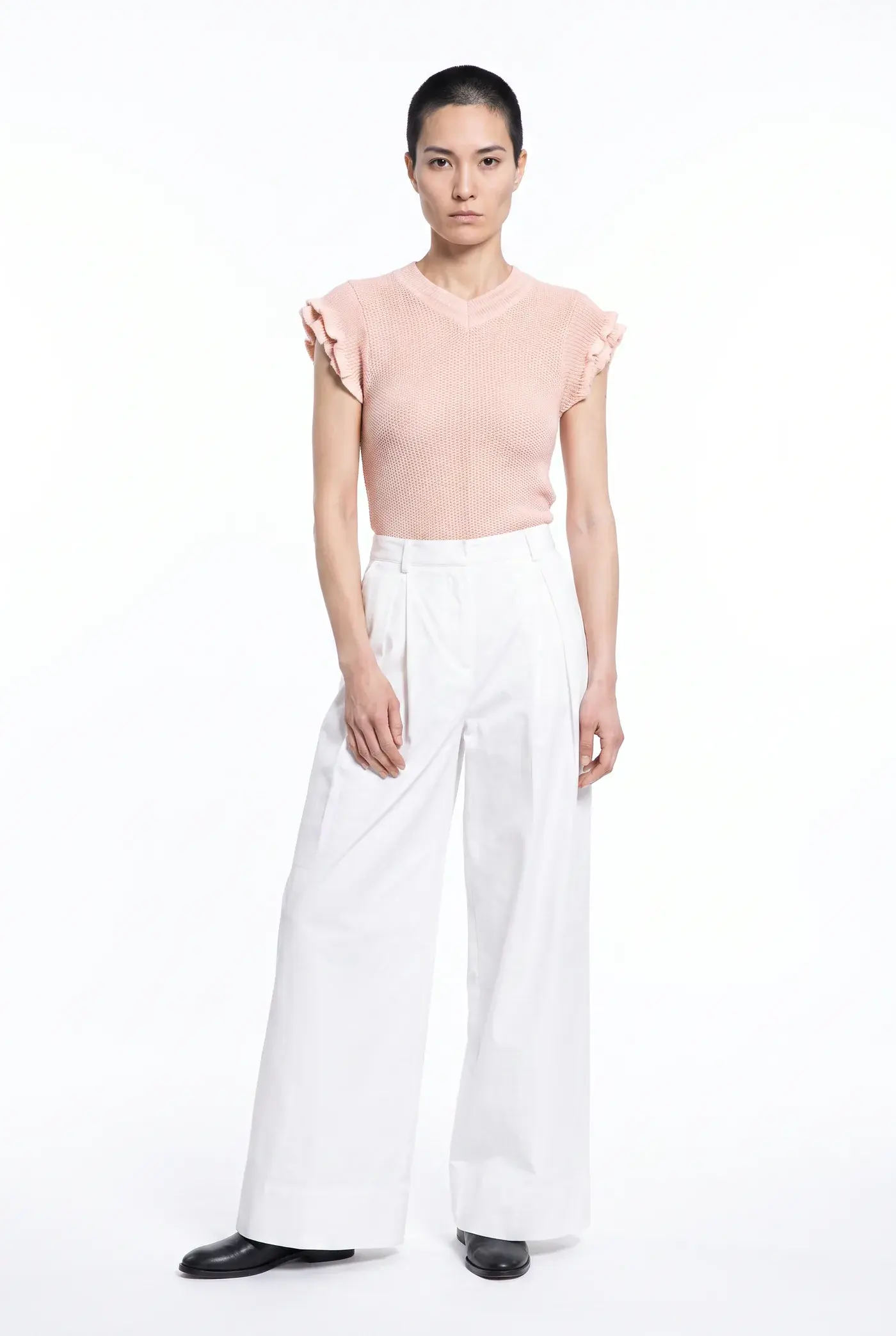
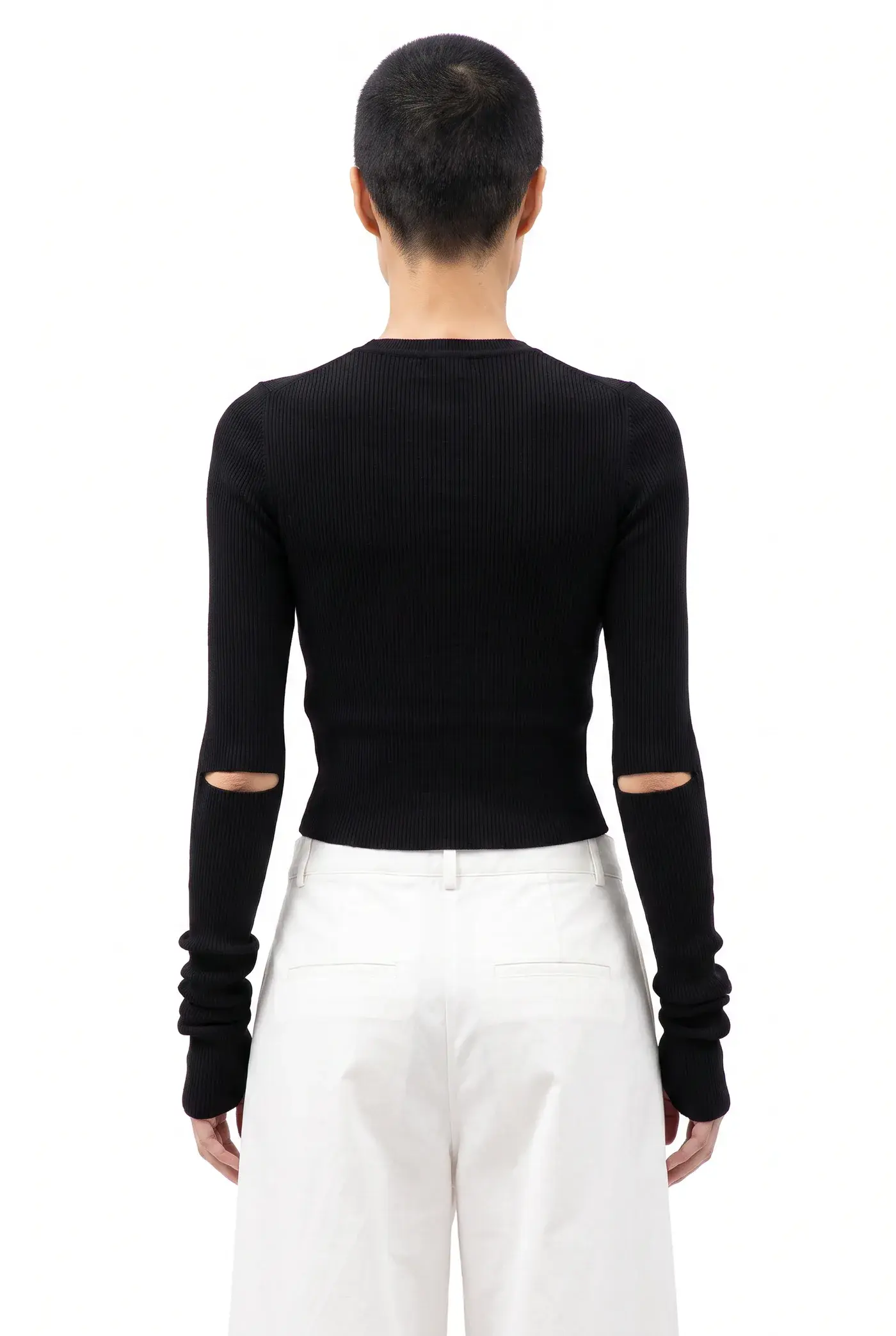
Photos from Uwear free previews, made from the product photos already on the store.
How do you shoot the rest of the catalog in Uwear?
- From your assistant. Connect the Uwear MCP server to ChatGPT, Claude or Codex and ask it to shoot your products with the same model and art direction. It shows the plan and its cost before anything is made.
- From your own systems. The Uwear API runs the same jobs from code, for a catalog that should shoot itself when products are added.
- By hand. In Uwear Studio, you choose every product, the model and the art direction.
A prompt to shoot the rest of your catalog from chat
Copy it into an assistant connected to the Uwear MCP server. It becomes a costed brief you approve before anything generates.
Product page set
“Connect to the Uwear MCP server and load the "Product page set" template. Run it on my product photos with the model and art direction from my free preview, and show me the costed brief before generating.”
Each photo is compared with its product photo during the run and can be retried; the check costs no credits. You pay in credits: $0.10 a credit. A photo is 3 credits ($0.30) on Gemini 2.1, the default image model, at 1K. Other image models start at 2 credits ($0.20). Minimum purchase: 70 credits ($7). [4][2][3]
What else should I know about free AI model photos?
Is there a free way to see my own clothing on an AI model before I pay for a tool?
Yes, four kinds, as of November 16, 2026. Free credits on signup let you upload your own product photo: FASHN gives 10 credits, Photta 20 (four 2K photos, watermarked) and The New Black an unpublished number, all with no card. Free plans and trials: Modelia’s Starter (watermarked, no commercial use), Flair’s Free plan, Botika’s 7-day trial and Photoroom’s free plan and trial. A free preview done for you: Uwear shoots three products from your store and emails photos and two short videos within 24 hours. Open-source try-on demos such as IDM-VTON run free on Hugging Face under a non-commercial license.
Get the Uwear free previewCan I use free AI model photos on my store?
Check the license of the free part first. Modelia’s terms exclude commercial use of free Starter images, Photoroom’s free app accounts are for personal use only, and IDM-VTON’s CC BY-NC-SA 4.0 license is non-commercial. Flair’s terms both grant and deny commercial use on the free tier, and Photta’s pricing page ties commercial exports to a purchase while its terms grant commercial use with no free-plan exclusion. The New Black’s FAQ says what you generate is yours to sell and publish on any plan, and Botika’s FAQ says generated photos can be used commercially, with no trial exception stated. FASHN does not publish a separate rule for its free credits.
Do free AI fashion model tools add a watermark?
Several do. Modelia’s free images carry a visible “Created by Modelia” watermark, Photta’s free photos are watermarked until you buy credits or a plan, Botika’s FAQ describes a restricted trial with watermarks and lower quality, and Photoroom’s API sandbox output is watermarked. FASHN, Flair and The New Black do not publish a watermark rule for their free credits.
Which free AI fashion model tools need no credit card?
FASHN, Photta and The New Black say no card for their signup credits, and Photoroom’s API sandbox needs no card. The IDM-VTON demo opens without an account. Uwear’s free preview needs no account or card, only a work email at the store’s domain. Photoroom’s 7-day trial needs a payment method. Botika, Modelia and Flair do not publish a card rule for their current free offers.
Is Uwear free to try?
Every clothing brand can get one free preview: Uwear picks three products from the store and emails on-model photos and two short videos within 24 hours, with no account or card. A person at Uwear checks the plan before the shoot. To shoot products you choose, you buy credits: $0.10 a credit. A photo is 3 credits ($0.30) on Gemini 2.1, the default image model, at 1K. Other image models start at 2 credits ($0.20). Minimum purchase: 70 credits ($7).
Uwear pricingHow do I compare free AI model photo tools fairly?
Run the same three products in every tool: a plain piece, a piece with a print or logo, and a piece where fit matters, such as a dress. Use the same product photo and the same resolution where the tool lets you choose, and note the mode or model. For Uwear’s free preview, request it first and run the three products it picks in the other tools. Then zoom in and check each garment against its product photo: colour, print and logo position, buttons, pockets and length. Count the credits each kept photo cost, retries included, and check the watermark and commercial rights before you publish.
Sources
We make Uwear. We have not tested the other tools hands-on; their facts come from their own pages, read on November 16, 2026.
- [1] Uwear free AI photoshoot for clothing brands (free preview). Accessed November 16, 2026.
- [2] Uwear pricing. Accessed November 16, 2026.
- [3] Uwear image models and credit rates. Accessed November 16, 2026.
- [4] Uwear quality check: how each photo is compared with its product photo. Accessed November 16, 2026.
- [5] FASHN pricing and pricing FAQ. Accessed November 16, 2026.
- [6] FASHN help: app pricing. Accessed November 16, 2026.
- [7] FASHN help: API pricing. Accessed November 16, 2026.
- [8] FASHN Product to Model. Accessed November 16, 2026.
- [9] FASHN terms of service. Accessed November 16, 2026.
- [10] Botika pricing, trial and top-up FAQ. Accessed November 16, 2026.
- [11] Botika FAQs. Accessed November 16, 2026.
- [12] Photta virtual try-on tool. Accessed November 16, 2026.
- [13] Photta pricing and one-time credits. Accessed November 16, 2026.
- [14] Photta terms of service. Accessed November 16, 2026.
- [15] Modelia pricing. Accessed November 16, 2026.
- [16] Modelia terms. Accessed November 16, 2026.
- [17] Modelia Product to Model. Accessed November 16, 2026.
- [18] Flair pricing. Accessed November 16, 2026.
- [19] Flair terms of service. Accessed November 16, 2026.
- [20] Flair Virtual Try On. Accessed November 16, 2026.
- [21] Flair FAQ. Accessed November 16, 2026.
- [22] The New Black help center. Accessed November 16, 2026.
- [23] The New Black pricing and packs. Accessed November 16, 2026.
- [24] The New Black Product to Model. Accessed November 16, 2026.
- [25] The New Black security. Accessed November 16, 2026.
- [26] Photoroom help: what are Photoroom’s plans. Accessed November 16, 2026.
- [27] Photoroom help: free trials of Photoroom. Accessed November 16, 2026.
- [28] Photoroom help: free accounts and commercial use. Accessed November 16, 2026.
- [29] Photoroom pricing (prices shown in Canadian dollars). Accessed November 16, 2026.
- [30] Photoroom API pricing and FAQ. Accessed November 16, 2026.
- [31] Photoroom AI fashion model tool. Accessed November 16, 2026.
- [32] Photoroom terms and conditions. Accessed November 16, 2026.
- [33] Photoroom privacy policy. Accessed November 16, 2026.
- [34] IDM-VTON demo on Hugging Face Spaces. Accessed November 16, 2026.
- [35] IDM-VTON model card (license). Accessed November 16, 2026.
- [36] IDM-VTON demo source code (working resolution). Accessed November 16, 2026.
- [37] Hugging Face docs: ZeroGPU quotas. Accessed November 16, 2026.
- [38] Hugging Face pricing. Accessed November 16, 2026.
Last updated November 16, 2026. Free credits, trials and plans change often, so check each vendor’s own page before you sign up.