How to automate on-model photos for every new product in your clothing store (2026)
Updated November 16, 2026. Tools compared on their own docs and pricing, read November 16, 2026
To get on-model photos for every new product automatically, connect three pieces. A "product created" event in your store starts the job: a Shopify Flow trigger, a products/create webhook, or a Make, n8n or Zapier trigger. An image tool's API turns the product photo into photos of a model wearing it. A write-back step attaches the finished photos to the product through Shopify's productUpdate mutation. [1][9][5] The rest of this page shows each piece step by step and compares the image tools for this job.
Disclosure. We make Uwear. We have not tested the other tools hands-on; their facts come from their own pages, linked below and read on November 16, 2026. Uwear facts come from its automation page and API reference.
Short answer. On Shopify, the usual path is a Flow workflow on "Product created" with a Send HTTP request action to the image tool, and a small receiver that writes the photos back when the tool's webhook arrives. Without code, n8n does the whole loop, because its Wait node can hold a run until the photos are ready. Of the image tools below, only Shotlly documents a built-in new-product trigger in Shopify. Our pick for brands that want the shoot, the quality check and the delivery webhook defined once is Uwear (we make it): the store sends the product to the API, and a published Automation does the rest.
What are the ways to automate on-model photos for new products?
In 2026 there are three ways. They differ in who starts the job and who puts the photos back on the product.
- Store automation plus an image API. Shopify Flow, or a products/create webhook to your own service, calls the image tool for each new product. You write the step that attaches the photos. [1][2][9]
- A no-code tool in the middle. Make, n8n or Zapier starts on a new Shopify product, calls the image API over HTTP and writes the photos back through the Shopify Admin API. [10][13][20]
- A platform with built-in triggers. The image tool itself starts on an event. Shotlly starts on new Shopify products. Uwear Automations start on new clothing, a tag or an outfit in the Uwear workspace, so the store still sends the product in. [39][41]
How do you automate on-model photos with Shopify Flow?
Flow is a free Shopify app on the Basic, Grow, Advanced and Plus plans. The Send HTTP request action that calls an image API is on Grow, Advanced and Plus only. [4][2]
- Start on "Product created". The trigger fires when a person or an app adds a new product, in the admin or through the API. It does not fire for a new variant. A product can arrive before its images, so add a Wait step or a condition that the product has an image. [1][3]
- Send the job with Send HTTP request. POST to the image tool's API. Put the product ID, the title and the image URL in the body with Liquid, and keep the API key in Flow secrets. Use the product ID as the idempotency key, so a retry does not start a second job. [2]
- Let the image tool call you back. Flow waits 30 seconds for a response, and its Wait action pauses only for a fixed time. Image generation takes longer, so the finished photos must arrive at a receiver: a webhook endpoint you host, or a Make or n8n workflow. [2][3]
- Attach the photos with productUpdate. The receiver calls the Admin GraphQL productUpdate mutation with a media list: each item has the image URL as originalSource, alt text, and the IMAGE content type. It needs the write_products scope. productCreateMedia is deprecated, so do not build on it. [5][7][6]
- Check that the media is ready. Shopify processes media asynchronously; a file moves through UPLOADED and PROCESSING to READY or FAILED. Formats are PNG, GIF, JPEG, WEBP and HEIC, up to 20 MB. [8]
- Do not loop. Your own write-back changes the product. If a later step listens to product updates, ignore the changes your receiver makes.
How do you do it without code, in Make or n8n?
n8n can run the full loop in one workflow when the image API takes a webhook URL with each request, as FASHN and Uwear generation requests do: its Wait node holds the run until the image tool calls back. [36][42]
- A Shopify Trigger node on the Product Created event. [13][14]
- An HTTP Request node that sends the job to the image API, with the run's $execution.resumeUrl as the webhook URL. [15][17]
- A Wait node set to On Webhook Call. The resume URL is unique to each run, so each product resumes its own run. [17]
- An HTTP Request node that calls productUpdate with the photo URLs. The Shopify node has no image operation, and its docs point to the HTTP Request node with the Shopify credential. [16][5]
Two other shapes need a change. A synchronous API, such as Photoroom's, returns the image in the same call, so drop the Wait node and read the response. An API that posts every result to one account webhook, such as Claid's, needs a second workflow that starts on that webhook and finds the product by the job ID you stored. [22][27]
n8n Cloud is billed by monthly executions, from 20 EUR a month billed yearly for 2,500. Self-hosted n8n without a license key runs as the free Community edition. [18][19]
Make has a Watch products trigger in its Shopify app, an HTTP Make a request module for the image API, and a Make a GraphQL API call module for productUpdate; its Shopify app has no image module. Its docs do not say whether Watch products also fires on updates, so test that before you go live. Make bills in credits, one credit per operation by default. [10][11][12] Zapier has a Shopify New Product trigger. [20]
Which image tools can run this job, and what do they cost per photo?
Updated November 16, 2026. Every fact is from the vendor's own page, read on that date.
| Tool | API | Webhook on completion | Built-in trigger for new products | On-model from | Cost per on-model photo | Photos back to Shopify |
|---|---|---|---|---|---|---|
| Uwear [41][42][43] | REST: clothing items, generations and automation runs; an MCP server for ChatGPT, Claude and Codex | Yes: generation and automation-run events, signed with HMAC-SHA256 when a secret is set | Inside Uwear: new clothing, a chosen tag or a new outfit starts a published Automation. No store trigger: the store sends each new product to the API | Product photo: flat lay, packshot, ghost mannequin or supplier photo | 5 credits ($0.50) at 2K on Gemini 2.1, the default model; other models on the models page; the check costs no credits | Through your receiver (productUpdate); no Shopify app |
| Botika [32][33][34] | On Enterprise only; no public API docs | Not published | Not documented | Flat lays, ghost-mannequin shots and existing photos | 30 credits a 2K photo: about $0.60 to $0.89 by plan and billing period | Its Shopify connector is not on the App Store |
| Claid [26][27][28][29][30][31] | Async AI Fashion Models endpoint | Yes: one account webhook URL, optional HMAC-SHA256 signature, up to 4 attempts | Not documented; its page says to trigger workflows from your PIM, DAM or ecommerce stack | Flat-lay or mannequin photos, up to 5 garment images a request | 2 credits an image; from $59 for 1,000 credits, about $0.12; no resolution tied to the price | No Shopify app: download the result and upload it |
| FASHN [35][36][37][38] | Product to Model and Agent Images endpoints | Yes: a webhook URL per request, up to 5 retries; no signature documented | Not documented; its page says a developer or agency connects the API to the store | Any product image, including flat lays and ghost-mannequin shots | Product to Model at 2K: $0.15 (Fast), $0.225 (Balanced), $0.30 (Quality); model not named | Not documented |
| Photoroom [22][23][24][25] | Virtual Model on its image editing endpoint, API Plus and Enterprise | Not documented; the call is synchronous and returns the image | Not documented; its guide has your DAM call the API for each new SKU | A flat-lay or ghost-mannequin product image | $0.10 an image at 1K on API Plus; 2K and 4K on Enterprise at a custom price; model not named | Yes, through its Shopify app, on products you pick |
| Shotlly [39][40] | No API documented; a Shopify app | No API documented | Yes: new products and new product photos in Shopify are styled automatically | Your Shopify product photos (on-model try-on) | 2 credits: $0.90 to $0.50 by monthly volume; resolution and model not published | Yes, pushed back automatically; its listing mentions a review step |
Uwear first, as our pick, then the others alphabetically; the order is not a score. Prices are per on-model photo before volume discounts, at 2K where the vendor publishes a 2K rate. Photoroom publishes only a 1K rate for self-serve API plans, and Claid and Shotlly do not tie their price to a resolution. Uwear rates by model and resolution are on the models page.
Our pick for a shoot, a check and a delivery webhook defined once: Uwear
Uwear (we make it) is built for brands that want every new garment shot on a saved model and art direction, checked, and handed back without a brief.
- A published Automation starts when new clothing is ready, a chosen tag is added, or an outfit is created. [41]
- No store trigger and no Shopify app: the store sends the product to the API. [42]
- Signed webhooks for finished generations and automation runs. [42]
- 5 credits ($0.50) a 2K photo on Gemini 2.1, the default; the check costs no credits. [43][45]
For an app with its own models, API on Enterprise: Botika
Botika is built for on-model photos from flat lays and ghost-mannequin shots, made in its app with its own foundation models. [33]
- API access is on Enterprise; public API docs and webhooks are not published. [32]
- A Standard 2K photo is 30 credits, about $0.60 to $0.89 by plan and billing period. [32]
- Its Shopify connector is not currently on the Shopify App Store. [34]
For a pipeline you build, with signed webhooks: Claid
Claid is built for ecommerce image pipelines, with an asynchronous AI Fashion Models endpoint among its operations.
- Up to 5 garment images in, from flat-lay or mannequin photos; 2 credits an output image. [28]
- Self-serve API plans from $59 for 1,000 credits, about $0.12 an image. [29]
- One account webhook URL with an optional HMAC-SHA256 signature. [27]
- No Shopify app; its page says to download the result and upload it to Shopify. [30][31]
For developers who want a low price per 2K photo: FASHN
FASHN is built for developers who connect its API to a catalog, PIM or store themselves.
- Product to Model at 2K is $0.15, $0.225 or $0.30 by mode, at $0.075 a credit. [37][38]
- A webhook URL per request with up to 5 retries; a signature is not documented. [36]
- For Shopify, its page says a developer or agency connects the API. [35]
For teams already on Photoroom: Photoroom Virtual Model
Photoroom is built for listing visuals across many product categories; Virtual Model is a feature of its image editing API.
- $0.10 an image at 1K on API Plus; 2K and 4K are on Enterprise at a custom price. [23][22]
- Synchronous: the call returns the image, and webhooks are not documented. [22]
- Its fashion guide has your DAM call the API for each new SKU. [24]
- Its Shopify app publishes back on products you pick. [25]
For a built-in new-product trigger in Shopify: Shotlly
Shotlly is built for Shopify stores that want new product photos restyled and pushed back without a separate automation tool.
- Its site says new products and new product photos are styled and pushed back to Shopify automatically. [39]
- On-model try-on is 2 credits, $0.90 to $0.50 by monthly volume; resolution not published. [39]
- No API or webhooks documented; its App Store listing mentions a review step before publishing. [39][40]
How do you automate new-product photos with Uwear?
Design the shoot with your assistant, connect your store through the API, and switch the Automation on in Studio.
- Plan and test the shoot with your assistant. Connect the Uwear MCP server in ChatGPT, Claude or Codex and use the Product page set template: front, upper-body and back photos on a white studio background, plus a 5-second 360-degree video, from one garment photo. Approve the costed brief, check the results, and save the shoot as an automation. An automation saved this way starts only by hand until you set its trigger in Studio. [44]
Copy this prompt into your assistant
Connect the Uwear MCP server in this session. Load the "Product page set" template on its white studio setup for the garment photo I attach, turn the AI reviewer on, and show me the costed brief in credits before generating. After I approve and check the results, save the same shoot as an automation named "New product photos", so I can set its trigger to When clothing is ready in Studio.
- Send each new product to the API. From Flow, n8n or your service, call POST /clothing-item with the product name and image URL and an Idempotency-Key, such as the Shopify product ID. Keep the returned clothing_item_id next to the product ID. To start one automation directly, call POST /workflows/{id}/runs instead. [42][41]
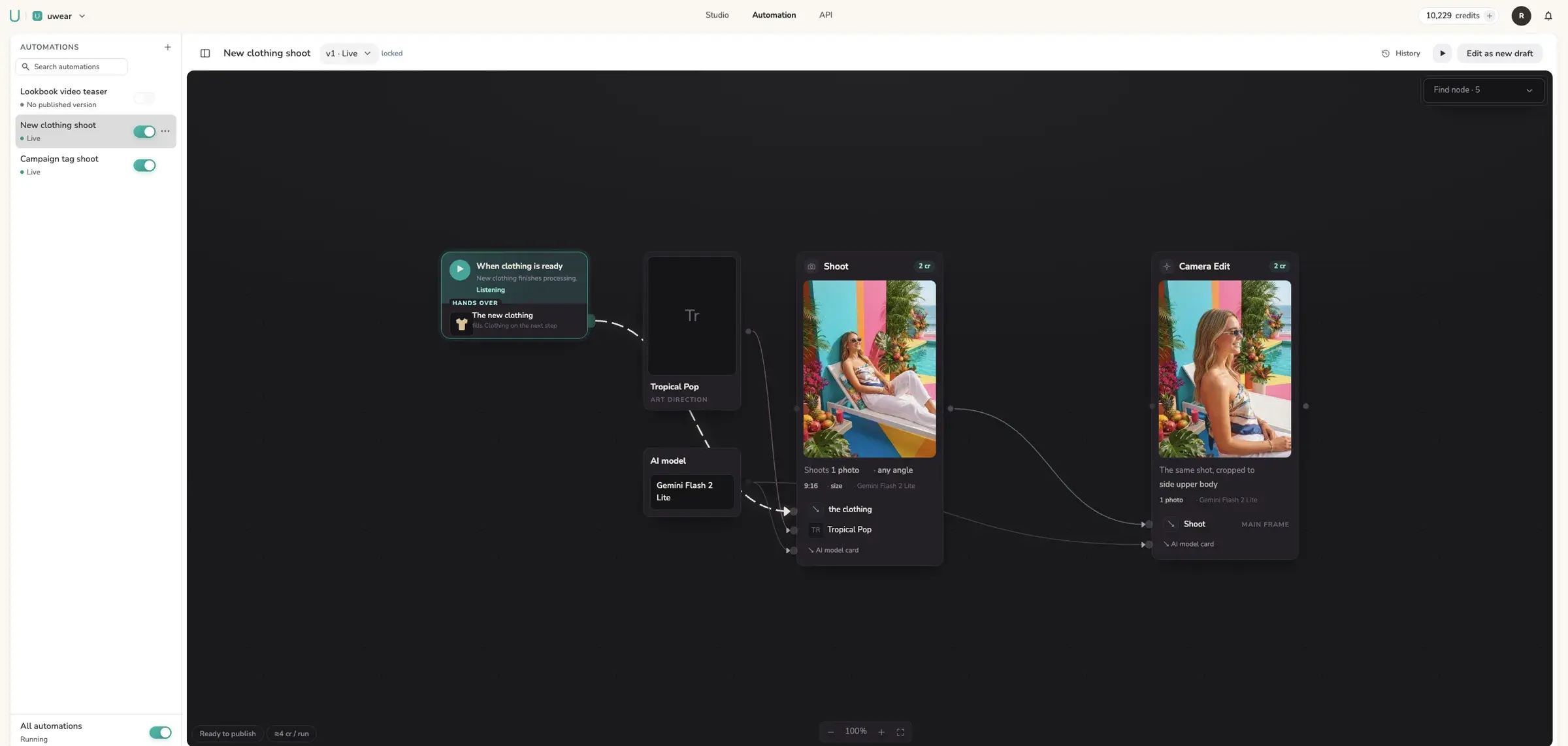
- Publish the Automation in Studio. In the automation canvas, start with "When clothing is ready", then add the shoot, a Check quality step and an Export step. The builder shows the cost of one run and the worst case with re-shoots before you publish. When the new garment finishes processing, the run starts by itself. [41]
- Receive the photos and attach them. Export can tag the photos or send a webhook, signed with HMAC-SHA256 in the X-Uwear-Signature header. The payload carries the run and result IDs; read each result with GET /generation-result/{id} for its image URL, then call productUpdate. Result URLs last 4 hours, so attach or copy the files at once. [42][5]
Prefer no automation in Uwear? Skip the canvas: send one generation request per product with a webhook_url, and the generation.completed webhook carries the photo URLs. The Shopify integration guide covers the write-back in detail, and plans and what they include are on the pricing page. [42]
What does it cost to automate photos for each new product?
The image tool is most of the cost. A worked example on Uwear: 3 photos a product at 2K on Gemini 2.1, the default model, at 5 credits ($0.50) a photo, is 15 credits ($1.50) a product. A month of 40 new products is 600 credits ($60). The quality check costs no credits; a retry costs the same as a new photo. [43][45]
The automation layer is small next to that. Flow is free on the plans that include it, Make bills one credit per operation by default, and n8n Cloud bills by executions, while self-hosted n8n is free. [4][12][18][19] The cost that is easy to miss is review: if the tool does not check its photos, a person checks each one before it goes live. Compare the cost per approved photo on your own garments, at the same resolution.
What can go wrong in an automated photo flow?
- The product has no image yet. Products are often created first and get images later. Wait, or check for an image, before you send the job. [1][3]
- Duplicate jobs. Flow and webhooks retry. Send the product ID as an idempotency key, or keep a record of the products already sent. [2]
- Loops. The write-back updates the product. A flow that listens to product updates must ignore its own changes.
- Expired result URLs. Image tools keep results for a limited time; on Uwear, 4 hours. Attach or copy the photos when the webhook arrives. [42]
- A wrong garment detail goes live. Put a check in the flow, or attach the photos to a draft product or a review tag, and let a person approve the hardest garments. See how Uwear's check and retries work.
How we compared these tools
We read the Shopify, Make, n8n and Zapier docs and each image tool's API, pricing and Shopify pages on November 16, 2026, and recorded only what they publish. Shopify's own guide to AI product photography covers bulk formatting and batch edits, not new-product triggers, so the Flow steps come from the Flow reference pages. [21] We did not test the other tools hands-on. Uwear facts come from its automation page and API reference. Prices change often; check the sources before you commit.
Questions about automating new-product photos
How do I automatically create on-model photos when I add a product to Shopify?
Connect three pieces. A "Product created" event starts the job: a Shopify Flow trigger, a products/create webhook, or a Make, n8n or Zapier trigger. An image tool’s API turns the product photo into on-model photos. A write-back step attaches the finished photos to the product with Shopify’s productUpdate mutation, which takes an image URL as the media source. Flow cannot wait for the image tool to finish, so the write-back runs on the image tool’s completion webhook, in an n8n Wait node, or in a small service.
Can Shopify Flow call an AI image API?
Yes, with the Send HTTP request action, on the Grow, Advanced and Plus plans. Flow sends the product title, ID and image URL in the request body and can read the response. It waits 30 seconds for an answer and has no step that waits for a callback: its Wait action pauses for a fixed time. Image generation takes longer, so the finished photos come back through the image tool’s webhook and a separate write-back step.
Can I automate on-model photos without writing code?
Mostly. In n8n, the Shopify Trigger starts on Product Created, an HTTP Request node sends the job with the run’s resume URL as the webhook (for image APIs that take a webhook URL per request), a Wait node set to On Webhook Call holds the run until the photos are ready, and a second HTTP Request node calls productUpdate. Make has a Watch products trigger, an HTTP module and a Make a GraphQL API call module for the write-back. In both tools, the image step and the write-back are HTTP calls that you configure.
Which AI photo tools start by themselves when a new product is added?
Of the six tools compared here, only Shotlly documents a new-product trigger in Shopify: it styles new products and new product photos and pushes them back. Photoroom, Claid and FASHN document APIs that your own system or flow calls for each new product. Uwear Automations start on events inside Uwear (new clothing, a chosen tag, a new outfit), so the store sends each new product to the Uwear API. A Botika trigger is not documented.
How much does it cost to automate on-model photos per product?
The image tool is most of the cost. Per on-model photo, published prices run from $0.10 at 1K on Photoroom API Plus to about $0.89 at 2K on a monthly Botika plan; FASHN is $0.15 to $0.30 at 2K. On Uwear, 3 photos at 2K on Gemini 2.1, the default model, are 15 credits ($1.50) a product, and the automatic check costs no credits. Flow is free on Shopify plans, Make bills in credits per operation, and n8n Cloud bills by executions; self-hosted n8n Community edition is free.
Does Uwear have a Shopify app that does this?
No. Uwear has no Shopify app and no store trigger. The store, Flow or an n8n workflow sends each new product to the Uwear API with the product ID as an idempotency key. A published Automation with the "When clothing is ready" trigger then runs the shoot and the check. Its Export step tags the photos or sends a signed webhook, and your receiver attaches the photos to the product with productUpdate.
How do I stop a wrong photo from going live on a product page?
Put a check between the image tool and the store. On Uwear, a Check quality step compares each photo with the product photo during the run and re-shoots rejects up to the number of retries you set; a retry costs the same as a new photo, and the check itself costs no credits. Whatever the tool, attach new photos to a draft product, or tag them for review, and let a person approve the hardest garments before the product goes live.
Sources
Each page was read on the access date. Vendor prices and features change; the numbers on this page refer to these pages.
- [1] Shopify Flow: Product created trigger. Accessed November 16, 2026.
- [2] Shopify Flow: Send HTTP request action. Accessed November 16, 2026.
- [3] Shopify Flow: Wait action. Accessed November 16, 2026.
- [4] Shopify Flow overview and plans. Accessed November 16, 2026.
- [5] Shopify Admin GraphQL: productUpdate. Accessed November 16, 2026.
- [6] Shopify Admin GraphQL: productCreateMedia (deprecated). Accessed November 16, 2026.
- [7] Shopify Admin GraphQL: CreateMediaInput. Accessed November 16, 2026.
- [8] Shopify: manage product media. Accessed November 16, 2026.
- [9] Shopify webhook topics, including products/create. Accessed November 16, 2026.
- [10] Make: Shopify app modules. Accessed November 16, 2026.
- [11] Make: HTTP app. Accessed November 16, 2026.
- [12] Make: credits. Accessed November 16, 2026.
- [13] n8n: Shopify Trigger node. Accessed November 16, 2026.
- [14] n8n source: Shopify Trigger events. Accessed November 16, 2026.
- [15] n8n: HTTP Request node. Accessed November 16, 2026.
- [16] n8n: Shopify node. Accessed November 16, 2026.
- [17] n8n: Wait node. Accessed November 16, 2026.
- [18] n8n pricing. Accessed November 16, 2026.
- [19] n8n: host n8n yourself. Accessed November 16, 2026.
- [20] Zapier: Shopify integrations. Accessed November 16, 2026.
- [21] Shopify: guide to AI product photography. Accessed November 16, 2026.
- [22] Photoroom: Virtual Model documentation. Accessed November 16, 2026.
- [23] Photoroom API pricing. Accessed November 16, 2026.
- [24] Photoroom: generate AI fashion models with the Photoroom API. Accessed November 16, 2026.
- [25] Photoroom app on the Shopify App Store. Accessed November 16, 2026.
- [26] Claid: AI Fashion Models async API reference. Accessed November 16, 2026.
- [27] Claid: async API and webhooks. Accessed November 16, 2026.
- [28] Claid: AI Fashion Models inputs and outputs. Accessed November 16, 2026.
- [29] Claid: self-serve API plans (stated on its Shadow Generator page). Accessed November 16, 2026.
- [30] Claid for Shopify. Accessed November 16, 2026.
- [31] Claid: fashion automation. Accessed November 16, 2026.
- [32] Botika pricing. Accessed November 16, 2026.
- [33] Botika FAQ. Accessed November 16, 2026.
- [34] Botika Connector on the Shopify App Store. Accessed November 16, 2026.
- [35] FASHN API. Accessed November 16, 2026.
- [36] FASHN: webhooks. Accessed November 16, 2026.
- [37] FASHN API pricing. Accessed November 16, 2026.
- [38] FASHN: Product to Model reference. Accessed November 16, 2026.
- [39] Shotlly. Accessed November 16, 2026.
- [40] Shotlly on the Shopify App Store. Accessed November 16, 2026.
- [41] Uwear Production Automation. Accessed November 16, 2026.
- [42] UWEAR.md, the Uwear API reference. Accessed November 16, 2026.
- [43] Uwear models and credit rates. Accessed November 16, 2026.
- [44] Uwear MCP server. Accessed November 16, 2026.
- [45] Uwear QA and retries. Accessed November 16, 2026.