Solutions · Luxury brands
Generate on-model photos under your own art direction
Use Uwear MCP to prepare a Product page set pilot from garment photos. Reuse your art direction and send result URLs to your brand team before publishing.
Who this is for
For fashion houses with owned channels and selected retail partners. Collection, style and creative usage determine the image brief; financial scale does not measure photo volume.[1][2][3]
| Operator | Published context and limits |
|---|---|
| Burberry | Its 2025/26 report describes an outerwear and scarf focus with retail and wholesale distribution.[1] |
| Prada Group | Its group profile describes owned operations and selective wholesale. Group figures do not count Prada-brand products.[2] |
| Louis Vuitton | LVMH lists Louis Vuitton among its Fashion & Leather Goods houses.[3] |
How teams produce photos today
Coordinate capture and brand review
Photoroom’s Palm Angels case describes models, stylists, studio coordination and post-production, followed by a capsule PDP project using product files and brand guidelines.[4]
Separate catalog and campaign production
Spring Studios offers ecommerce, stills, video, creative retouching and AI work. No representative luxury PDP unit cost was established in this research.[5]
Where the images must land
| Specification | Requirement or guidance |
|---|---|
| Owned product pages | The Palm Angels case identifies PDP delivery. Proposed workflow: your brand team reviews master assets before your own system publishes them.[4] |
| Zalando designer profile | JPEG portrait images have a designer-brand minimum of 1800 × 2600 px. Check partner backgrounds, category views and AI provenance separately from brand approval.[7] |
| JOOR Lite example | JPEG/PNG product images use style, color and order naming with a shared-folder link. This is a destination example, not proof that the named houses use JOOR.[8] |
Assistant workflow
How do you run this from your assistant?
Proposed workflow: your assistant runs Uwear MCP; your own systems handle asset matching, destination checks and publishing.[13]
Prepare the brand’s garment references
Supply source views, your chosen avatar and approved art direction. Ask the assistant to identify missing views and focus review on texture, hardware, prints and silhouette.[13]
Approve the Product page set brief
Load Product page set on Pure White with the AI reviewer on. Review the chosen avatar, saved art direction and cost in credits before generation. The template makes front, upper-body and back photos plus a 360 video per garment.[13]
Send URLs for brand approval
Your team owns the publishing decision and partner exports. Request Instagram drop separately if an approved lifestyle capsule needs three lifestyle photos and a clip per garment.[13]
Run it from your assistant
Run this photoshoot from your AI assistant with a Uwear template.
Connect the Uwear MCP server to ChatGPT, Claude, or Codex and ask for the Product page set template. It is a batch workflow that runs once per garment: front, upper-body, and back product-page shots on a white studio background, plus a 360-degree video, from one garment photo. Any Uwear account can load it by name, and the assistant shows a costed brief in credits before generation starts.
Proposed prompt: adapt the supplied identifiers and destination checks to your own systems. A delivery manifest is a workflow request, not a native publishing connector.
Copy this prompt into your assistant
Use the Uwear MCP to prepare Product page set for the supplied capsule. Use our selected avatar and approved art direction. Ask for missing product views before drafting. Show the costed brief and wait for approval. Enable automatic QA with retries, paying attention to fabric texture, hardware, prints and silhouette. Return result URLs by style and view for our brand team's review. Prepare a separate Instagram drop brief for lifestyle use only after we approve the PDP direction. Use the Pure White studio setup with nano-banana-pro and turn the AI reviewer on. Keep any delivery manifest in our own workflow; do not publish yet.
What one run does, per garment
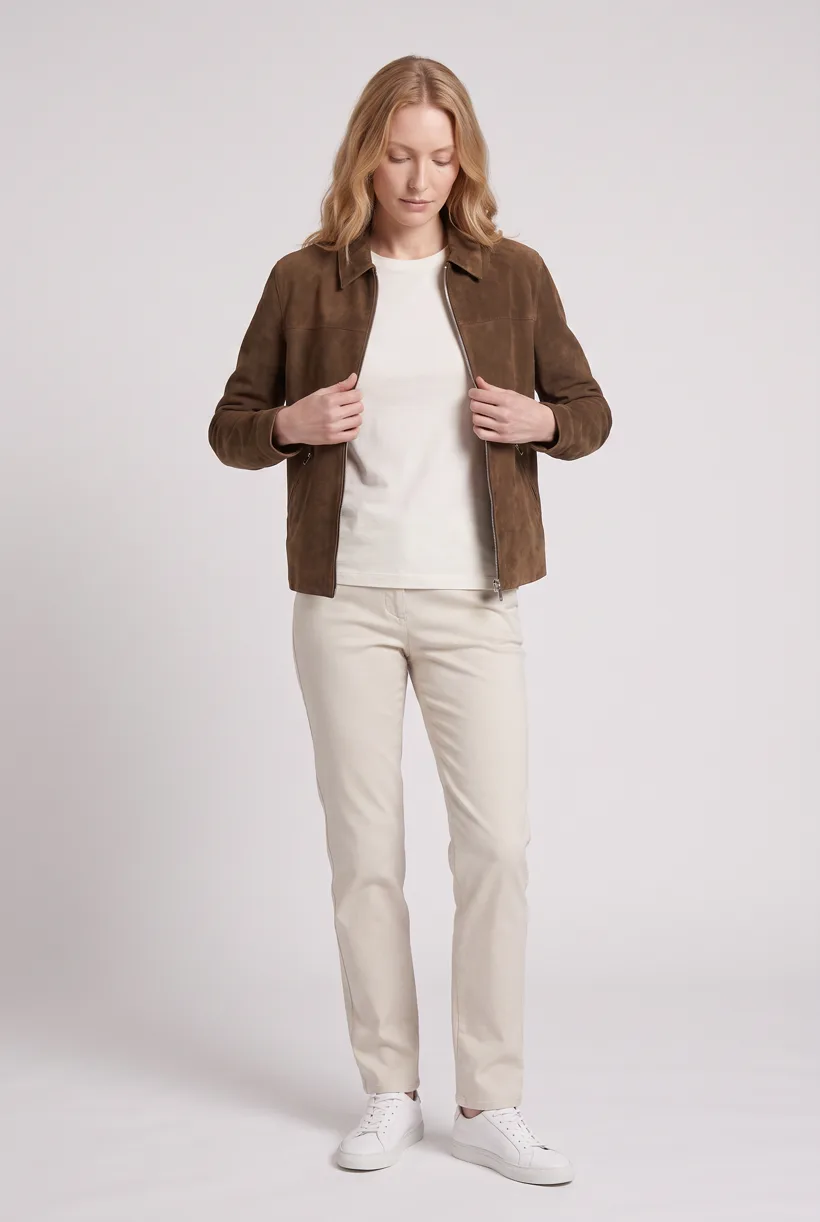
Generate the front hero
One full-body front photo of the garment on the template model, in the Basic white photoshoot art direction on the Pure White studio location.
Edit to the upper-body crop
A camera edit that reframes the front result to an upper-body front frame instead of generating a new image, so the crop comes from the same session as the hero.
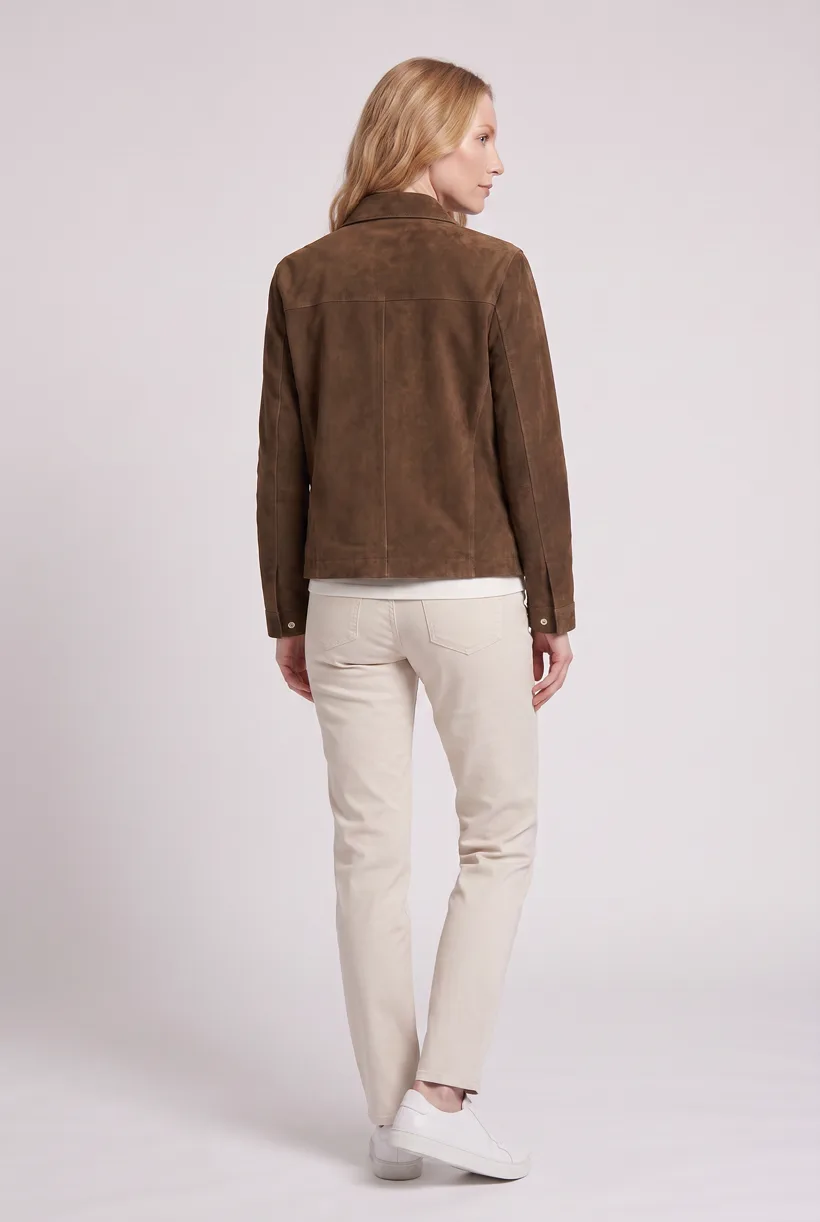
Edit to the back view
A second camera edit of the front result to a full-body back frame, so the product page gets the back of the garment from the same session.
Render the 360 turn
A 5-second Kling 3 Pro video from the front photo: the model turns a slow, full 360 degrees in place, garment readable throughout.
Outputs per garment
- Full-body front photo, 2K, 2:3
- Upper-body front photo, 2K, 2:3
- Full-body back photo, 2K, 2:3
- 5-second 360-degree video
The setup the template pins
- Template kind
- Batch workflow: runs once per garment row
- System key
- demo_full_pdp_test_white_studio
- Art direction
- Basic white photoshoot (system art direction)
- Location
- Pure White (system studio location)
- Model
- The Uwear system model by default; the assistant can swap in one of your saved models when it proposes the brief
- Image model
- nano-banana-pro, 2K, 2:3
- Video model
- Kling 3 Pro, 5 seconds
- QA
- Optional. With the AI reviewer on, each result is checked against the source product photo and flagged results are retried
- Approval
- The assistant shows a costed brief in credits before anything generates
Pure automation
Run it without an assistant
Run asynchronous generation
Use REST jobs with polling or webhook callbacks. Production Automation can instead start from garment-processed, tag-added or outfit-created events, with published versions, idempotent runs and upfront credit reservation.[13]
Tools that target this operator
Documented features from the linked sources. These are not independent quality tests.
Photoroom
Its Palm Angels case documents a luxury/streetwear PDP project. A fit for teams seeking a named capsule example; the reported delivery time is specific to that case.[4]
Rawshot
Markets luxury imagery and creative controls. A fit for evaluating model and detail adjustment tools; the cited page’s claims are vendor descriptions, not tested results.[9]
Browzwear / Lalaland
Shows digital garments on generated avatars through VStitcher. A fit for teams already working with 3D garments, a different input path from product photos.[12]
Frequently asked questions
Yes. Connect Uwear MCP to a supported assistant, supply actual garment photos, and request a costed Product page set proposal. Approve the brief before generation. Uwear returns result URLs; delivery to your catalog needs your own tools and permissions.[13]
Start with a small PDP pilot and supplied detail views. The AI reviewer compares results with those photos and retries flagged results when on. Your brand team decides whether the outputs meet its publishing standard; no fidelity or approval rate is promised.[13]
Reuse saved art direction for the product pilot. Instagram drop is a separate option for three lifestyle photos and a clip per garment after you approve the direction. It is not an unrestricted bespoke campaign service.[13]
Uwear uses credits at $0.10 per credit; see /models for model rates. The assistant shows a costed brief before generation. QA is automatic and toggleable: when on, an AI reviewer compares results with source photos and retries flagged results.[13]
Yes. Studio is the manual path: select the garment photos and generation setup, then download the results. Your team checks destination rules and uploads the files with its own catalog tools.[13]
Research
Sources and access dates
- [1]2025/26 product/category and distribution strategy
Accessed 2026-09-07
- [2]Manufacturing scale and selected wholesale/owned distribution
Accessed 2026-09-07
- [3]Louis Vuitton as fashion/leather-goods house
Accessed 2026-09-07
- [4]Vendor-reported capsule workflow, elapsed launch time and adoption questions
Accessed 2026-09-07
- [5]Creative production services, ecommerce and AI
Accessed 2026-09-07
- [7]Designer-brand partner image minimum and policy
Accessed 2026-09-07
- [8]Product image naming, formats and shared-folder intake, guide page 7
Accessed 2026-09-07
- [9]
- [12]VStitcher/Lalaland integration and pricing contact route
Accessed 2026-09-07
- [13]
Next step
Connect your catalog to Uwear.
Start with an assistant-led test, then build the API delivery your catalog needs.