Integration · Amazon
Generate white-background on-model listing images for Amazon
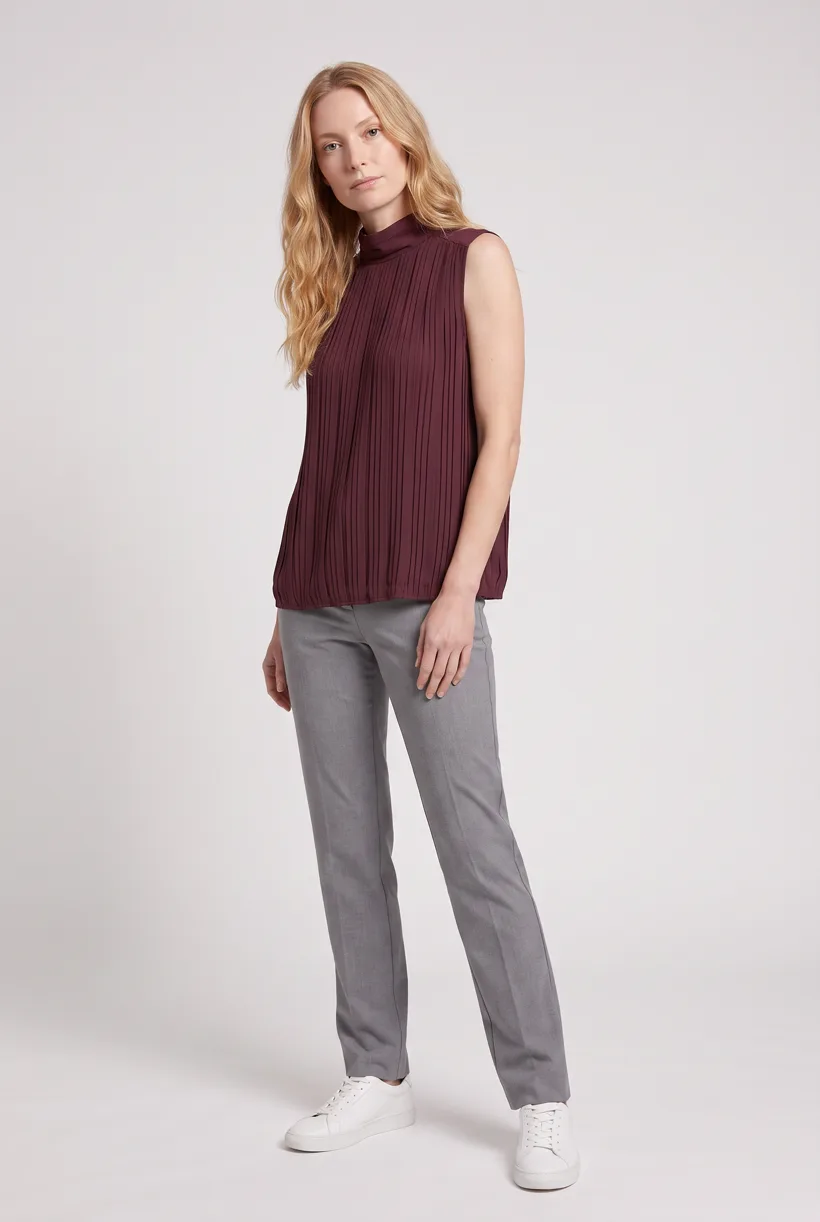
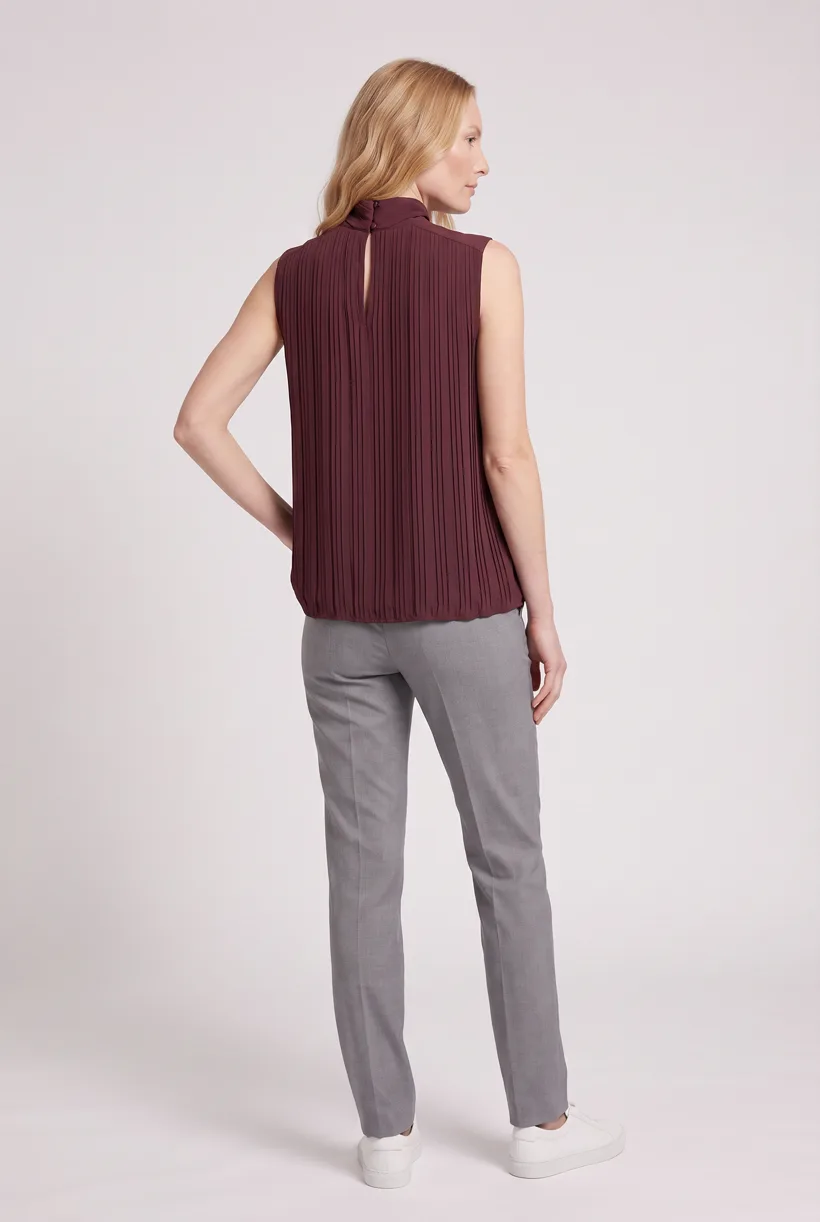
Generate a Product page set with your assistant. Prepare the crop and disclosure metadata, then use a seller-authorized SP-API adapter for image delivery.
Use cases
What can you build?
Generate listing views for selected SKUs
Build try-on on your own site
Assistant workflow
How do you run this from your assistant?
Proposed integration, not a preinstalled connection. Use an assistant with Uwear MCP plus an authorized SP-API tool adapter. Seller Assistant has no verified external handoff to Uwear.[2][3][4][6][9]
Seller Assistant
Supports signed-in seller tasks. No public external tool contract or arbitrary listing-image upload command was verified; do not assume it calls Uwear MCP.[2][3][4][6][9]
Available inside Seller Central. No Amazon-published seller-catalog/image-mutation MCP was found in the reviewed sources.[2][3][4][6][9]
Amazon Ads MCP Server
Approve the Product page set brief
Load Product page set on its Pure White studio at 2:3 with the AI reviewer on. Review the costed brief in credits before generating. QA is automatic and toggleable: when on, an AI reviewer compares results with source photos and retries flagged results.
Prepare the marketplace files and disclosure
Product page set uses Pure White at 2:3. Pad or crop to the marketplace ratio, check category suitability and convert the format. Then apply and verify contains-synthetic-performer in dc:subject (XMP) for photorealistic AI-generated people before upload.[24][25][31]
Run it from your assistant
Run this photoshoot from your AI assistant with a Uwear template.
Connect the Uwear MCP server to ChatGPT, Claude, or Codex and ask for the Product page set template. It is a batch workflow that runs once per garment: front, upper-body, and back product-page shots on a white studio background, plus a 360-degree video, from one garment photo. Any Uwear account can load it by name, and the assistant shows a costed brief in credits before generation starts.
Copy this prompt into your assistant
Connect the Uwear MCP server and a seller-authorized SP-API tool adapter in this session; Seller Assistant has no verified external Uwear handoff. Read my listings and catalog photos, resolve product-type schemas, and keep seller ID, SKU, ASIN, child relationships and marketplace. Load "Product page set" on its Pure White studio setup at 2:3, turn the AI reviewer on, and show me the costed brief in credits before generating. After I approve, pad or crop to the marketplace ratio, check category rules, convert the format and apply the contains-synthetic-performer tag in dc:subject (XMP) for photorealistic AI-generated people before upload. Preview and approve the slot changes, then PATCH /listings/2021-08-01/items/{sellerId}/{sku} with top-level image locator attributes and public media_location URLs. Poll listing issues, wait for readiness and verify catalog and storefront display before reporting.
What one run does, per garment
Generate the front hero
One full-body front photo of the garment on the template model, in the Basic white photoshoot art direction on the Pure White studio location.
Edit to the upper-body crop
A camera edit that reframes the front result to an upper-body front frame instead of generating a new image, so the crop comes from the same session as the hero.
Edit to the back view
A second camera edit of the front result to a full-body back frame, so the product page gets the back of the garment from the same session.
Render the 360 turn
A 5-second Kling 3 Pro video from the front photo: the model turns a slow, full 360 degrees in place, garment readable throughout.
Outputs per garment
- Full-body front photo, 2K, 2:3
- Upper-body front photo, 2K, 2:3
- Full-body back photo, 2K, 2:3
- 5-second 360-degree video
The setup the template pins
- Template kind
- Batch workflow: runs once per garment row
- System key
- demo_full_pdp_test_white_studio
- Art direction
- Basic white photoshoot (system art direction)
- Location
- Pure White (system studio location)
- Model
- The Uwear system model by default; the assistant can swap in one of your saved models when it proposes the brief
- Image model
- nano-banana-pro, 2K, 2:3
- Video model
- Kling 3 Pro, 5 seconds
- QA
- Optional. With the AI reviewer on, each result is checked against the source product photo and flagged results are retried
- Approval
- The assistant shows a costed brief in credits before anything generates
Pure automation
How does API delivery work?
Use PATCH /listings/2021-08-01/items/{sellerId}/{sku} with the marketplace and productType schema. Replace a top-level image attribute: main_product_image_locator, other_product_image_locator_{1-8} or swatch_product_image_locator. Its value contains a public media_location URL and marketplace_id. Amazon downloads the file; supported slots vary by product type and marketplace.[11][12][13]
Run generation without an assistant
Submit Uwear REST API jobs and receive completion webhooks or poll. A published Production Automation can also start when a garment is processed, a tag is added or an outfit is created. These are Uwear workspace triggers; platform delivery still needs an adapter.
Platform requirements
What image specifications apply?
| Specification | Requirement or guidance |
|---|---|
| Main-image background | “MAIN images must have a pure white background”. The Spring 2021 informational apparel guide specifies RGB 255 and HEX #FFFFFF; this is not the full current policy.[25] |
| Product in the frame | “The product must fill at least 85% of the image.” Amazon staff guidance; confirm the current category requirements.[29] |
| General pixel range | “500 to 10,000 pixels on their longest side”. This public FAQ range is general, not an apparel-specific recommendation.[24] |
| File formats | “In JPEG, TIFF, PNG, or non-animated GIF file formats”. The public FAQ does not list WebP; convert the final delivery files.[24] |
| Apparel image height | “At least 1,600 pixels in height”. This is Spring 2021 apparel guidance, distinct from the general longest-side range.[25] |
| Synthetic-person metadata | For photorealistic AI-generated people in listing and A+ media worldwide, the public notice requires contains-synthetic-performer in dc:subject (XMP), added with an IPTC-compatible editor before upload. Amazon applies a customer indicator where applicable.[31] |
| Policy scope | Authenticated policy bodies were not read. Public notices and the Spring 2021 apparel guide are partial evidence; older UK and India regional guides are not current worldwide policy. Check the seller’s current category rules.[34] |
Existing options
Which AI image tools are already available?
Documented features from the linked sources. These are not independent quality tests.
Amazon A+ Content Manager, gen AI features
A fit for native text and lifestyle imagery in eligible A+ modules. This does not establish direct gallery generation or a reusable fashion-avatar system. No separate generation price was verified.[32]
Amazon Ads creative tools / AI creative studio
A fit for native advertising creative. The cited tools page says the solutions are currently free to use; listing-gallery submission is a separate workflow. No install or review count was verified.[35]
Ecomtent
A fit for generated lifestyle images, infographics, A+ and copy with vendor-documented Amazon Seller 3P/Vendor 1P publishing. Its plan selectors show different monthly amounts; verify the billing selection and allowance before quoting a price. Reviews were not verified.[36]
Photoroom
A fit for batch editing, Product Staging and AI Fashion Models. Its Amazon guide describes export and upload to Seller Central, not a verified native listing-write plugin.[38]
Frequently asked questions
For photorealistic AI-generated people in listing and A+ media worldwide, Amazon’s public notice requires contains-synthetic-performer in dc:subject (XMP), added with an IPTC-compatible editor before upload. Amazon applies a customer indicator where applicable. The authenticated tagging guide was not read; this is not the full current policy.[31][33]
It produces Pure White studio photos at 2:3. The seller must pad or crop to the marketplace ratio, convert the format, apply the synthetic-person tag and check current category eligibility. Spring 2021 and older regional guides are not blanket approval for every garment or synthetic main image.[24][25][28][31][34]
Uwear uses credits at $0.10 per credit; model rates are on /models. The assistant shows a costed brief before generation. QA is automatic and toggleable: when on, an AI reviewer compares results with source photos and retries flagged results.
Research
Sources and access dates
- [2]current Seller Assistant description and active usage
Accessed 2026-09-07
- [3]Amazon Seller Assistant actions and Seller Central entry point
Accessed 2026-09-07
- [4]official Ads MCP open beta and Ads Agent scope
Accessed 2026-09-07
- [6]documentation-only tools, preview status, authentication
Accessed 2026-09-07
- [9]official SP-API documentation and agent-readable index
Accessed 2026-09-07
- [10]
- [11]
- [12]PATCH endpoint, top-level restriction, validation preview, response handling
Accessed 2026-09-07
- [13]product-type schema lookup
Accessed 2026-09-07
- [14]seller listing search, variation filters, pagination
Accessed 2026-09-07
- [15]seller listing detail and issues retrieval
Accessed 2026-09-07
- [16]catalog images, product types, relationships
Accessed 2026-09-07
- [17]JSON feed staging, submission, polling, processing report, one-store scope
Accessed 2026-09-07
- [19]A+ image objects, altText, module-specific constraints
Accessed 2026-09-07
- [21]create A+ document endpoint
Accessed 2026-09-07
- [24]public general image dimension range and formats
Accessed 2026-09-07
- [25]
- [28]
- [29]
- [30]
- [31]
- [32]Amazon AI listing/A+ capabilities and seller accuracy responsibility
Accessed 2026-09-07
- [33]detailed AI-person tagging help target; sign-in redirect, body not accessed
Accessed 2026-09-07
- [34]canonical product image help target; JavaScript shell, body not accessed
Accessed 2026-09-07
- [35]native creative-generation tools and free-use statement
Accessed 2026-09-07
- [36]
- [38]publisher's Amazon on-model/staging and export-to-Seller-Central workflow
Accessed 2026-09-07
Next step
Connect your catalog to Uwear.
Start with an assistant-led test, then build the API delivery your catalog needs.