Best Image Size and Format for AI Fashion Generation
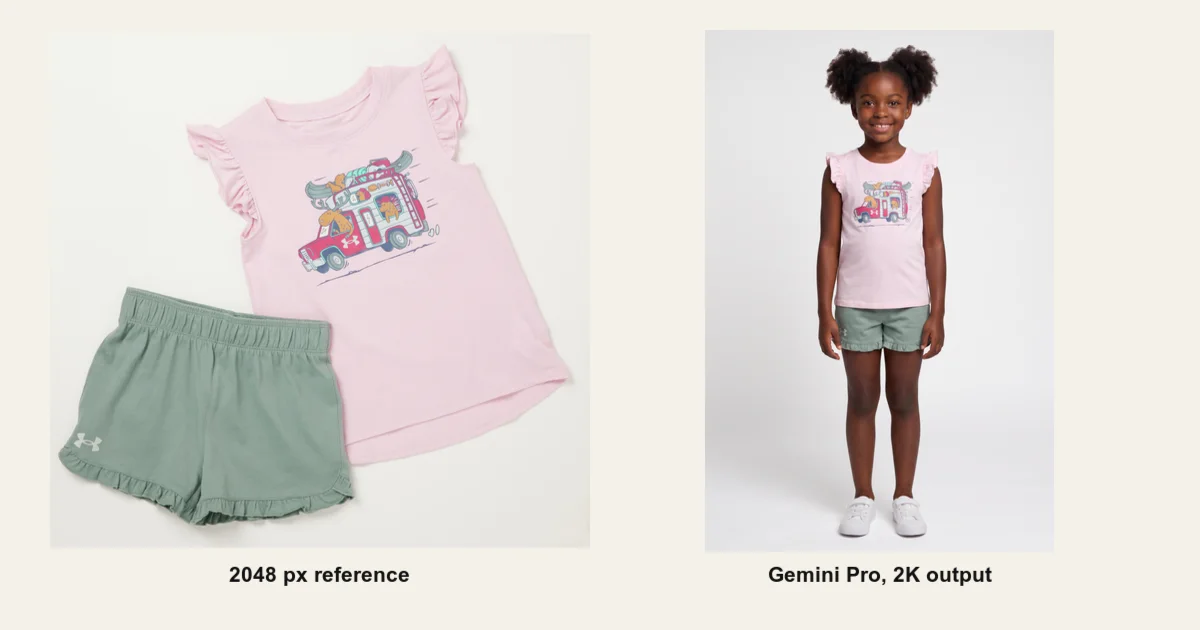
What size should a clothing reference image be before you send it to an AI image generator? Should you upload PNG, JPEG, or WebP? Does a 12 MB file preserve more garment detail than a 3 MB file with the same pixels?
We could not find a practical answer for fashion production, so we ran the test. Uwear generated 60 full-body fashion images from one detail-heavy kids set. We varied the reference dimensions from 256 to 4936 pixels, compared three lossless encodings, and pushed JPEG compression from quality 85 down to quality 10.
The short answer: use a 2048 pixel long edge for a detailed fashion reference. Treat 1024 pixels as the practical minimum. Above 2048 pixels, this test found no useful gain. For opaque photos, a high-quality JPEG is usually practical. Keep PNG or lossless WebP for transparency and small details that must remain exact.
Our Reference Image Recommendation
| Decision | Recommendation | Why |
|---|---|---|
| Default size | 2048 px long edge | Safe detail level with no observed gain above it |
| Minimum size | 1024 px long edge | Usable, but model choice and small graphics matter more |
| Opaque product photo | High-quality JPEG, around quality 90 | A practical balance of fidelity and transfer size |
| Transparency or exact detail | Lossless WebP or optimized PNG | Preserves alpha, line art, small text, and exact pixels |
| Avoid | Huge unoptimized files and heavy JPEG compression | More transfer risk without a proven generation benefit |
Why This Product Made a Useful Test
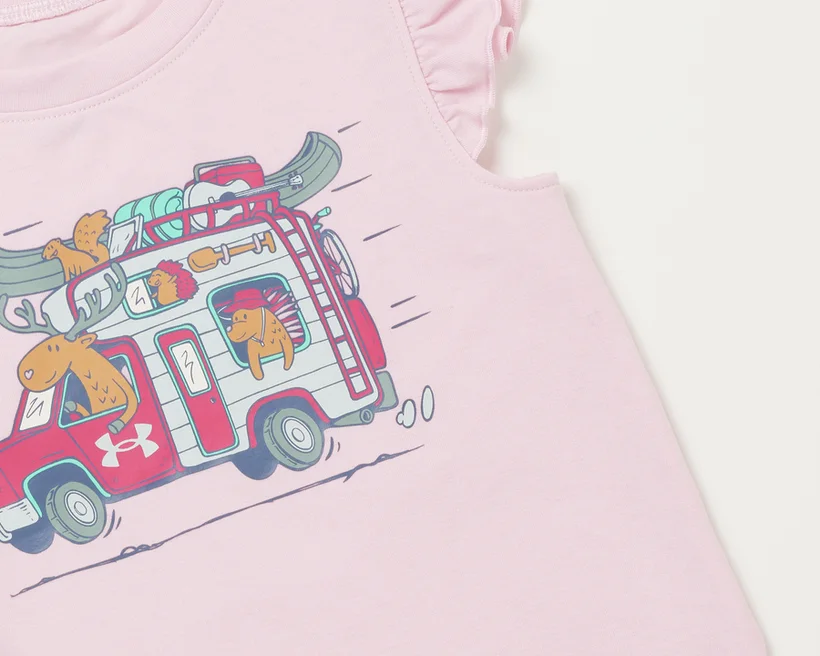
A plain blazer would have hidden the failure point. We chose a pink kids top and green shorts with a dense illustrated vehicle on the chest. The print contains animals, luggage, roof objects, windows, wheels, thin outlines, and small marks. A model can reconstruct the broad idea of a red vehicle while still changing the actual product.
How We Tested Image Size, Format, and Compression
We prepared every input from the same original product image. The generation prompt, child avatar, full-body camera, white studio setting, aspect ratio, reference order, and model settings stayed fixed within each model series.
Resolution series
JPEG quality 98 references at 4936, 2048, 1024, 768, 512, and 256 pixel long edges.
Lossless series
Pixel-identical 2048 pixel inputs encoded as PNG compression 0, PNG compression 9, and lossless WebP.
JPEG series
2048 pixel inputs at quality 85 with 4:4:4 and 4:2:0 chroma, then quality 70, 50, 30, and 10 with 4:2:0 chroma.
Generation matrix
15 inputs across four Uwear models, for 60 generations and 225 credits. Every provider attempt completed successfully.
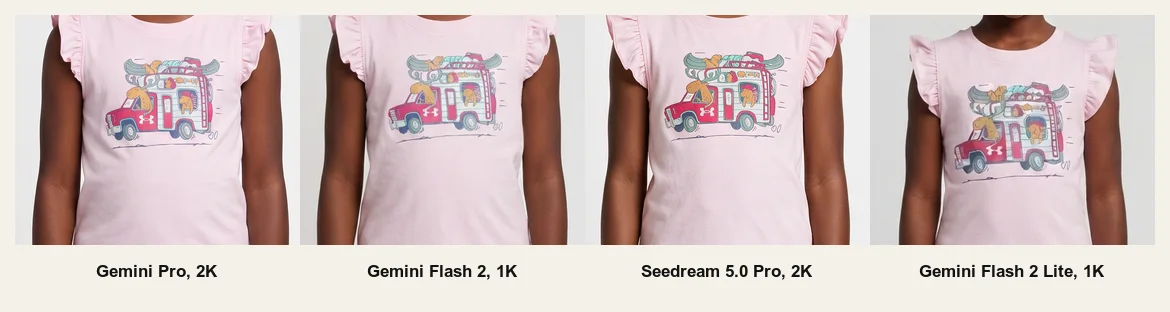
We tested Gemini Pro at 2K, Gemini Flash 2 at 1K, Seedream 5.0 Pro at 2K, and Gemini Flash 2 Lite at 1K. These are the current display names in the Uwear model catalog. Each condition received one generation, so this is a controlled case study rather than a statistical estimate of model randomness.
Result 1: 2048 Pixels Was the Useful Plateau
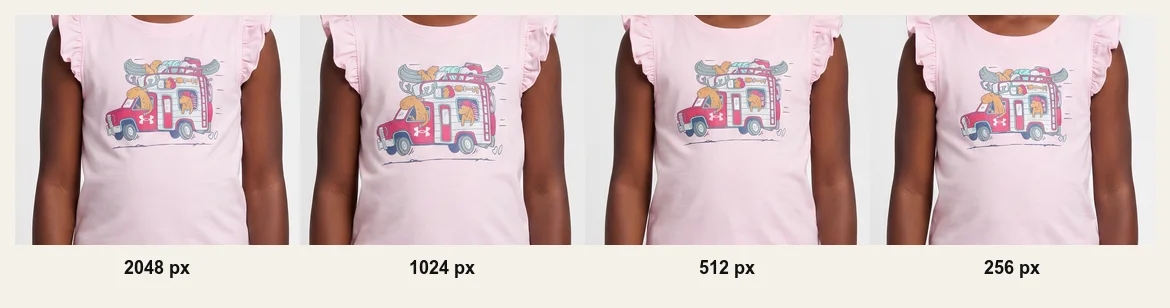
The 4936 pixel reference was 10.89 MB. The 2048 pixel version was 1.58 MB. Reviewers found no useful quality improvement from the much larger input on Gemini Pro, Gemini Flash 2, or Seedream 5.0 Pro. The result was unclear on Gemini Flash 2 Lite because its 1K output did not preserve the print well at any input size.
At the other end, 1024 pixels remained a practical input. Gemini Pro kept the garment acceptable through 768 pixels in this run, but visible losses became clear at 512 pixels and the 256 pixel reference was not usable. Seedream 5.0 Pro showed detail loss earlier, at 1024 pixels. That model difference is why 1024 is a minimum, not the ideal default.
Result 2: Encoded Byte Size Did Not Predict Quality
The clearest way to separate file size from image content was the lossless comparison. PNG compression 0 produced an 11.96 MB file. PNG compression 9 reduced it to 4.53 MB. Lossless WebP reduced it to 3.21 MB. All three used the same 2048 by 1945 source pixels, and the review found no consistent visual winner.
This does not prove that byte size never matters. A transport can still reject a large request, and a lossy codec can remove real information. It shows something narrower and more useful: sending nearly four times as many lossless bytes did not improve the generated garment in this test.
Google's WebP specification describes lossless WebP as restoring pixel values exactly. That is why a smaller lossless encoding can represent the same visible source as a larger PNG. See the official WebP lossless bitstream specification.
Result 3: JPEG Was More Resilient Than Expected
The models often reconstructed the broad illustration even when the reference showed visible JPEG damage. Gemini Pro did not show a clear loss until the quality 30 arm, and its quality 10 result was visibly different at normal size. Seedream 5.0 Pro held the concept longer but sometimes interpreted compression artifacts as garment features.
The exact cutoff was not stable across models. The two 1K output models were already weak on the small print, which made it difficult to separate input compression from output resolution and ordinary generation variation. We therefore do not recommend a universal JPEG quality threshold from these four runs.
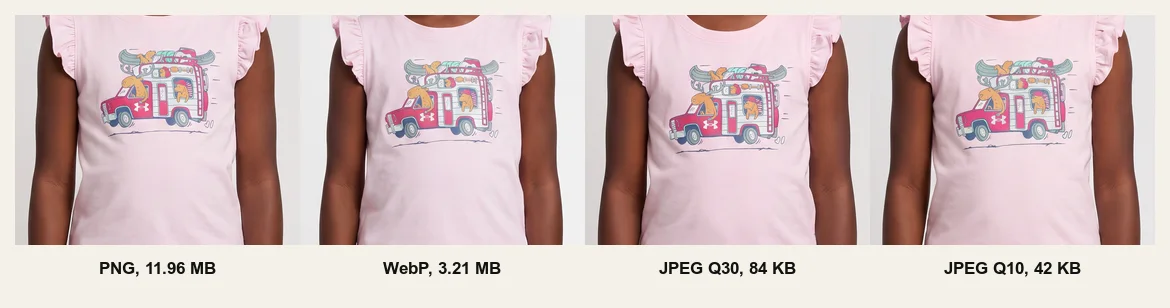
For production, use a high-quality JPEG near quality 90 when the reference is an opaque photograph. Keep a lossless format when the exact small details are the product. Do not silently convert a transparent cutout to JPEG because JPEG does not preserve alpha.
Result 4: Model and Output Resolution Mattered More Than Format
At the 2048 pixel reference baseline, the reviewer ranked Gemini Pro first, Seedream 5.0 Pro second, Gemini Flash 2 third, and Gemini Flash 2 Lite fourth. The difference was most visible when zooming into the illustration.
Gemini Pro and Seedream both produced 2K outputs in this matrix. Gemini Flash 2 and Gemini Flash 2 Lite produced 1K outputs. The lower output resolution limited how much print detail could appear even when the reference itself was large. A better source cannot force a low-resolution output to contain detail it has no room to render.
What Public Model Documentation Can and Cannot Explain
Proprietary image-generation providers do not fully document every resize, crop, tile, color conversion, or recompression step used before generation. We cannot prove from the outputs that any tested provider resized a specific reference internally.
Public Gemini image-understanding documentation does show why source pixels should not be treated as a direct map to model vision. Google documents tiling larger images into 768 by 768 pixel units and allocating a limited media-token budget. The same guide lists PNG, JPEG, and WebP as supported inputs and sets a 20 MB total limit for inline request data. Those details apply to the documented Gemini API path, not necessarily to every image-edit provider route used by Uwear.
Reliability: What 60 Successful Attempts Tell Us
All 60 controlled generations completed. The accepted references included a 4936 by 4687 JPEG at 10.89 MB and a 2048 by 1945 uncompressed PNG at 11.96 MB. PNG, JPEG, and lossless WebP all passed through the tested Uwear routes.
This test began after a separate 5400 by 5400, roughly 42 MB PNG passed Uwear intake but later failed during provider-side image processing. We did not reproduce that failure here, so the experiment does not establish a rejection threshold. The defensible claim is that every tested input up to 11.96 MB succeeded, not that every larger file will.
Limits of This Benchmark
- We used one detail-heavy, opaque product reference.
- Each model and input combination received one generation.
- One reviewer scored the results at normal size and while zoomed.
- Different model tiers used different output resolutions.
- The resolution series changed dimensions and encoded bytes together.
- Provider-side preprocessing remains an inference unless the provider documents it.
A larger follow-up should add a transparent cutout, unpredictable microtext or a serial pattern, multiple reviewers, and repeated generations. That would let us measure output variance and test whether the same plateau holds beyond this product.
The Practical Rule for Fashion Brands
Start with the cleanest original you have, preserve its aspect ratio, and export a 2048 pixel long edge. Use high-quality JPEG for a normal opaque packshot. Use optimized PNG or lossless WebP for transparency, tiny exact graphics, labels, or line art. Do not make a file huge because it feels safer. In this benchmark, useful visual information mattered more than encoded megabytes.
When the product carries dense prints or exact small features, model choice still matters. Compare the current image models on the Uwear models page or run the same product through Uwear Studio before committing a full catalog.
Frequently Asked Questions
What is the best reference image size for AI image generation?
For detailed fashion products, start with a 2048 pixel long edge. In this test, 1024 pixels was a practical minimum, while increasing the reference from 2048 to 4936 pixels did not produce a useful improvement.
Is PNG or JPEG better for AI fashion image generation?
Use high-quality JPEG for clean, opaque product photos when smaller files are useful. Use PNG or lossless WebP when you need transparency or when tiny text, line art, logos, and exact print details must survive the upload.
Does a larger image file produce better AI images?
Not by itself. Three lossless 2048 pixel files in this test contained the same source pixels but ranged from 3.21 MB to 11.96 MB. Reviewers found no clear quality winner among them.
Do reference images larger than 2048 pixels improve AI generation?
They can help in a different model or with a different product, but they did not help in this benchmark. The 4936 pixel reference used almost seven times the encoded bytes of the 2048 pixel reference without a visible practical gain.
How much JPEG compression is safe for an AI reference image?
There was no universal cutoff across the four tested models. A JPEG quality setting near 90 is a safer production recommendation than the extreme compression levels in this benchmark. Avoid heavy compression around small graphics, text, thin outlines, and texture.
Will every AI image provider accept a large PNG?
No universal limit applies to every model and transport. All 60 controlled attempts in this test succeeded with references up to 4936 pixels and 11.96 MB, but the test did not reproduce the separate 42 MB production failure that motivated the research.