From 30 Clothes to 100 Photos, in One Conversation
You know exactly what your spring catalog should look like. The model, the vibe, the lighting. You could describe the whole shoot in two sentences.
The problem is that most AI product photography tools don't let you work that way. They hand you a dashboard full of menus, sliders, model selectors, and batch configuration panels. Every new feature adds another screen. The tools are powerful, but most people never get past the learning curve.
What if you could skip all of that and just describe the shoot you want?
Meet 
The last photographer you'll ever hire.
Moùza is an AI agent built into the Uwear platform. Instead of navigating an interface, you talk to her. Describe the shoot you need. Moùza handles clothing selection, model assignment, shooting set configuration, and generation.
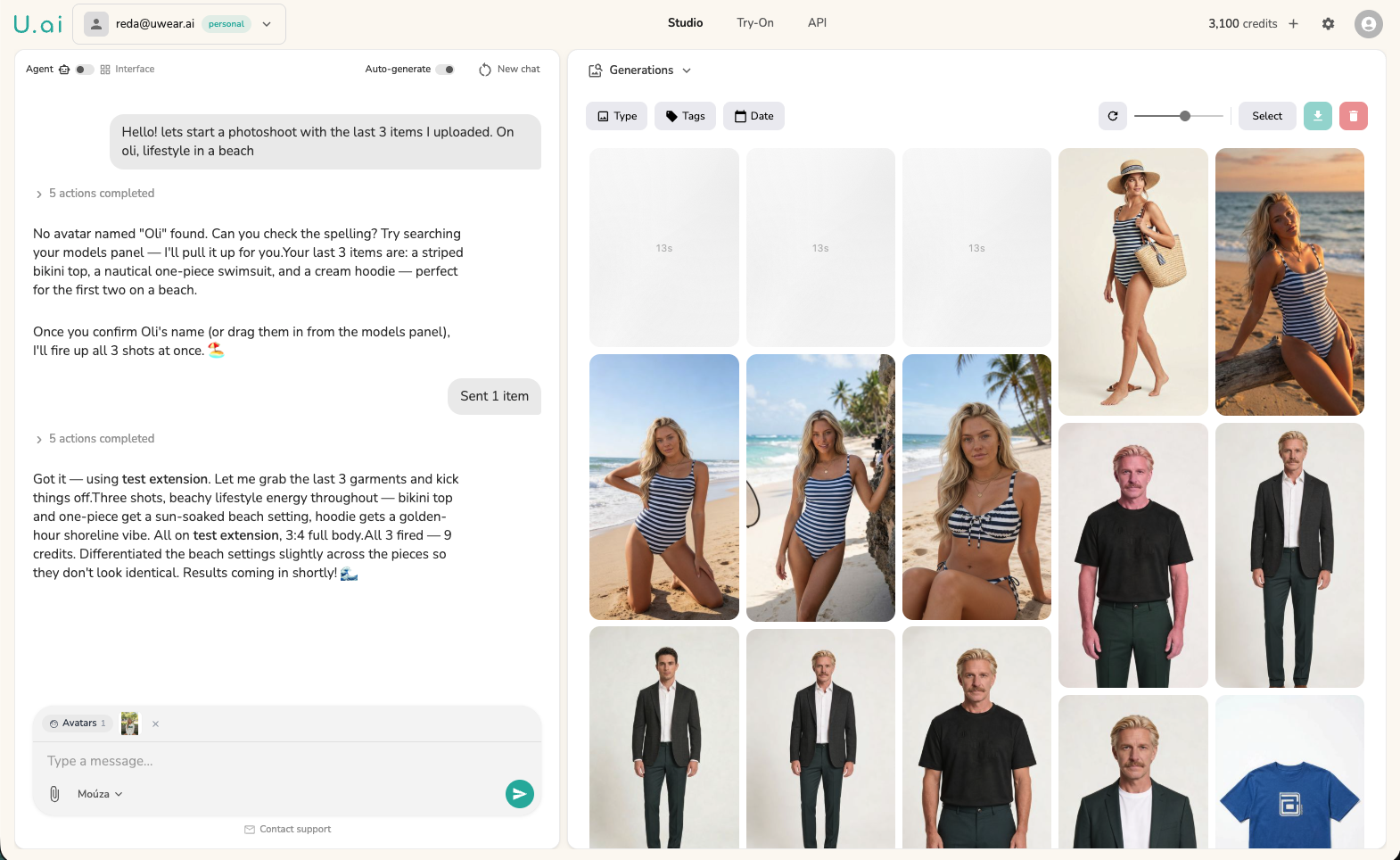
The interface is a two-panel layout. On the left, you chat with Moùza. On the right, a visual panel shows your generations, clothing library, and available models in real time. Moùza surfaces interactive elements inline: an avatar selector when you mention a model, a clothing picker when you reference your uploads, a generation proposal when you're ready to shoot.
Moùza in action: describe a photoshoot, review the brief, hit generate
You don't open a dropdown to pick a model. You say "I want someone tall, dark-skinned, editorial feel" and Moùza surfaces the right options from your library. You don't configure a shooting set. You say "late afternoon, warm light, something that works for Instagram" and Moùza translates that into generation parameters. When you're ready, she queues the entire batch and runs it.
One conversation. Hundreds of photos.
Drop 30 clothing items into the chat and tell Moùza what you need. She builds a structured photoshoot brief: which items go on which models, how many shots per piece, what the shooting set looks like for each group. You review the brief, adjust anything you want, and hit generate.
Moùza then queues the entire batch. Not 2 or 3 images at a time. The full run: 30 items, 3 shots each, 90 generations, organized by item, ready to download when they're done.
A single conversation can cover your entire seasonal catalog. No spreadsheets, no CSV uploads, no manual batching.
Drop your items, describe the shoot, and Moùza builds the full batch
This is the gap between Moùza and generic AI image tools. ChatGPT generates a few images per prompt. Moùza orchestrates an entire production pipeline: clothing assignment, model selection, set design, and batch execution, all from one thread.
AI that styles outfits, not just generates images
Most AI tools generate exactly what you tell them. One garment, one model, one output. Moùza goes further. She makes creative decisions.
Drop your full collection and ask for a lookbook shoot. Moùza analyzes the pieces and builds styled outfits that work together: pairing the linen blazer with the wide-leg trousers, matching the silk top to the midi skirt, grouping complementary colors for cohesive editorial sets.
She's thinking about what looks good together, not just rendering garments one at a time. The result is a lookbook that feels curated, not auto-generated.
Moùza pairs pieces into styled outfits that work together
One ask. Every angle.
Tell Moùza you want "the photoshoot template" on any garment. She produces a fullbody hero shot, three angle edits (front, side, back), and a 360-degree video. Multiple output types from a single message.
In the studio interface, this workflow takes five separate steps: select clothing, pick a model, generate the fullbody shot, run angle edits, create the video. Each step is a different screen with different settings.
With Moùza, it's one sentence. She chains the generation steps automatically, passing the output of each step into the next. You get the complete asset set without touching a single configuration panel.
One garment in, full asset set out: hero shot, angle edits, and 360 video
Why not just use ChatGPT?
You could ask a generic AI to generate fashion photos. Here's what you'd be working without:
| Generic AI | Moùza | |
|---|---|---|
| Fashion domain knowledge | Generic image generation | Trained on fashion workflows, understands pose conventions, fabric behavior, editorial vs. catalog framing |
| Brand memory | Starts from scratch every session | Remembers your models, preferred styles, past shoots, and catalog structure |
| Connected to your catalog | No access to your products | Reads your uploaded clothing, model library, and generation history |
| Generation scale | 2-4 images per prompt | Hundreds per conversation, batched and organized |
| Output types | Single images | Fullbody, angle edits, 360 video, styled lookbooks |
| Multi-step workflows | Manual, one step at a time | Chains generation, editing, upscaling, and video automatically |
Generic tools don't know the difference between a lookbook shot and a product detail shot. They can't reference your existing model library or chain multiple generation steps together. Moùza does all of this because she's connected to everything in your Uwear workspace.
Two ways to work
Moùza doesn't replace the studio interface. Both modes coexist, and they share the same models, clothing library, and generation history.
Interface Mode
The full studio dashboard. Every parameter exposed: model selection, pose, lighting, background, generation settings. Built for teams with established workflows who want granular control over every shot.
Best for: power users, complex multi-variable shoots, fine-tuning individual images.
Agent Mode
NewMoùza. Describe the shoot you need in plain language. She handles model selection, styling, batch setup, and generation. Same capabilities as the studio, zero configuration.
Best for: full catalog shoots, styled lookbooks, anyone who knows what they want but doesn't want to configure how to get it.
Start a shoot in Agent Mode, then switch to Interface Mode to fine-tune a specific image. Or use Agent Mode for the bulk of your catalog and the studio for the hero shots that need extra attention. They're not competing; they're complementary.
Describe the shoot. Get the photos.
Upload your clothing, tell Moùza what you need, and watch your catalog come together. No menus, no presets, no learning curve.
Try Agent ModeCredits never expire