AI Clothing Generator: How to Create Professional On-Model Photos
What is an AI Clothing Generator?
An AI clothing generator takes a flat-lay or mannequin photo of a garment and produces a professional on-model photo using artificial intelligence. Upload your product, select an AI model, and get catalog-ready images in minutes: no studio, no model booking, no photographer.
- Upload a flat-lay photo of any garment
- Choose from a diverse library of AI models or create your own
- Generate full-body shots, close-ups, and back angles
- Scale to thousands of products with batch generation via CSV
Search "ai clothing generator" and you'll find three very different categories of tool. Consumer apps that let shoppers swap outfits on a selfie. Virtual try-on solutions that brands install on their stores so customers can see themselves in products before buying. And professional photoshoot platforms that generate thousands of catalog photos from flat-lays, without a single studio booking.
If you're a brand, an e-commerce manager, or a creative director, each of these tools solves a different problem. Using the wrong one means wasting money and producing photos your catalog can't use. This guide explains the three categories, when each makes sense, and how professional AI clothing generation actually works, with dedicated guides for every major garment type below.
For the Uwear product workflow, start with the AI fashion model generator. This guide explains the broader AI clothing generator category and the tradeoffs between consumer clothes changers, virtual try-on, and catalog production tools.
AI Clothing Generators by Garment Type
Every garment category has its own quirks: content-policy limits for lingerie and swimwear, white fabric challenges for wedding dresses, layering complexity for full outfits. The use cases and guides below cover each one: which AI models render the category, how the product photo is prepared, and how a saved art direction keeps a range consistent.
Lingerie photoshoots
Bras, sets, and bodysuits. How lace, straps and fit carry from the product photo, which models render delicate constructions, and how one saved direction keeps a range on-brand.
Swimwear photoshoots
Bikinis and one-pieces. One coastal art direction per collection, straps and prints from the product photo, and the whole drop delivered as a batch before the season starts.
AI Dress Generator
Casual, formal, wedding, and prom dresses. Includes white fabric tips, Gemini Pro recommendations for dresses, multiple camera angles, and wedding collection batching.
AI Costume Generator
Halloween, theatrical, and specialty costumes. Covers complex garment construction, detail preservation, and producing on-model photos for costume e-commerce catalogs.
Not sure which guide to start with? The lingerie guide and the product photography guide cover the broadest range of techniques. Most generation principles apply across all garment types: the differences are mostly in AI model selection and content settings.
What Is AI Clothing Generation? (Three Categories, One Name)
"AI clothing generator" describes three distinct categories of tool that happen to share a name:
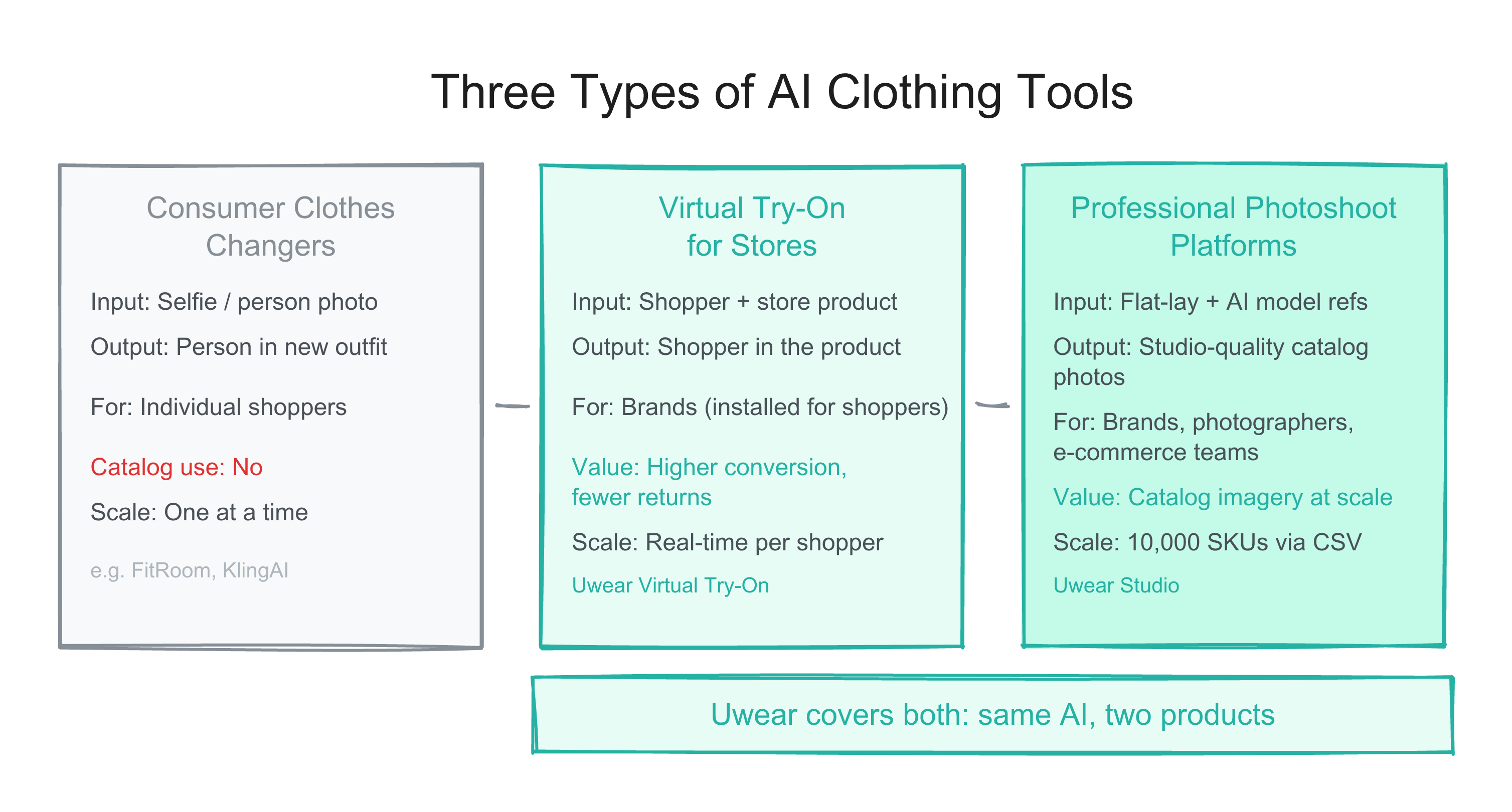
Consumer Clothes Changers
Apps like FitRoom, KlingAI, and BitstudioAI let shoppers upload a selfie and "try on" garments virtually. The input is a person photo. The output is that person wearing different clothes.
Who it's for: Individual shoppers exploring outfit ideas and managing their wardrobe.
Virtual Try-On for Stores
Solutions that brands install directly on their e-commerce store. Shoppers click a "Try On" button on any product page to see themselves wearing the item, for free, with no app download required. Uwear's Virtual Try-On is built for this.
Who it's for: Brands that want to boost conversion and reduce returns by letting shoppers visualize fit before buying.
Professional Photoshoot Platforms
Platforms like Uwear Studio take your flat-lay or packshot and generate studio-quality on-model photography. You can also upload and create your own AI fashion models. The UX is optimized for large-scale catalog production, but the underlying principle is the same: give the AI reference inputs and it generates realistic imagery.
Who it's for: Brands generating product images at scale for e-commerce catalogs.
The key distinction: Consumer tools let individuals visualize outfits. Virtual try-on lets brands offer that same experience on their store. Photoshoot platforms generate the catalog imagery itself. All three use AI to put clothes on models, but they serve different stages of the fashion workflow.
How the Three Categories Compare
The surface-level output looks similar: a person wearing a garment. But each category optimizes for a different outcome and a different user.
| Criterion | Consumer Clothes Changers | Virtual Try-On for Stores | Professional Photoshoot Platforms |
|---|---|---|---|
| Primary input | Selfie or person photo | Shopper photo + product from the store | Flat-lay, mannequin, or packshot |
| What the AI preserves | The person | Both the person and the garment | The garment and/or the AI model (configurable) |
| Who triggers it | The shopper (standalone app) | The shopper (on the brand's store) | The brand's team |
| Output usable in catalog | No | No (personalized to each shopper) | Yes, designed for product pages |
| Batch processing | No (1 at a time) | N/A (real-time per shopper) | Yes, up to 10,000 SKUs via CSV |
| Model control | Limited (uses uploaded person) | Shopper is the model | Full (browse, select, or create AI models) |
| Brand value | None (third-party app) | Higher conversion, fewer returns | Catalog imagery at scale, lower production cost |
| Who uses it | Shoppers | Brands (installed for shoppers) | Brands, photographers, e-commerce teams |
Uwear covers the last two columns. Virtual Try-On installs on your store so shoppers can see themselves wearing your products. Uwear Studio generates the catalog photography itself. Both are built on the same underlying principle: give the AI reference inputs (garments, models, scenes) and it generates realistic imagery. The difference is the UX and who it's optimized for.
How Fashion Brands Use AI Clothing Generation for E-Commerce
The workflow differs from consumer tools in one important way: brands start with the product, not a person.
A typical e-commerce catalog workflow looks like this:
- 1
Photograph the garment
Flat-lays or packshots on a clean background. No model booking needed. Even a basic in-house flat-lay can work.
- 2
Upload to the platform
Upload individual items or batch upload via CSV for large catalogs. The platform parses your SKUs and queues them for generation.
- 3
Select your AI model and settings
Choose from a library of diverse AI models or create a custom model that fits your brand. Control camera angle, zoom, scene, and background.
- 4
Generate at scale
The AI generates studio-quality on-model photos for each garment. Batches of thousands run overnight; small orders take minutes.
- 5
Review and publish
Download and QA your results. Accepted images go directly into your product catalog. Regenerate any items that don't pass review.
The economics are meaningfully different from a traditional photoshoot. Studio time, model fees, and post-production for a 200-item catalog run $10,000 to $40,000. AI clothing generation replaces the bulk of that cost while maintaining the quality standard product pages require.
How Uwear Generates Professional AI Clothing Photos
Uwear's platform is built for exactly this B2B workflow. The technical approach behind it matters because it determines output quality.
Multi-model access in one platform
Uwear gives you access to multiple AI generation engines, including SeedDream, Gemini, and Drape, through a single interface. Different models perform differently on different garment types. Sheer fabrics, knitwear, and structured tailoring each have models that handle them better. You can switch engines without switching platforms.
Reference-driven generation
The generation pipeline works by combining references you provide: your garment (flat-lay or packshot), your chosen AI model (from the library or one you create), and scene settings like background and lighting. The AI preserves the details of each reference: fabric texture, color accuracy, model appearance, and composes them into a realistic photo. You can also upload your own AI fashion models to use across your catalog.
Batch generation for catalog scale
Upload up to 10,000 items per generation run via CSV. Real-time progress tracking via WebSocket lets you monitor batch jobs as they run. Results are organized by item, making QA and download straightforward even at high volume.
Team and API support
Team billing, shared company accounts, and API access are built in. Brands running large catalogs typically integrate Uwear into their existing PIM or DAM workflows rather than treating it as a standalone tool.
Which AI Clothing Tool Is Right for You?
The decision is straightforward once you know what you're trying to produce:
Use a professional photoshoot platform (Uwear Studio) if:
- You need on-model photos for product pages
- You have a catalog of 10 or more garments to photograph
- You need consistent model appearance across your catalog
- You want to control camera angle, scene, or background per SKU
- You need API access or batch processing at scale
Use a virtual try-on solution (Uwear Try-On) if:
- You want shoppers to see themselves in your products before buying
- You want to reduce return rates by helping shoppers visualize fit
- You need a widget that installs on your existing store with no app download for shoppers
Use a consumer clothes changer if:
- You want to try on clothing virtually as a shopper
- You're exploring personal outfit combinations
- You don't need output usable in a commercial product catalog
Many brands need both: a photoshoot platform for generating catalog imagery and a try-on solution for their storefront. Uwear covers both with the same underlying AI, packaged in two products optimized for different workflows.
Frequently Asked Questions
What is an AI clothing generator?
An AI clothing generator uses machine learning to create images of garments being worn. Consumer versions take a selfie and swap outfits. Professional versions take a flat-lay of your product and generate catalog-quality on-model photos. The term covers both categories.
Is there a pay-as-you-go AI clothing generator?
Uwear uses transparent credit-based pricing, so you can buy credits when you are ready to generate on-model photos. It is not an unlimited no-sign-up clothing generator: production generations use credits because they run specialized image models. Consumer apps like KlingAI may offer low-commitment entry paths, but their outputs are not designed for product catalog use.
Can AI generate models wearing my actual clothes?
Yes, with a professional catalog generator. You upload a flat-lay or packshot of your garment, and the AI generates a realistic AI model wearing exactly that item, preserving your garment's specific details. Consumer apps do the opposite: they start with a person and overlay a generic version of a garment.
How many products can I process at once?
On Uwear's platform, you can upload up to 1,000 items per batch submission and run up to 10,000 items per generation run via CSV. Consumer clothes-changer apps process one image at a time.
Do I need API access or can I use it via a web interface?
Both options are available. The Uwear Studio interface works entirely in the browser for brands that want a visual workflow. API access is also available for teams that need to integrate generation into existing pipelines, PIMs, or Shopify workflows.
How do AI clothing generators handle difficult fabrics like sheer or mesh?
Difficult fabrics require specific AI models. Sheer, mesh, and knitwear behave differently from structured tailoring. Platforms with access to multiple generation engines (like Uwear, which includes SeedDream, Gemini, and Drape) let you select the model that performs best for your garment category. Single-model platforms are more likely to struggle with complex fabrics.
Generate Your First AI Clothing Photos
Upload your flat-lays. Select an AI model. Get professional on-model photos in minutes. Add credits when you are ready to generate.
Start Your PhotoshootAlso available via API and Shopify integration.
Related Guides
- Lingerie photoshoots: lace, straps and fit from the product photo
- Swimwear photoshoots: one coastal direction for the whole drop
- AI Product Photography for Fashion Brands: The Complete 2026 Guide
- Best AI Fashion Generators in 2026, Compared by Use Case
- Uwear Studio: AI Photoshoot Platform for Fashion Brands
- Virtual Try-On for Shopify: Let Shoppers Try Before They Buy