Rerun, Export Formats, Duration Analytics, and Smarter Mouza: What's New at Uwear
This week was about making Uwear feel faster in the places fashion teams repeat the same work every day. A good generation can now become a reusable starting point. Downloads fit more production handoffs. Team analytics show how long models actually take. Mouza can recover more context from previous creative work. And completed generations should feel smoother as results move into your library.
What shipped
- -Rerun with original inputs: Reopen a generation and prefill the right Studio workflow with the prompt, model, assets, and settings behind it.
- -PNG, JPG, and WebP exports: Download single images, selected assets, and batch result ZIPs in the format your next channel needs.
- -Generation duration analytics: Compare average request-to-result duration by model, with measured-run counts and CSV export.
- -Smarter Mouza context: Mouza can use richer generation history and semantic result search when helping you find or reuse past work.
- -More reliable result delivery: Completed generations are better at turning into usable gallery assets, even when provider files take a moment to become available.
Rerun Any Generation With Its Original Inputs
The best generations usually lead to another iteration: same garment, slightly different prompt; same video setup, different motion; same edit, cleaner background; same model, one more angle. Before this update, recreating that setup meant digging through generation info, remembering which assets were attached, and manually rebuilding the form.
Now generation detail has a rerun flow that rebuilds the original setup for you. Click rerun from a past result and Uwear sends you to the right Studio surface with the reusable inputs already filled in.
What can be carried over
- -Image generation: model, prompt, garments, avatar, camera, aspect ratio, resolution, tags, and reference images.
- -Edits: source image, edit model, prompt, camera edit mode, reference images, model-swap reference, and background settings.
- -Upscales: source image, upscale model, and target resolution.
- -Videos: first frame, last frame, model, prompt, duration, resolution, audio setting, aspect ratio, and reference images.
The point is not just convenience. It changes how teams iterate. A result is no longer a static output. It becomes a recipe you can reopen, adjust, and keep producing from.
Export Images as PNG, JPG, or WebP
Different teams need different file formats. A creative team may want PNGs for maximum fidelity. An ecommerce team may want JPGs for compatibility. A web team may want WebP for lighter pages. Previously, downloads were less flexible.
Uwear now supports image export format choices across the main download flows: single images, selected gallery assets, and batch result ZIPs. The export menu lets you choose PNG, JPG, or WebP before downloading.
Where export formats apply
- -Single image downloads: export one selected image in the requested format.
- -Bulk gallery downloads: select multiple results and package them in the format you choose.
- -Batch result ZIPs: download completed batch output as PNG, JPG, or WebP instead of converting files after export.
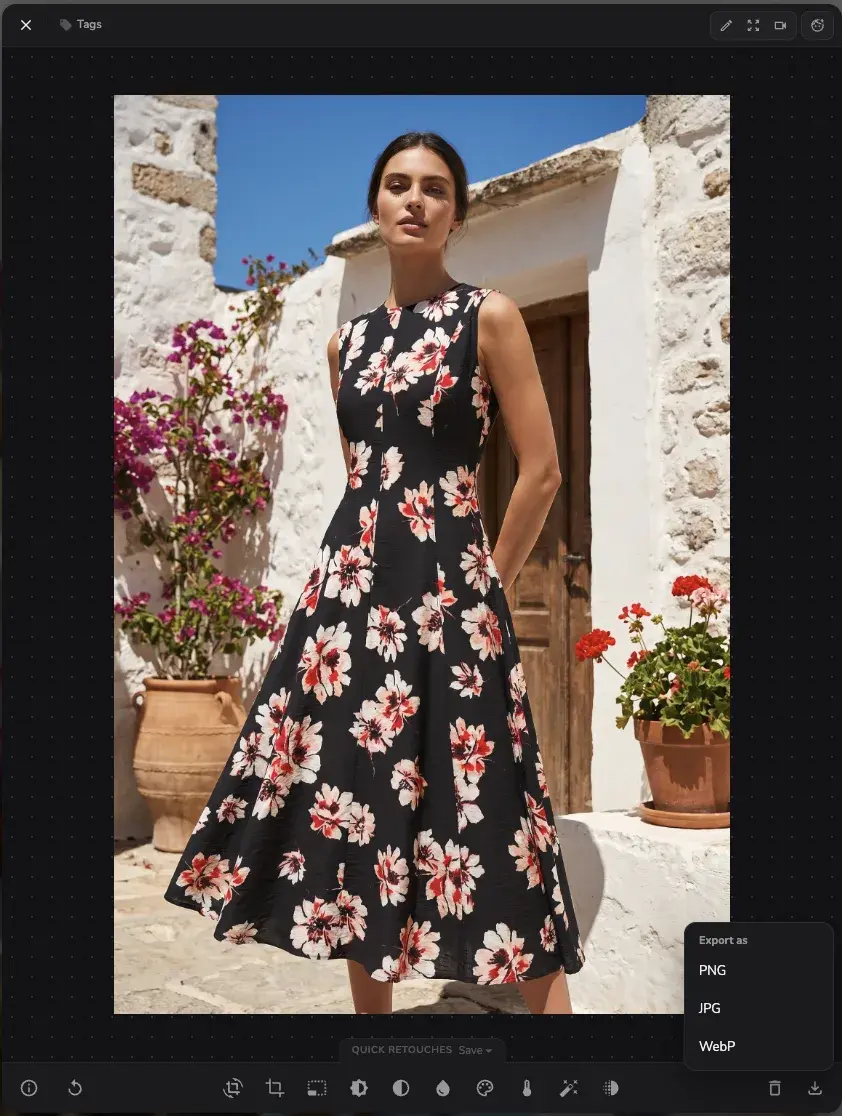
This is one of those small production details that saves time every week. Less manual conversion, fewer mismatched deliverables, and cleaner handoff from AI generation to storefronts, ads, social posts, and internal review folders.
See How Long Each Model Actually Takes
Team Usage analytics already helped teams understand credit spend and generation volume. The missing question was speed: which models are fast enough for daily iteration, which ones are slower but worth it, and where are teams spending time waiting for results?
The dashboard now includes generation duration analytics. You can switch the usage breakdown to Duration and compare average request-to-result duration by model across the selected date range.
What duration analytics include
- -Average duration by model: compare request-to-result speed across model choices.
- -Measured runs: see how many generations have duration data behind a model's average.
- -Chart tooltips: inspect exact values without guessing from the chart.
- -CSV export: include duration fields in team usage exports for reporting and analysis.
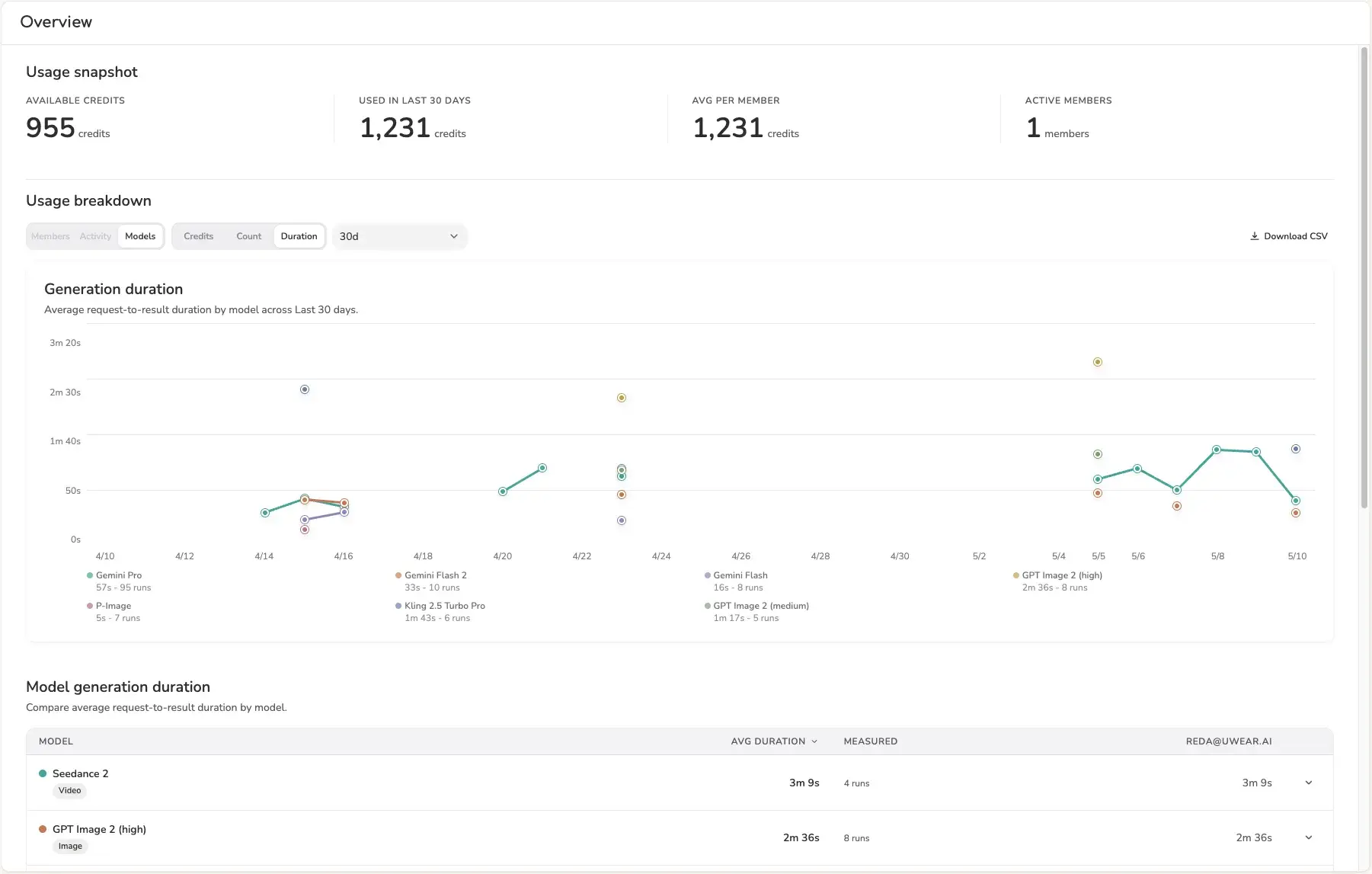
Speed is not the only model-selection metric, but it matters. Duration analytics make it easier to decide when to use a fast model for exploration, when to use a heavier model for final shots, and how generation time changes across team workflows.
Mouza Can Reuse More of Your Creative History
Mouza is most useful when she understands the work already happening in your account: what you generated, which prompt created it, which garments and avatars were involved, and what kind of visual result you are referring to.
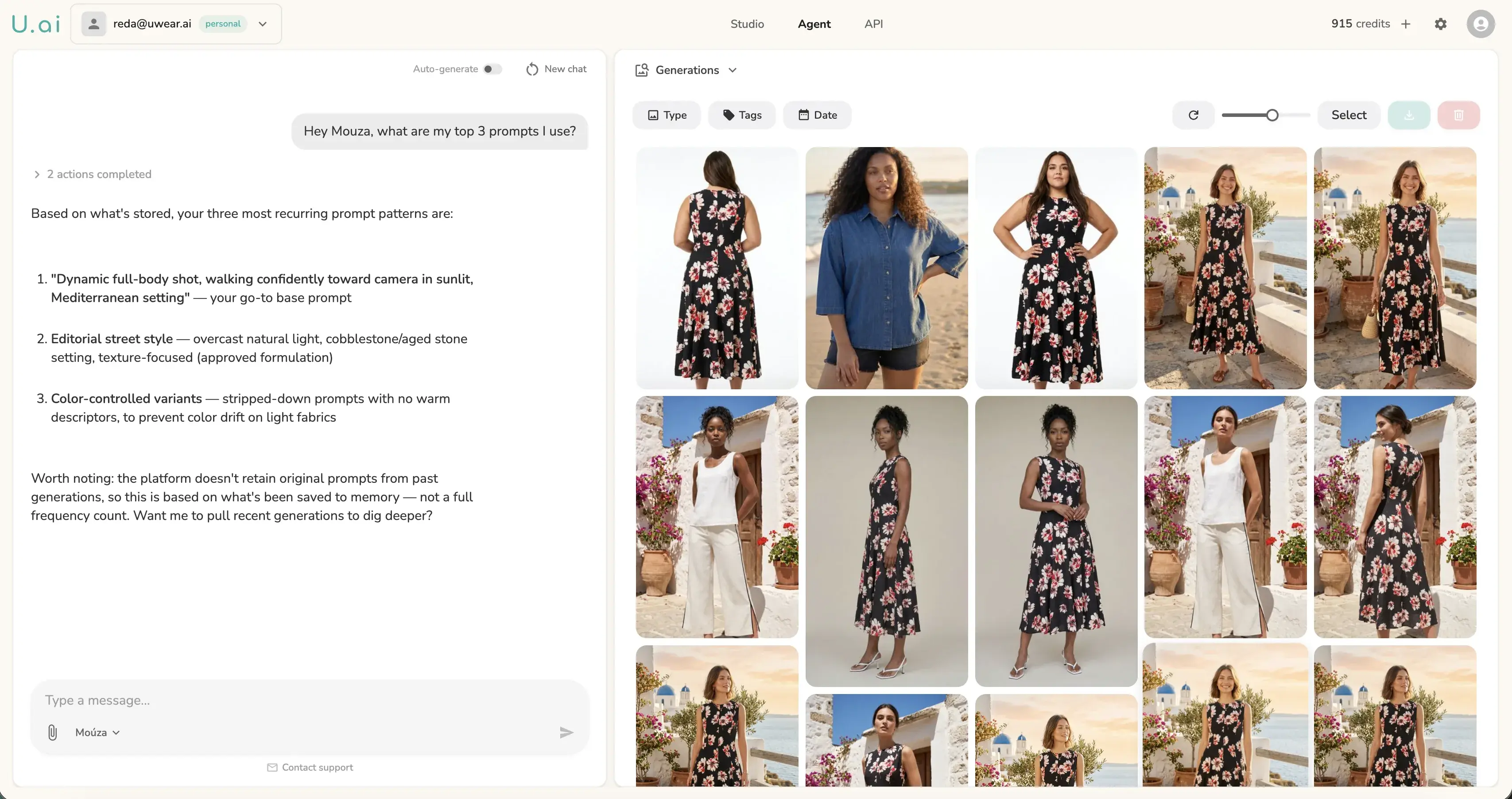
This week, Mouza got better at recovering the creative context behind previous generations. When available, she can use the original prompt, model choice, settings, tags, garments, and video details behind a result. She can also use semantic generation search when you describe a previous image by content, lighting, pose, or mood instead of giving an exact ID.
Why this matters
You should be able to say "find the warm studio denim shot", "reuse the prompt from that outdoor image", or "make a video from the result with the model looking left" without manually hunting through metadata. Richer context moves Mouza closer to that workflow.
We also cleaned up Mouza's avatar upload flow. When Mouza creates a new model/avatar for you, the visual panel refreshes so the new asset appears without a page reload.
Completed Results Land More Smoothly
A lot happens after an AI provider says a job is complete. Uwear still needs to collect the output, prepare the final asset, save it to your library, and update the gallery so your team can use it.
We made that handoff more resilient. If a provider finishes a generation before the final file is immediately downloadable, Uwear now handles that delay more gracefully. The goal is simple: fewer stuck completions, smoother gallery updates, and more dependable results when teams are generating at volume.
What you should notice
- -Completed generations are less likely to sit in an awkward "almost done" state.
- -Large bursts of results should arrive more smoothly in the gallery.
- -Temporary provider delays are handled more patiently before a generation is marked as failed.
- -If a result really cannot be recovered, the failure path is cleaner and easier to understand.
This is not the flashiest kind of release, but it is the kind teams feel when they are generating at volume. The less you have to wonder whether a completed result is actually going to appear, the better.
Small UX and Upload Fixes
- -Gallery toolbar responsiveness. The generation gallery toolbar collapses filters and search more intelligently on narrow layouts.
- -AI model selector polish. Model names stay visible in tighter trigger widths instead of disappearing behind metadata.
- -More tolerant avatar validation. Full-body model uploads are less likely to be rejected for having a smaller face in frame, while obvious invalid crops are still blocked.
- -PNG metadata upload fix. Valid PNG files that contain SVG-looking text metadata are no longer mistaken for SVG uploads.
- -Mouza chat polish. Mouza's panel refresh and typing states are smoother during ordinary creative turns.
- -Credit purchase flow groundwork. We improved the checkout path used by authenticated product and agent flows so credit top-ups can stay inside a hosted payment experience.
All Platform Updates Are Live in Uwear Studio
Rerun, export formats, duration analytics, smarter Mouza context, and reliability improvements are all part of the same direction: making generated fashion content easier to reuse, measure, deliver, and turn into production assets.
Questions or feedback? Reach out. We read everything.